How to Use the Save My Exams Strengths & Weaknesses Feature

Written by: Angela Yates
Reviewed by: Emma Dow
Last updated
Contents
- 1. Key Takeaways
- 2. What Is the Save My Exams Strengths & Weaknesses Tool?
- 3. Where to Find the Strengths & Weaknesses Tool
- 4. How the Tool Works
- 5. How to Use the Strengths & Weaknesses Tool to Improve Your Revision
- 6. Tips for Getting the Most from the Feature
- 7. Frequently Asked Questions
- 8. A Smarter Way to Feel Ready for Your Exams
Revising can sometimes feel like guesswork. You sit down, open your notes and think, “What should I even revise next?” It’s stressful, especially as exams get closer and you want to feel in control.
That’s exactly what the Save My Exams Strengths & Weaknesses feature is designed to fix. Instead of trying to work out what you know or hoping you’re revising the right topics, the tool analyses the questions you’ve already answered. Then it shows you exactly where you’re confident and where you need more practice.
The result is a clear sense of direction. You spend your time where it matters most, and revision becomes more manageable and less overwhelming. This guide shows you how to use the tool confidently and make it part of an effective revision routine.
Key Takeaways
The Save My Exams Strengths & Weaknesses tool shows you which topics you’re confident in and which ones need more practice.
It uses the questions you’ve already answered on the site, including Mock Exams, Target Tests and Exam Questions.
Instead of revising everything, you can focus on the areas that will make the biggest difference.
The tool links you straight to the resources that help you improve fastest.
What Is the Save My Exams Strengths & Weaknesses Tool?
The Strengths & Weaknesses tool is a personalised feature that turns your Save My Exams revision activity into clear, easy-to-understand insights. It shows which topics you’re strong in and which ones need more attention, based on the questions you’ve completed.
It helps you:
improve your exam performance by focusing on the right areas
save time, because you don’t have to revise everything at once
feel in control with a simple breakdown of your progress
Whether you are preparing for a class test, a mock or the real exam, the tool gives you a clear starting point for each study session. No more guessing, no more stress, just a clear sense of direction.
Where to Find the Strengths & Weaknesses Tool
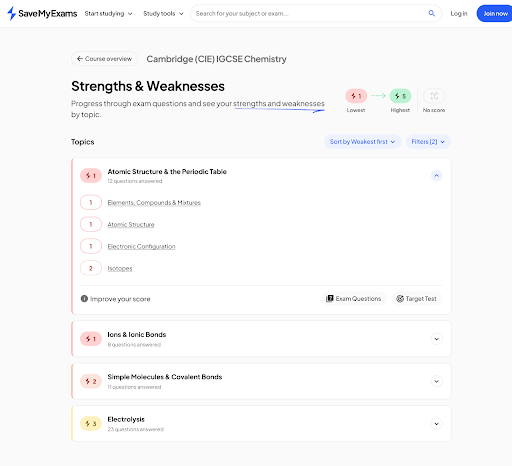
You can find the tool on your Save My Exams course overview page. If the feature is available for your subject and exam board, you will see a Strengths & Weaknesses tab.
Here’s an example of how it looks on a Cambridge (CIE) IGCSE Chemistry page:
You’ll also see strengths and weaknesses recommendations at the end of:
These recommendations are based only on the questions in that single test, and you’ll get direct links to the revision resources that can help you improve.
How the Tool Works
The Strengths & Weaknesses tool analyses your activity in the background while you practise.
Here is what it does:
1. It analyses every question you answer
Each question on Save My Exams is linked to a specific spec point or subtopic on the course you’re studying. When you get a question right or wrong, the tool updates your performance for that exact part of the course.
2. It builds a personalised topic breakdown
Once you have completed at least ten Exam Questions, the tool creates a topic-by-topic breakdown on your course overview page.
3. It gives instant feedback after tests
At the end of every Target Test or Mock Exam, you will see which spec points were your strongest and weakest within that test.
4. It updates in real time
As you revise more, your strengths and weaknesses change. This means the dashboard always reflects your most recent performance.
5. It highlights exactly where to go next
The tool highlights the areas that need attention and points you in the direction of helpful resources.
The more questions you complete, the more accurate and helpful the tool becomes. Here’s an example of what you’ll see once you’ve answered exam questions:
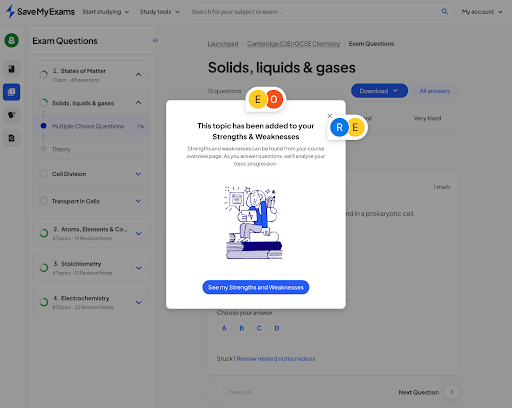
No more guessing what to revise. The Strengths & Weaknesses tool is like having a revision coach keeping track of your progress and guiding you to the next best step every time you study.
How to Use the Strengths & Weaknesses Tool to Improve Your Revision
Once you know your strengths and weaknesses, you can turn that insight into a clear revision plan.
Here’s how to use the tool effectively to maximise your revision:
Start with your weak topics
When the tool highlights a weaker area, click through to the recommended resources and revise those first. Fixing weaknesses early has a big impact on your confidence and overall score.
Revisit tricky questions
The tool remembers which questions you got wrong. Once you’ve revised the topic, go back and retry them. The repetition will help to lock the knowledge into place, and you’ll feel more confident, too.
Use strong topics as quick wins
Stronger topics are great for short study sessions or a warm-up before getting stuck into harder work. This keeps your motivation high.
Build a weekly revision plan
Use the tool as the starting point for your revision timetable. Choose one or two weaker topics each week and focus your study sessions around them. This keeps your revision focused and avoids last minute stress.
Combine with other Save My Exams tools
The tool links directly to Save My Exams’ extensive range of revision notes, flashcards, and exam questions for the exact topic you’re studying. Using these together helps you build a revision routine that adapts as you progress. And our Learning Hub is packed with helpful revision advice.
Tips for Getting the Most from the Feature
These extra tips help you make the best use of the tool:
Check your Strengths & Weaknesses tool regularly so you can spot progress as it happens
Open the dashboard whenever you start a study session to give yourself a clear starting point
Fire up your dashboard anywhere - the tool works on any device, including phones, tablets and laptops
Don’t worry if your strengths and weaknesses change
Pair the tool with active revision methods
Celebrate improvements so you stay motivated as you turn weaknesses into strengths
Frequently Asked Questions
Do I need a Save My Exams subscription to use the Strengths & Weaknesses tool?
Free users get one free Target Test per module or syllabus, and at the end of that test, you will receive personalised recommendations showing which spec points you were strong or weak on.
If you have a free trial or a premium membership, you can access the full Strengths and Weaknesses tool through your course overview page and unlock topic scores and detailed guidance.
Can I use the tool if I’ve only answered a few questions?
Yes, but the full dashboard appears after you have answered at least ten exam questions.
Target Tests and Mocks always give you feedback straight away, no matter how many questions you’ve completed.
Is the feature available on mobile?
Yes. You can use it on smartphones, tablets and computers.
A Smarter Way to Feel Ready for Your Exams
Revision always feels easier when you know exactly what to focus on. The Strengths & Weaknesses tool provides that clarity by showing your current progress and next steps.
Use it regularly to stay organised, build confidence and keep improving. Let the tool guide your revision, and use Save My Exams exam-aligned resources to support you along the way.
Over 97% of Save My Exams members report getting better grades*. You’re not revising alone. With the right tools and a clear plan, you can feel confident that your effort is taking you in the right direction.
References:
* 1917 Save My Exams students were surveyed in September 2025
Was this article helpful?
Sign up for articles sent directly to your inbox
Receive news, articles and guides directly from our team of experts.

Share this article










 written revision resources that improve your