Flowcharts (SQA National 5 Computing Science): Revision Note

Exam code: X816 75

Robert Hampton

Written by: Robert Hampton

Reviewed by: James Woodhouse

Updated on

Flowcharts

What is a flowchart?

  • A flowchart is a design technique that shows the steps needed to solve a problem

  • It uses standard symbols to represent the flow of data and control through a program

  • Flowcharts show inputs, processes, decisions, loops, and outputs

  • They are read from top to bottom and left to right

  • Lines or arrows show the order of execution

Flowchart symbols

Symbol

Name

Description

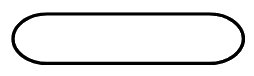
Horizontal oval shape with a black outline against a white background.

Terminal

Shows the start or end of an algorithm

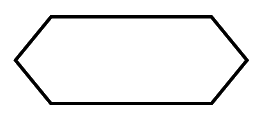
Outline of a hexagon with parallel top and bottom sides, and angled ends, drawn with a thick black line on a white background.

Initialisation

Used to show a variable being declared or given a starting value

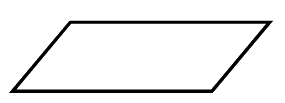
Black-outlined parallelogram on a white background, slanted to the right. The shape has two pairs of parallel and equal-length sides.

Input/Output

Represents data being entered or displayed

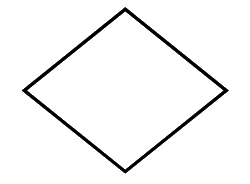
A simple black outline of a diamond shape, positioned with corners aligned to the top, bottom, and sides, on a plain white background.

Decision

Represents a question or condition with Yes/No branches

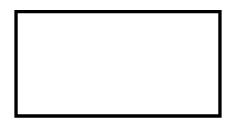
Simple black-bordered rectangle on a white background, resembling a blank frame or empty space, with no discernible features or text.

Process

Shows a calculation or instruction that changes data

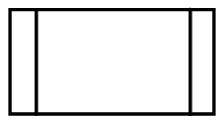
A blank white rectangle with a black border, flanked by two vertical black rectangles on each side, resembling a simplified window or card design.

Pre-defined function

Represents a subprogram, function, or procedure that has already been defined elsewhere

Black outline of a simple circle on a white background, resembling a basic geometric shape or symbol.

On-page connector

Used when a flowchart continues elsewhere on the same page

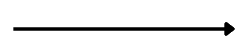
Horizontal black arrow pointing right on a white background, symbolising direction or movement.

Flow line

Show the order in which steps are carried out

Example

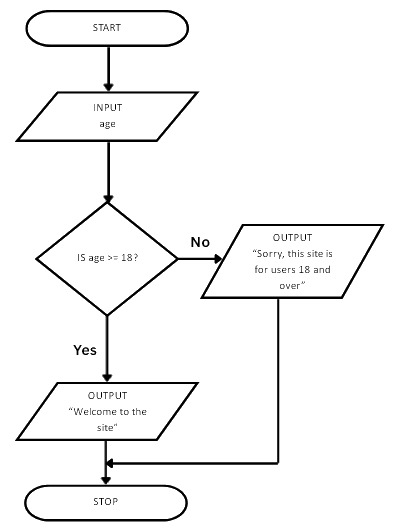
  • A gambling website wants to check a members age to inform them if they are ok to enter

  • An example flowchart is

Flowchart checks if age is 18 or over. If yes, outputs "Welcome to the site", else outputs "Sorry, this site is for users 18 and over".
  • They would like the algorithm refined so that the user also enters their first name and this is used to greet the user when they access the site
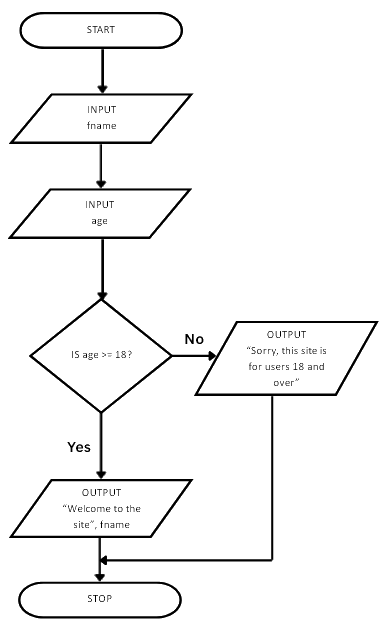
Flowchart checks age eligibility: inputs name and age, verifies if age is 18 or over. If yes, welcomes user; if no, denies site access. Ends process.
  • A new input box was added, along with updating the output box to include the variable fname collected from the user

Unlock more, it's free!

Join the 100,000+ Students that ❤️ Save My Exams

the (exam) results speak for themselves:

Robert Hampton

Author: Robert Hampton

Expertise: Computer Science Content Creator

Rob has over 16 years' experience teaching Computer Science and ICT at KS3 & GCSE levels. Rob has demonstrated strong leadership as Head of Department since 2012 and previously supported teacher development as a Specialist Leader of Education, empowering departments to excel in Computer Science. Beyond his tech expertise, Robert embraces the virtual world as an avid gamer, conquering digital battlefields when he's not coding.

James Woodhouse

Reviewer: James Woodhouse

Expertise: Computer Science & English Subject Lead

James graduated from the University of Sunderland with a degree in ICT and Computing education. He has over 14 years of experience both teaching and leading in Computer Science, specialising in teaching GCSE and A-level. James has held various leadership roles, including Head of Computer Science and coordinator positions for Key Stage 3 and Key Stage 4. James has a keen interest in networking security and technologies aimed at preventing security breaches.