

Contents
- 1. Key Takeaways
- 2. Getting Started With Save My Exams
- 3. Using Save My Exams for Lesson Planning
- 4. Differentiating With Save My Exams
- 5. Setting and Managing Homework
- 6. Monitoring Student Progress
- 7. How Teachers Can Use Save My Exams For Exam Preparation
- 8. Frequently Asked Questions
- 9. Supporting Teaching and Exam Success
Teachers need high-quality resources that match exam specifications. But creating them from scratch or searching for reliable materials can take valuable time.
Save My Exams provides exam-board-specific revision notes, exam questions, past papers, and other exam-focused resources that teachers can quickly use in lessons.
This guide explains how to use Save My Exams effectively in the classroom, from lesson planning and differentiation to homework, progress checks, and exam preparation.
Key Takeaways
Save My Exams provides exam-board-specific revision notes, exam questions, and past papers that can be used directly in lessons.
Teachers can quickly find ready-made resources for starters, class activities, homework, and revision.
The Test Builder tool allows teachers to create personalised assessments for different ability levels.
Practice questions, mock exams, and past papers help prepare students for real exam conditions.
Getting Started With Save My Exams
To start using Save My Exams in the classroom, create a teacher account and log in to the platform.
Once logged in, you can explore the full range of resources organised by subject, exam board, and topic.
Teachers can quickly browse materials such as:
Past papers and mark schemes
Flashcards and other revision materials
Many teachers begin by exploring their subject areas and bookmarking useful resources to return to during lesson planning, revision sessions, or homework setting.
Using Save My Exams for Lesson Planning
Once you’ve explored the platform, Save My Exams can quickly become part of your regular lesson planning.
Use the platform to structure lessons, introduce new topics, and provide exam-style practice. Because materials are organised by specification and topic, it’s easy to find activities that match what students are currently learning.
Finding Relevant Content for Your Curriculum
When planning a lesson, start by navigating to your subject and exam board. From there, you can browse topics that match the specification you are teaching.
This allows you to quickly locate revision notes, exam questions, and practice materials that align exactly with the content students need to learn.
Many teachers use this approach to quickly build lesson activities without needing to search across multiple sources.
Incorporating Revision Notes Into Lessons
Revision notes can support both teaching and consolidation.
For example, you might use them to:
introduce key ideas at the start of a topic
explain difficult concepts clearly
summarise important points at the end of a lesson
support quick recap activities before moving on to new content
enable revision activities before assessments
Using Exam Questions and Past Papers in Class
Exam-style questions can be integrated into lessons to build confidence and develop exam technique.
For example, you might:
use short exam questions for starter activities that revisit previous learning
set timed practice tasks during lessons
review mark schemes together in groups or as a whole class
analyse strong answers to understand exam technique
PDF downloads make it easy to share questions with students both online and offline, so they can practise during lessons or at home.
Differentiating With Save My Exams
Most classrooms include students with a wide range of abilities. Save My Exams resources can help teachers adapt activities so that all students can access the material and continue to make progress.
By combining revision notes, exam questions, and targeted assessments, teachers can provide additional support where needed while also challenging more confident students.
Supporting Struggling Students
Students who need extra support often benefit from clear explanations and structured practice.
Teachers can use Save My Exams resources to:
provide revision notes that break down key concepts step by step
assign focused practice questions on specific topics
revisit core ideas before moving on to more complex material
Teachers can also use the Test Builder tool to create personalised tests by topic and difficulty level. Our guide to how to use the Test Builder tool provides tips on making the most of it.
Challenging High-Achieving Students
More confident students can apply their knowledge to more demanding exam-style questions.
Teachers can use Save My Exams to help these students by:
selecting more complex exam questions to allow high-achieving students to refine their exam technique
using full exam papers for timed practice
analysing mark schemes to understand how top answers are awarded marks
Our Learning Hub is full of articles written by our experts that reveal the strategies students can adopt to reach the top grade in each subject. You could direct your students to articles such as these examples:
Setting and Managing Homework
Save My Exams resources can be used to set structured homework that helps students practise the types of questions they will encounter in real assessments while reinforcing the knowledge taught in class.
Because many resources are available as downloadable PDFs, teachers can easily share them with students to complete online or offline.
Common ways teachers use Save My Exams for homework include:
assigning exam-style questions that match the topic covered in class
setting past paper questions to build exam familiarity
asking students to review revision notes before the next lesson
assigning sections of mock exams for more extended practice
Monitoring Student Progress
Save My Exams resources can be used to quickly check how well students understand a topic.
Teachers often use the platform to:
run short topic tests after completing a unit
review answers together using mark schemes
identify common mistakes across the class
highlight topics that need further revision
Students can also use the Strengths & Weaknesses tool, which analyses the questions they complete and highlights the topics where they are performing well and the areas that need more practice.
See more in our guide on how the Strengths & Weaknesses tool can help to steer student revision.
How Teachers Can Use Save My Exams For Exam Preparation
As exams approach and you shift focus toward revision and exam technique, Save My Exams provides resources to support your revision sessions and allow your students regular opportunities to practise exam-style questions.
Running Revision Sessions
Revision lessons often focus on revisiting key topics and practising exam skills.
Teachers can use Save My Exams resources to:
review important content using revision notes
practise exam-style questions under timed conditions
discuss answers and mark schemes as a class
revisit topics where students commonly lose marks
You can also direct your students to our Learning Hub, which offers an extensive library of revision tips and advice.
Mock Exam Preparation
Mock exams give students valuable experience of exam conditions before their final assessments.
Teachers can use Save My Exams resources to:
run timed mock exam practice using past papers
review answers using mark schemes
analyse common mistakes after mock exams
guide targeted revision before the final exams
Frequently Asked Questions
Is Save My Exams Suitable for All Exam Boards?
Save My Exams provides resources for a wide range of major exam boards and international qualifications.
Resources are organised by subject, exam board, and topic, making it easy for teachers to find materials that match the courses they teach.
Can I Print Resources From Save My Exams?
Yes. Many Save My Exams resources are available as downloadable PDFs, making them easy to print for classroom activities, homework, or revision sessions.
Does Save My Exams Work With Google Classroom or Other Learning Management Systems?
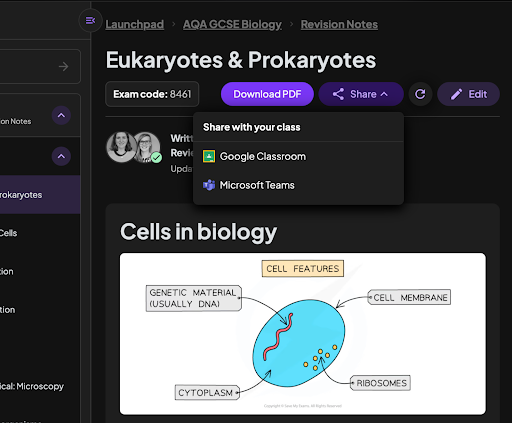
Yes. Teachers can use the Share button on Save My Exams resources to quickly share materials through platforms such as Google Classroom and Microsoft Teams.
See an example of the tool in use in the image below.
Supporting Teaching and Exam Success
Save My Exams helps you save valuable planning time while giving students access to high-quality, exam-focused resources.
Because all materials are written by experienced teachers and examiners, you can feel confident they reflect both the course content and the demands of real exams. Our team of subject specialists brings together more than 400 years of classroom experience.
By using Save My Exams for lessons, homework, and revision, you can support students and help them build the knowledge and exam technique they need to succeed.
Was this article helpful?
Sign up for articles sent directly to your inbox
Receive news, articles and guides directly from our team of experts.

Share this article















 written revision resources that improve your