ERDs & Data Dictionaries (SQA National 5 Computing Science): Revision Note
Exam code: X816 75

What is a database?
A Database is a structured, persistent collection of data
It allows easy storage, retrieval, and management of information
Electronic databases offer a number of key benefits:
Easier to add, delete, modify and update data
Data can be backed up and copied easier
Multiple users, from multiple locations, can access the same database at the same time
There are two main types of database
Flat file
When creating a relational database, the design stage involves two key tools:
Entity-relationship diagrams (ERDs) — to show how data is organised and linked
Data dictionaries — to describe the details of each table and attribute
Together, they help ensure the database is accurate, efficient and easy to implement
Entity-relationship diagrams (ERDs)
What is an entity-relationship diagram?
An ERD is a diagram that shows:
The entities (tables) that will be in the database
The attributes (fields) for each entity
The relationships between entities
Entities and attributes
An entity is something that data is stored about, such as Customer, Order, or Product
Each entity has attributes, which are the pieces of data stored in that table
Entity | Example attributes |
|---|---|
Customer |
|
Order |
|
Attribute data types
Each attribute must have a data type that defines what kind of data can be stored.
Data type | Description | Example |
|---|---|---|
Text | Letters, numbers or symbols not used for calculation | “Glasgow” |
Number | Whole or decimal numbers | 12, 45.6 |
Date/Time | Stores calendar dates or times | 14/03/2025 |
Boolean | True/false or yes/no values | TRUE |
Attribute size
The size controls how much data can be entered in a field
Example: Text(50) allows up to 50 characters
It helps prevent errors and limits storage use
Relationships
Relationships show how data in one table links to another
One-to-one (1:1) — uncommon
One-to-many (1:∞) — most common
Many-to-many (∞:∞) — must be resolved using a link table

Example
One Customer can make many Orders, but each Order belongs to only one Customer
This means:
The
CustomerIDis the primary key in theCustomertableThe same
CustomerIDappears as a foreign key in theOrdertable
What is a primary key?
A primary key is a unique field that identifies each record in a table
No two records can share the same primary key value
For example:
orderIDis the primary key for theOrdertablecustomerIDis the primary key for theCustomertable
Each primary key allows the database to locate, update, or delete a specific record
What is a foreign key?
A foreign key is a field in one table that refers to the primary key in another table
It’s used to create a relationship between two entities
For example:
In the
Ordertable,customerIDis a foreign key that links each order back to the customer who made it in theCustomertable
This connection enforces referential integrity, ensuring that every order relates to a real, valid customer
Data dictionary
What is a data dictionary?
A data dictionary gives detailed information about each table in the database
It lists all entities, their attributes, and how the data should be stored
Entity name | Attribute name | Key | Type | Size |
|---|---|---|---|---|
|
| Primary | Text | 6 |
|
| Text | 50 | |
|
| Text | 100 | |
|
| Primary | Text | 8 |
|
| Foreign | Text | 6 |
|
| Date | — |
Worked Example
A database company, GameTracker, manages information about video game Testers and the Games they are currently evaluating.
The company establishes the following rules:
Each Tester has a unique Staff ID, along with their name and expertise level
Each Game has a unique Game ID, a title, and a rating
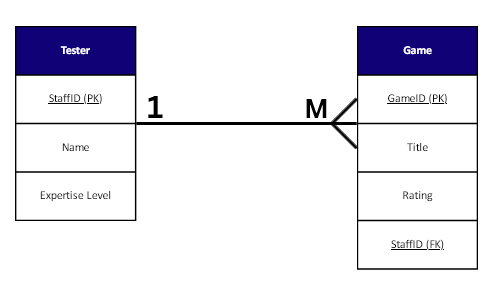
One tester may be assigned to many different games, but each game is assigned to only one tester
(i) Entities and Attributes
Draw and label an Entity-Relationship Diagram (ERD) showing the two entities, Tester and Game. Include two appropriate attributes for each entity, clearly identifying the Primary Key (PK) in each entity
[2]
(ii) Relationship
Complete the ERD drawn in part (i) by drawing the notation to correctly show the one-to-many (1:M) relationship between the entities and clearly identifying the necessary Foreign Key (FK).
[2]
Answers
(i)
Two entities correctly drawn/named (Tester, Game) [1 mark]
At least two attributes listed per entity, with the correct PK underlined/identified in each (e.g., Staff ID and Game ID) [1 mark]
(ii)
Correct one-to-many notation drawn from Tester (one) to Game (many) (e.g., using crow's feet notation) [1 mark]
The Foreign Key (e.g.,
Staff ID*orTester ID) is correctly placed within the Game entity [1 mark]

Unlock more, it's free!
Join the 100,000+ Students that ❤️ Save My Exams
the (exam) results speak for themselves:

Was this revision note helpful?
