Website Structure (SQA National 5 Computing Science): Revision Note
Exam code: X816 75

Website structure
What is website structure?
Website structure describes how the pages on a website are connected
The structure must make navigation clear and easy for users
Website structure is shown using a navigational structure diagram
A navigational structure diagram can use either:
A linear structure
A hierarchical structure
Examiner Tips and Tricks
In SQA N5, mandatory structural requirements include:
A home page
A maximum of four linked multimedia pages (can be connected to the home page)
Any required external links
The structure must make sense for the content and the functional requirements
Structure types
Linear structure
Pages are arranged in a sequence
The user moves forward or backward one page at a time
Useful for step-by-step guides
Diagram uses arrows that show one-direction or two-direction linking
[Linear structure diagram goes here]
Hierarchical structure
Pages branch out from the home page
The home page links to sub-pages
Sub-pages usually link back to the home page
Useful for organising large amounts of content into categories
[Hierarchical structure diagram goes here]
Arrows in a navigational structure diagram
Arrow type | Meaning | When it is used |
|---|---|---|
Single-headed arrow → | One-way navigation | When a page links to another page but the user cannot return using the same link |
Double-headed arrow ⇅ | Two-way navigation (forward and back) | When both pages link to each other, usually between the Home Page and internal pages |
Single-headed arrow to external site → (External box) | One-way link to a different website | When a page contains an external hyperlink required by the task |
Internal vs external links
Link type | Description | Arrow used | Destination |
|---|---|---|---|
Internal link | A hyperlink that connects two pages within the same website | Single-headed → or double-headed ⇅ | Another internal page |
Internal two-way link | Allows users to move both ways between two internal pages | Double-headed ⇅ | Another internal page |
External link | A hyperlink that takes the user to a page on a different website | Single-headed → | External site shown as a separate box |
Examiner Tips and Tricks
Navigational structure is the overall layout that shows how pages link together
It is not a type by itself
Exam questions can ask for a navigational structure to be designed, you can choose either linear or hierarchical
Why structure matters
Splits large amounts of content into clear, manageable pages
Helps users find information quickly
Ensures navigation is logical and accessible
The structure chosen will later guide the HTML links that are implemented
Worked Example
Global Trekking Tours is developing a new website. Initial user feedback indicated that the original single page containing all their tour information was overwhelming and disorganised.
The company requires a complete redesign that splits the content across multiple pages to improve user experience and clarity.
The new website must implement the following specific design elements:
A central Home Page.
Four separate internal pages linked to the Home Page: Asia Tours, Europe Tours, Africa Tours, and a Contact Us page.
All four internal pages must allow navigation directly back to the Home Page.
The Asia Tours page must include a link to an external visa application website.
The Europe Tours page must include an external link to a partner airline’s booking site.
The Africa Tours page must include a direct one-way link to the Contact Us page.
Draw a comprehensive navigational structure diagram for the Global Trekking Tours website. Your diagram must clearly show all internal pages, external links, and the correct direction of every hyperlink.
[4]
Answer
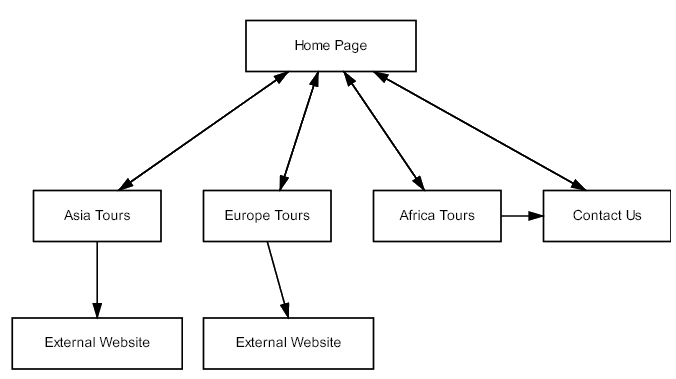
Correct hierarchical structure with Home Page linking to Asia Tours, Europe Tours, Africa Tours and Contact Us [1 mark]
Double-headed arrows showing two-way navigation between the Home Page and all four internal pages [1 mark]
Single-headed external links shown only from Asia Tours and Europe Tours [1 mark]
Single-headed internal link shown from Africa Tours to Contact Us [1 mark]

Unlock more, it's free!
Join the 100,000+ Students that ❤️ Save My Exams
the (exam) results speak for themselves:

Was this revision note helpful?
