The Best Revision Apps: Tested by a Former Teacher

Written by: Emma Dow
Reviewed by: Holly Barrow
Published
Contents
- 1. Key Takeaways
- 2. Why Active Revision Apps Work
- 3. How I Tested These Apps
- 4. Best Revision Apps at a Glance
- 5. Quizlet: Best Revision App for Active Recall
- 6. Duolingo: Best Revision App for GCSE Languages
- 7. MindMeister: Best Revision App for Linking Ideas Together
- 8. Pomofocus: Best Revision App for Time Management
- 9. Zen Zones: Best Revision App for Focusing
- 10. Other Apps Worth a Look
- 11. How to Use Revision Apps Effectively
- 12. Combining Apps With Save My Exams
- 13. Frequently Asked Questions
- 14. Why Save My Exams Works With Revision Apps
Have you ever downloaded a revision app, excited to use it in your study sessions, only to find it clunky, unreliable, or really hard to use?
A listicle you’ve read may have sung its praises, but a lot of those round-ups are written by people who've never opened the app past the sign-up screen. They describe what the app looks like, add a stock photo, and call it a review.
I did it properly. I'm a former teacher with eight years' experience, and I used five popular revision apps the way a GCSE or A Level student would - for real revision, on real topics, over real sessions.
No generic blurbs. Just an honest review of which revision apps are worth your time.
Key Takeaways
Revision apps work best when they support active learning - testing yourself, spacing out review sessions, and breaking work into manageable chunks.
The right app depends on what you're trying to do.
Quizlet suits quick flashcard sessions.
Duolingo suits GCSE languages.
MindMeister suits linking ideas together.
Pomofocus suits structuring your time.
Zen Zones suits blocking out a noisy environment.
Apps support revision - they don't replace it. Use them alongside proper subject notes and past papers.
Why Active Revision Apps Work
The apps worth using all lean on the same two techniques.
Active recall, which means testing yourself instead of rereading.
Spaced repetition, which means reviewing material at increasing intervals instead of cramming it all at once.
That's the test I judged each app against: does it get you actively recalling information, or is it just a nicer way to reread your notes?
How I Tested These Apps
I used each app on real revision content:
Using GCSE flashcard sets
Mapping out an English Literature theme
Timing a Maths revision session
Working through a longer reading task
I judged each one on how easy it was to use, how well it supported active revision, and whether I'd actually recommend it to a student.
Best Revision Apps at a Glance
App | Best for | Free version? | My verdict |
|---|---|---|---|
Quizlet | Flashcards, quick recall | Yes | Great cards, but search results can miss the mark. |
Duolingo | GCSE languages | Yes | Fun, effective top-up - not a sole tool. |
MindMeister | Linking ideas, humanities/English | Yes (3 free maps) | Brilliant for visual, theme-based subjects. |
Pomofocus | Structuring revision time | Yes | Simple, free, and genuinely keeps you on track. |
Zen Zones | Blocking out a noisy environment | Yes | Perfect for revising somewhere less than ideal. |
Start with the free versions, try one at a time, and keep the ones that fit how you revise. Let's go through each one.
Quizlet: Best Revision App for Active Recall
Quizlet (opens in a new tab) is a flashcard app with millions of user-generated sets alongside the option to build your own.
It's easy to use, and a simple click flips each card. That makes it great for short-burst revision, and helps you to memorise equations, dates, and quotes.
The search isn't perfect, though. When I looked for GCSE Maths cards, Chemistry and Physics sets came up first. That's a minor annoyance if you're in a hurry.
The cards themselves are solid, and it's great that people can design and share their own sets. However, that does mean checking accuracy before you rely on someone else's flashcards.
Where Quizlet really stands out is its study modes. Blast, where you match cards to definitions against the clock, was my favourite as it stops revision feeling repetitive. You can also play live against friends, which adds a bit of competition without it feeling like a chore.
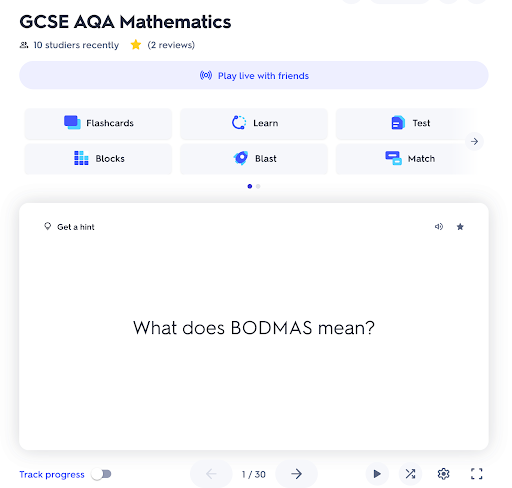
A GCSE Maths flashcard set on Quizlet.
My verdict: Great for short-burst active recall. Just double-check you've landed on the right subject before you start.
Cost: Free version available; some study modes require a paid subscription.
Duolingo: Best Revision App for GCSE Languages
Duolingo (opens in a new tab) is a gamified language app, and it's useful for GCSE language revision.
It won't stretch far enough for A Level, which needs more advanced understanding than short daily lessons can build. And it doesn't replace teacher input. Think of it as a supplement, rather than a sole revision tool.
Where it earns its place is in review sessions and flashcard-style drills that cement vocabulary. The story-based tests are a highlight: you move a character around a supermarket, a record store, or a library, and speak to other characters along the way. It gives the language a more real-life feel than a standard vocab list.
It covers speaking, listening, reading and writing, and the sessions are short enough to fit into a bus journey. The interface is fun and colourful, and the activities stay interesting rather than repetitive.
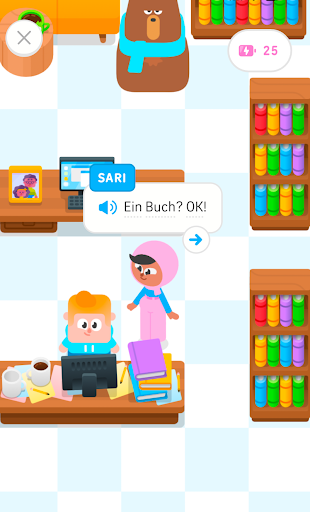
Story-based test in Duolingo.
My verdict: A brilliant short-burst way to cement a language you're already learning at school. Not a replacement for lessons.
Cost: Free (ad-supported); Super Duolingo removes ads and adds extra features, and requires a paid subscription.
MindMeister: Best Revision App for Linking Ideas Together
MindMeister (opens in a new tab) is a mind-mapping app, and it's the best tool I tested for subjects built around linking concepts.
I used it to map the theme of ambition in Macbeth. It asked me to write out what I wanted the mind map to include, then it generated the interactive mind map image.
It produced a simple starting map that I could build on - adding quotes, related ideas, and links across other themes as I went.
Everything's colour-coded and easy to follow, even once a map gets more complex. That makes it a great revision tool for visual learners.
You can share your maps with friends too, which turns revision into something more collaborative rather than solitary. I could create three free maps before I'd need to upgrade, which is enough to trial it properly.
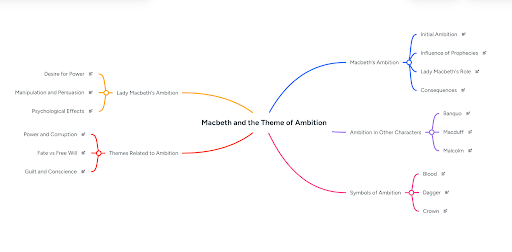
A mind map created in MindMeister.
My verdict: Best suited to humanities and English, where themes and quotes need linking.
Cost: Free version (limited to 3 maps); paid plans required for unlimited maps.
Pomofocus: Best Revision App for Time Management
Pomofocus (opens in a new tab) uses the Pomodoro Technique - a time-management method where you work in focused blocks of 25 minutes, followed by a short 5 minute break. After four blocks, you take a longer break to properly reset.
The app was ideal for planning out how you will use your pomodoro blocks.
You write down your revision tasks, and the app times each Pomodoro block for you. It even times your rest breaks, so you're not left guessing when to stop.
It's very structured, and that makes it easy to see your progress across a session.
Plus, it's free and takes seconds to set up - no accounts, no faff, just a timer and a task list.
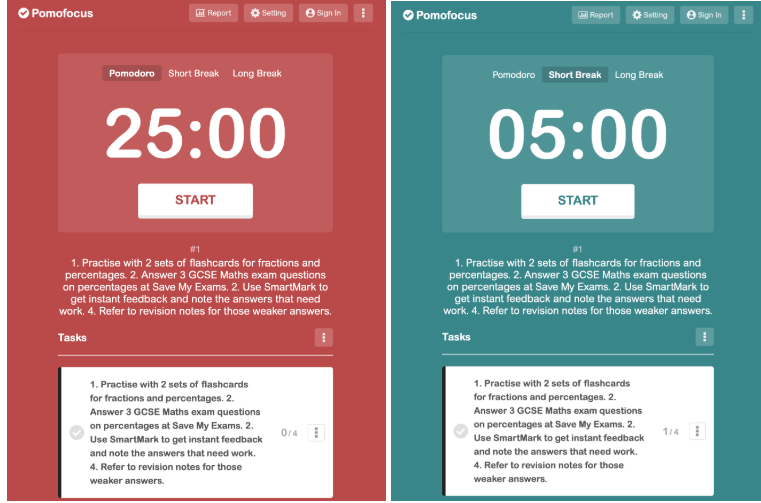
Easy to use Pomofocus timers.
My verdict: One of the simplest tools I tested, and one of the most effective. Ideal if you struggle to sit down and start revising.
Cost: Free.
Zen Zones: Best Revision App for Focusing
Zen Zones, Save My Exams' own free focus tool, is a low-fi digital environment built to help you concentrate during a revision session.
It's split into Maths, English and Science zones, each with a background soundtrack designed for that kind of thinking.
Save My Exams' own research found that over half of students say they're at a disadvantage because of their revision space, which is the gap this tool is trying to close.
It's perfect if you're stuck somewhere less than ideal - a noisy kitchen table, a shared room, a busy cafe. Pop your headphones in and the ambience does the rest.
I used the English zone the most. The rain backdrop kept me on task through a longer reading session in a way silence never quite manages.
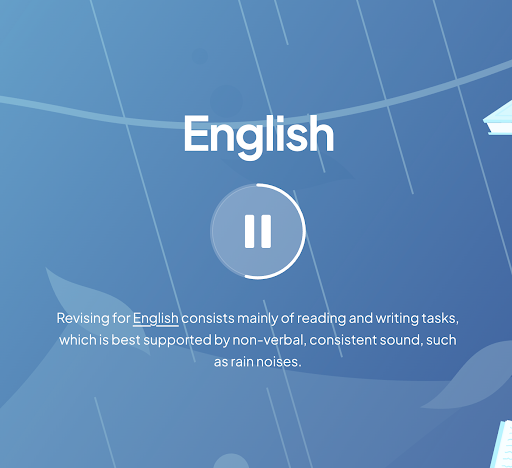
The English Zen Zone at Save My Exams.
My verdict: A simple, free way to ensure a productive revision environment when your real one isn't cutting it.
Cost: Free.
Other Apps Worth a Look
I've only reviewed the apps I've properly tested, but they're not the only options out there. A few others are worth exploring if they fit how you work.
Anki - for spaced-repetition flashcards.
Notion - for building a full revision dashboard.
Google Keep - for quick lists and last-minute reminders.
Forest or Freedom - for blocking phone distractions
Audible - for listening-based revision.
How to Use Revision Apps Effectively
Apps are supportive tools, rather than teaching replacements. Here's what I'd tell a student before they download any of them:
Limit how many you use. Two or three apps you actually open beat ten you downloaded and forgot.
Match the app to the task. Use Quizlet for quick recall, MindMeister for linking ideas, Pomofocus for structuring time, and Zen Zones when you need a focus boost.
Don't let apps replace the basics. Past papers, proper notes and exam-board-specific practice are key to exam prep.
Combining Apps With Save My Exams
Apps are great to help support your revision, but they don’t know the specifics of what your exam board wants.
Save My Exams does. Our revision resources are written by experienced teachers and examiners. They’re not generated by an algorithm. Everything is aligned to your exam specification.
So why not:
Use Quizlet to turn Save My Exams revision notes into flashcards for quick recall?
Use MindMeister to map out themes from Save My Exams' English Literature or History content?
Use Pomofocus while working through Save My Exams topic questions?
Use Zen Zones to block out distractions while you complete a Save My Exam mock exam?
Paired together, you get apps that make revision feel more active, and resources that guarantee you're revising the right thing.
Frequently Asked Questions
What's the best app for revision?
There isn't a single winner - it depends on what you need.
For simple flashcards, I'd pick Quizlet. For languages, Duolingo. For linking ideas, MindMeister. For structuring your time, Pomofocus. For blocking out a bad environment, Zen Zones.
Can I revise using only apps?
No. Apps support your revision, but you still need exam-board-specific resources, past papers and proper subject knowledge. Think of apps as a way to make revision more active, rather than a replacement for it.
Are these apps free?
All five have a free version that's enough to properly try them. Quizlet, Duolingo and MindMeister have some features behind a paid subscription. Pomofocus and Zen Zones are entirely free.
Why Save My Exams Works With Revision Apps
Every app I tested is good at one thing. But none of them know where you're going wrong and how you can fix it.
Quizlet will drill the cards you build but won't tell you that you keep mixing up ionic and covalent bonding. And MindMeister will map out a theme brilliantly but it won't flag that your grasp of Macbeth's Act 3 is shakier than the rest.
That's the gap Save My Exams closes. Target Test spots your weak areas and tells you what to study next, so you're not guessing which topics need more time.
It's also built around your exact exam board. Every question, mark scheme and revision note lines up with what you'll actually sit.
So the apps above are worth downloading. Just don't expect them to tell you what to revise next - that's the bit Save My Exams does for you.
Explore Save My Exams revision resources.
References
Quizlet (opens in a new tab)
Duolingo (opens in a new tab)
MindMeister (opens in a new tab)
Pomofocus (opens in a new tab)
Was this article helpful?
Sign up for articles sent directly to your inbox
Receive news, articles and guides directly from our team of experts.

Share this article

 written revision resources that improve your