
Contents
- 1. Key Takeaways
- 2. How AI Tools Are Changing the Way Students Study
- 3. How I Tested These AI Tools
- 4. Best AI Tools for Students at a Glance
- 5. Grammarly: A Brilliant Spell Checker That Still Needs Your Eyes
- 6. Wordtune: An Imagination Injection for Essay Subjects
- 7. Duolingo: Short, Fun Revision Bursts for GCSE Languages
- 8. Smart Mark: Exam Practice That Adapts to You
- 9. Other AI Tools Worth a Look
- 10. How to Use AI Tools Responsibly at School
- 11. Frequently Asked Questions
- 12. Why Save My Exams Works Alongside AI Tools
You've typed "best AI tools for students" into a search bar, and now you're drowning. Every list looks the same. And every tool is "revolutionary." None of it tells you what actually helps you revise.
Most of those round-ups are written by people who've never wondered whether ChatGPT is teaching you the right thing for your exam board and never checked if an app is worth the subscription.
So I did it for you. I'm a former teacher with eight years’ experience and now I tutor GCSE Maths students. I sat down and used five of the most popular AI tools the way a GCSE or A Level student would, then wrote down what worked and what didn't.
No hype. Just an honest review of which AI tools for students are really worth your time.
Key Takeaways
AI tools work best as a study assistant, not a replacement. Used well, they explain tricky concepts, sharpen your writing and turn revision into something more active.
The right tool depends on the subject. Wordtune suits essay subjects, Duolingo suits languages, and Smart Mark suits exam-style practice. Start with free versions and add one at a time.
You still have to do the thinking. AI can be wrong, vague, or off-spec for your exam board. Always sense-check it, check your school's policy, and be honest with your teachers about how you've used it.
How AI Tools Are Changing the Way Students Study
AI has gone from novelty to norm. Our 2026 study shows that 93% of students now use some form of AI for schoolwork or revision.
That's near-universal. But that doesn't mean that everyone uses it well.
Think of AI as a study assistant. The students who get the most out of it use it to understand topics faster and free up time for deeper learning. They don’t copy answers they can't explain.
How I Tested These AI Tools
I used each tool on real GCSE content:
Explaining science concepts
Building essay points
Drilling weak spots
Practising exam questions
I judged them on how easy they were to use, how accurate they were, and whether they'd help a student revise.
Best AI Tools for Students at a Glance
Before we take a deep dive into each tool, here’s how they performed at a glance.
Tool | Best for | Free version? | My verdict |
|---|---|---|---|
Grammarly | Spelling, grammar, tone | Yes | Great language checker - won't replace proofreading |
ChatGPT | Explaining concepts, brainstorming | Yes | Brilliant for understanding - weak on exam-specific detail. |
Wordtune | Essay subjects, idea generation | Yes | Best imagination injection for essays - can be confusing. |
Duolingo | GCSE languages | Yes | Fun, effective top-up - not a sole tool. |
Smart Mark | Exam-style practice | Yes | Most tailored to actual exams. |
Start with the free versions, try one tool at a time, and keep the ones that fit your learning style. The best AI tool for students is the one you'll use.
Let’s dig deeper into each tool.
Grammarly: A Brilliant Spell Checker That Still Needs Your Eyes
Grammarly (opens in a new tab) is an AI writing assistant that checks your grammar, punctuation and tone as you type. It's the tool I'd reach for before submitting an essay or emailing a teacher.
It's really easy to use, and the spell checking is excellent.
The word-choice suggestions are interesting, but I found that they're not always better, just different. It's strongest as a thesaurus-style check when a word isn't quite feeling right.
The tone-detection feature is a clever touch. It tells you whether your writing reads as formal, confident, friendly and so on.
I have one warning, though. Lean on it too hard and you can lose your own voice and your writing starts to sound robotic. Plus, it doesn't catch everything, so you still need human eyes on your work before you submit.
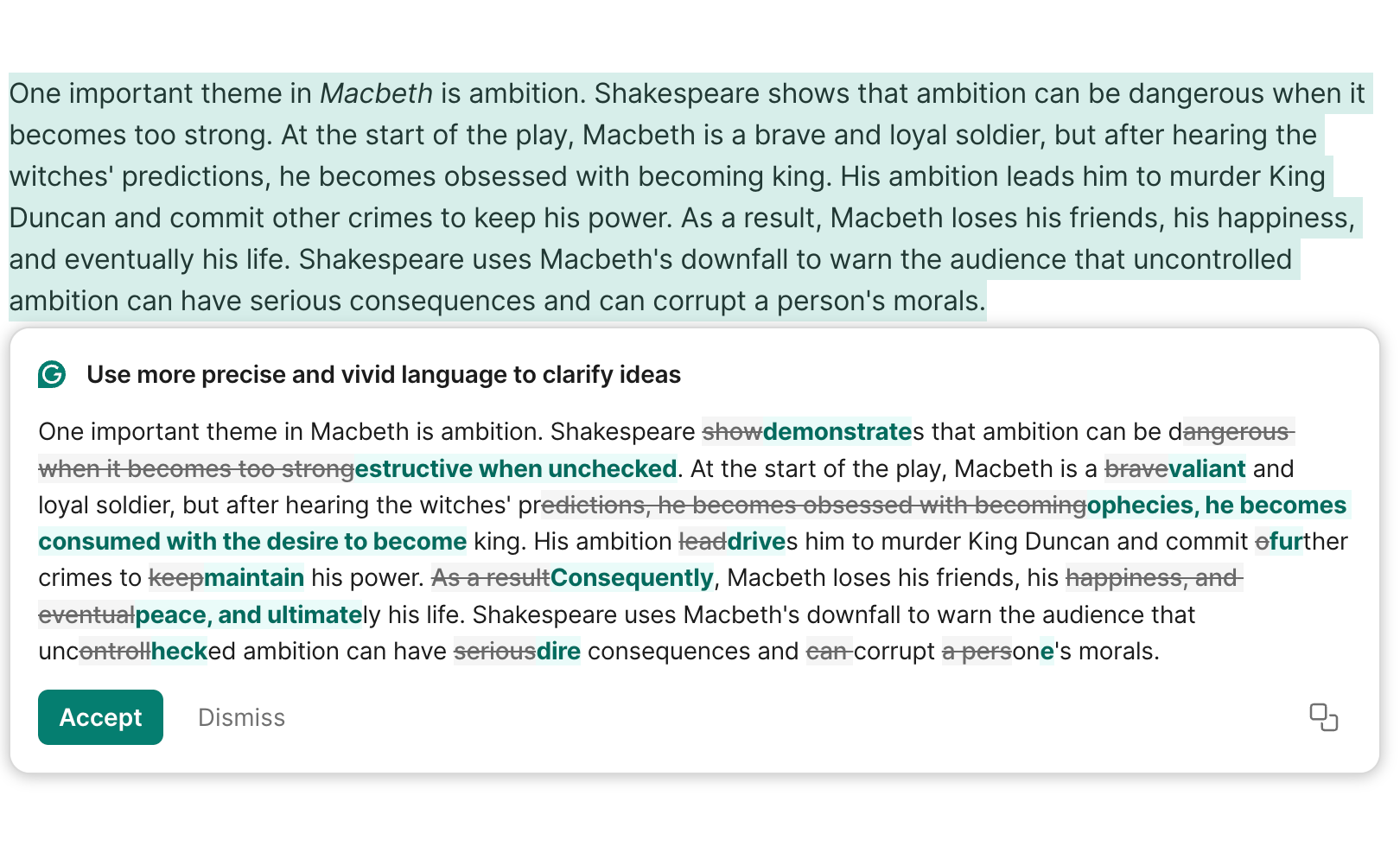
Grammarly suggestions to help clarify ideas for a GCSE English Literature Macbeth response.
My verdict: A great safety net for spelling and grammar. Just don't let it write for you.
Cost: Free version available; requires a paid subscription for unlimited feature access.
ChatGPT: Your Patient, Slightly Unreliable Study Buddy
ChatGPT (opens in a new tab) is the best-known large language model, and it shines when you want to clarify your understanding or drill a weak spot.
When I asked it for the difference between mitosis and meiosis, it gave me a clear explanation plus a short set of diagrams to look at. That's a real plus for visual learners - it adapts to different ways of taking information in.
It's intuitive, conversational and easy to talk to. And you can ask follow-up questions until something clicks.
The catch is making it specific. I couldn't always tell whether I was learning too much, too little, or the right vocabulary for my exam board. Like all AI, it can also be confidently wrong, so everything it tells you needs a cross-check against a trusted source.
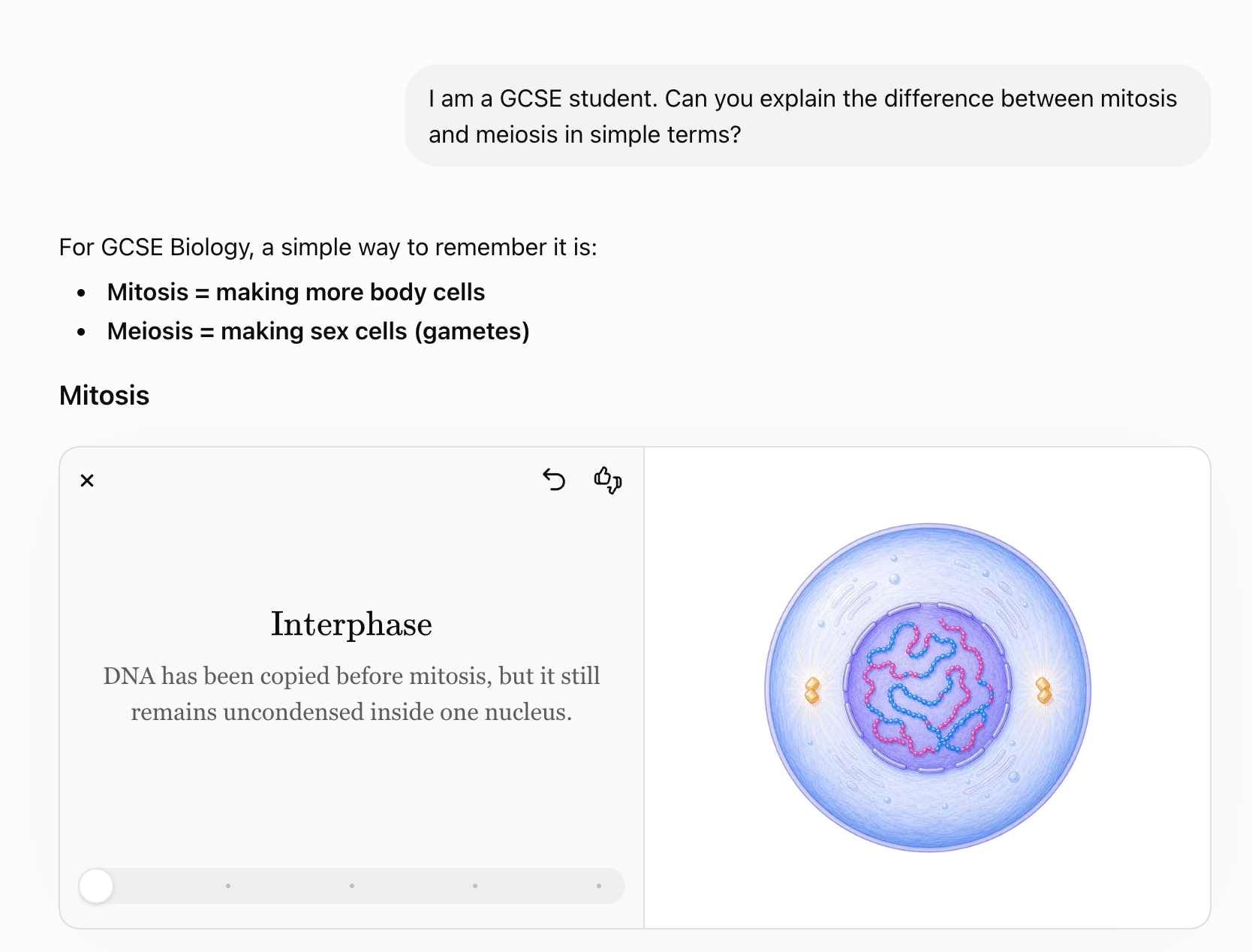
ChatGPT prompt and response for GCSE Biology revision.
My verdict: Excellent for understanding concepts and brainstorming. Less reliable for exam-specific detail - pair it with proper revision notes.
Cost: Free version available; requires paid subscription for higher usage limits.
Wordtune: An Imagination Injection for Essay Subjects
Wordtune (opens in a new tab) was the surprise of the bunch, and it's my pick for essay-based subjects like History.
I pasted in a short paragraph on the causes of World War I, and it suggested ways to make my response more detailed. You can also highlight a sentence and change its tone to something more formal, or expand on an idea you've half-formed.
That's where it excels. If you stare at a blank page and freeze, Wordtune sparks ideas. It's an imagination injection.
It’s a clever addition to your revision toolkit as it can build a solid set of points for a range of essay-based topics:
The causes of World War I
Key quotations and their effect in an English Literature text
Evaluation points for a Geography case study
You can then turn the output into flashcards. That's passive reading converted into active revision.
The one downside is the interface. It has a lot going on, and it can feel complicated to work out what each tab and header means.
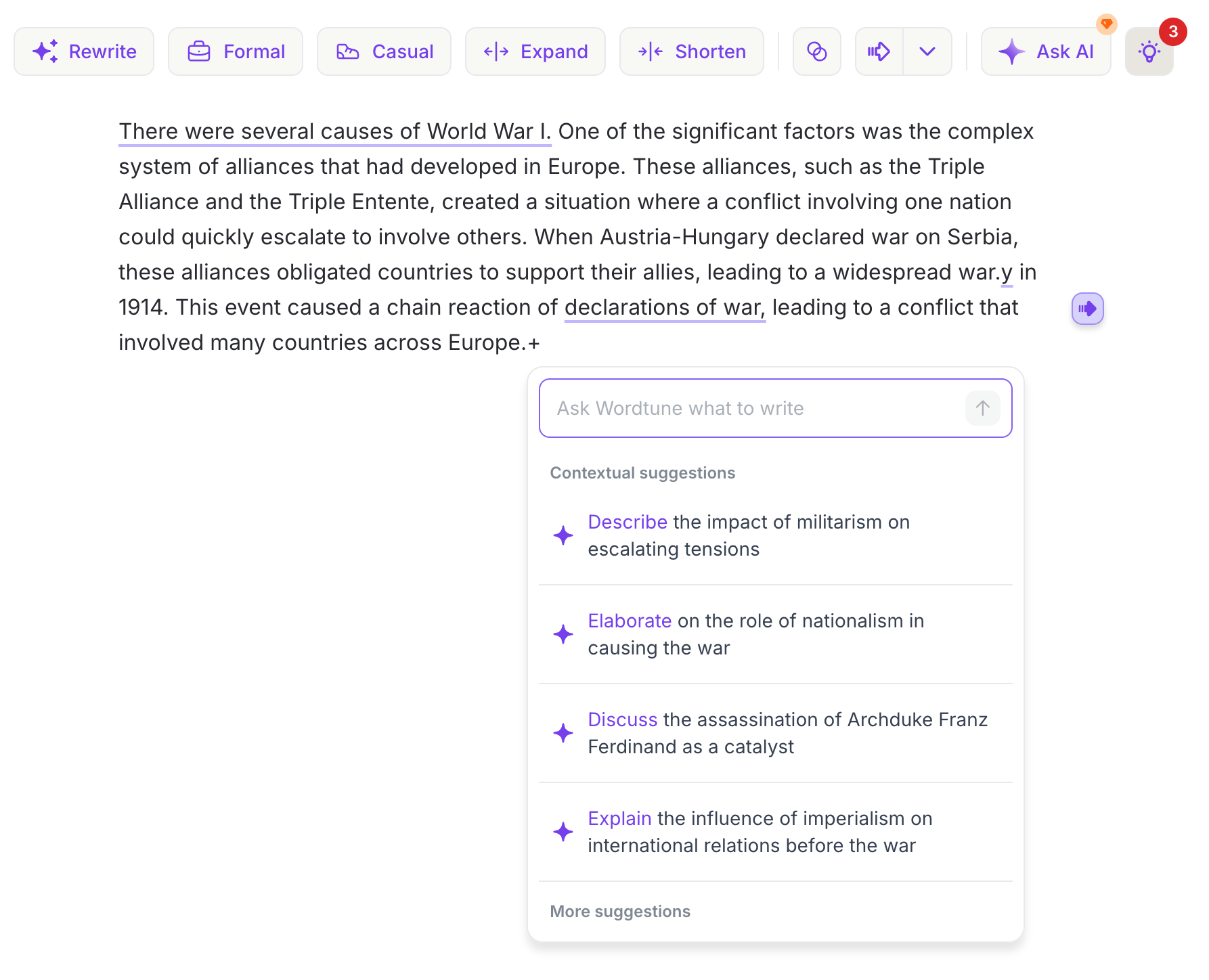
Wordtune suggesting additions to the causes of World War I for GCSE History.
My verdict: The best idea-generator I tested for essay subjects. Worth pushing through the busy interface.
Cost: Free version (limited daily rewrites); paid plans vary by region.
Duolingo: Short, Fun Revision Bursts for GCSE Languages
Duolingo (opens in a new tab) is an AI-powered app I'd recommend for GCSE language learners.
The interface is fun and colourful, the activities are interesting, and the lessons are short enough to fit into a bus journey. It covers speaking, listening, reading and writing, and it's great for review sessions and flashcard-style drills that cement vocabulary.
For short-burst, on-the-go practice that keeps a language ticking over, Duolingo works.
However, it probably won't stretch far enough for A Level, which demands more advanced understanding. And it doesn't replace your teacher. Instead, think of it as a supplement, not a sole revision tool.
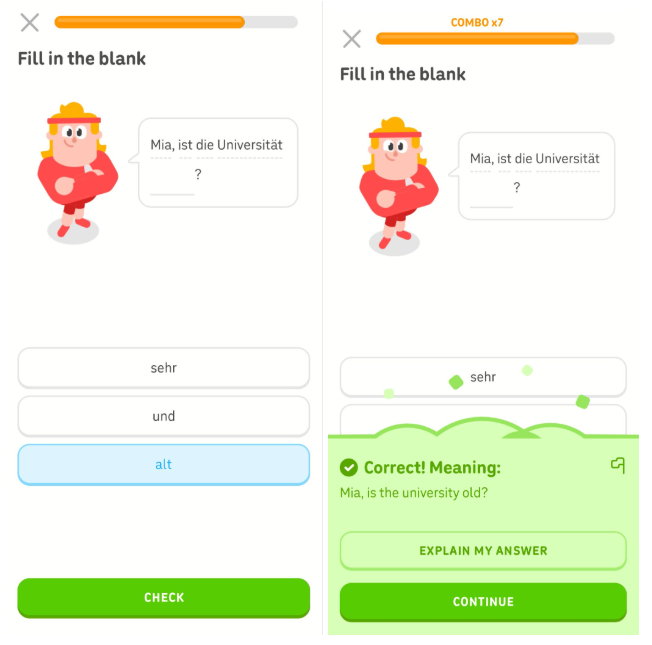
Duolingo used for quick-fire GCSE German vocab learning.
My verdict: A fun, effective top-up for GCSE languages. Brilliant alongside lessons, but not instead of them.
Cost: Free (ad-supported); Super Duolingo (extra features, ad-free) varies by region.
Smart Mark: Exam Practice That Adapts to You
Lastly, I tried Smart Mark - Save My Exams' own AI tool. I ran a Smart Practice session on atomic structure for GCSE Chemistry. It's intuitive, and the feedback is instant.
What stood out is how it adapts. It sets questions based on what you've already shown you understand, then nudges the difficulty up just enough to push your knowledge without overwhelming you. The explanations are good and are helpful if you’re finding anything tricky.
The short-burst flashcard quizzes that assess understanding are real confidence-boosters and the tool tracks your progress so you can see where you're improving. Everything links out to Save My Exams resources, all aligned to your exam board.
It’s a great way to actively practise what you’ve covered. However, it's built around exam-style practice, so you'll still want full notes and teaching alongside it to cover a topic from scratch.
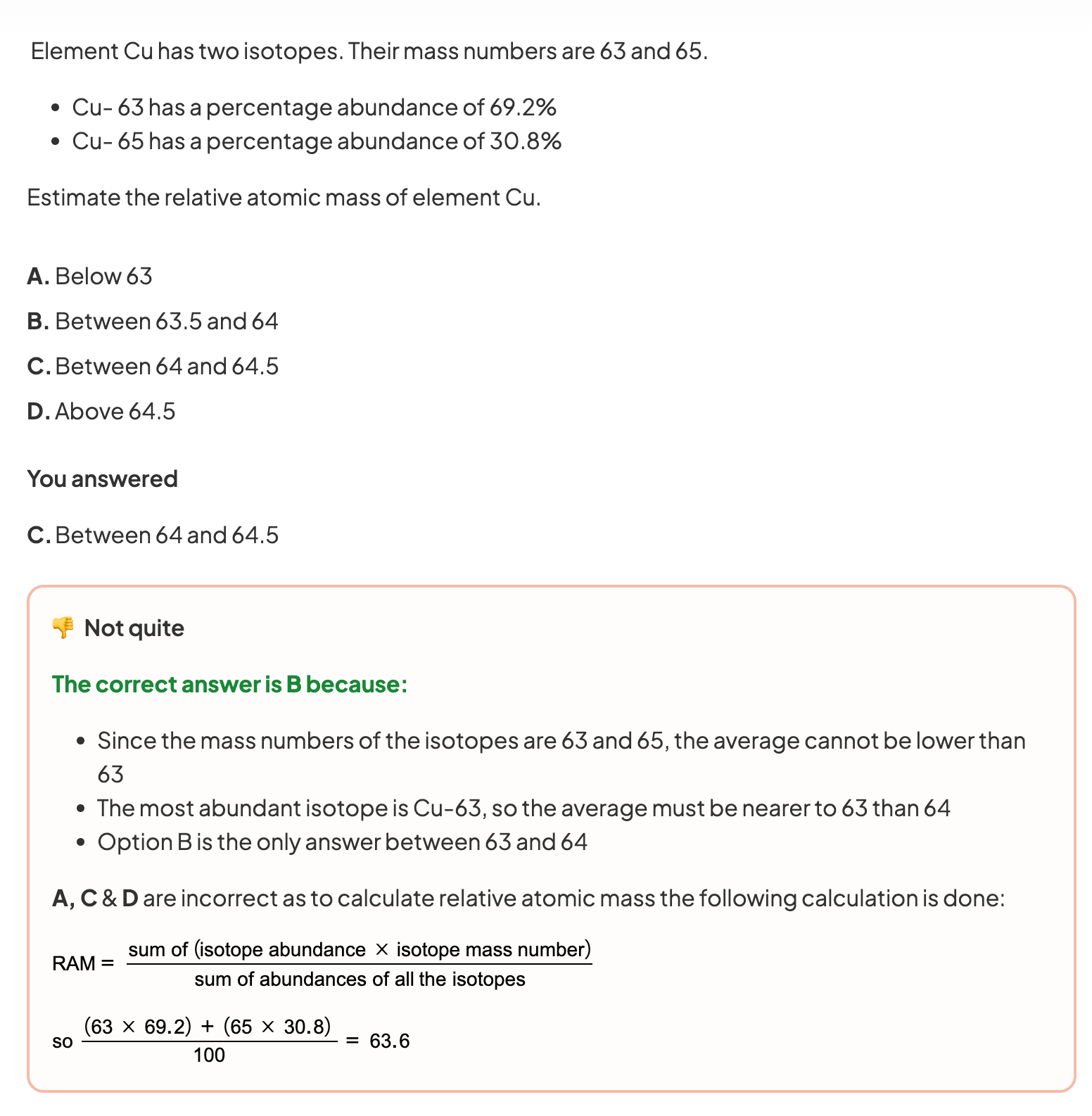
Smart Practice showing me the correct answer to a GCSE Chemistry exam-style question.
My verdict: The one that felt most tailored to actual exams. A strong revision tool, especially paired with Save My Exams bank of revision resources.
Cost: Free to try; requires paid subscription for full access.
Other AI Tools Worth a Look
This review is focused on five tools I tested, but they're not the only options out there. A few others are worth exploring if they fit how you work.
I haven't road-tested these myself, so treat them as starting points rather than recommendations:
QuillBot - for paraphrasing and summarising notes.
Google Gemini - for research and explanations, like ChatGPT.
Notion AI - for note organisation.
Motion - for automatic study session scheduling.
Clockify - for time tracking.
Most offer a free version, so you can try before you commit.
How to Use AI Tools Responsibly at School
Using AI doesn't mean you've skipped the hard work, but you do need to use it ethically. Get this right and you'll know your subjects inside out, which is the whole point.
JCQ's guidance on AI use in assessments (opens in a new tab) sets out the rules for schools and students.
Check your school's policy first. Rules differ, especially for coursework and controlled assessments. When in doubt, ask your teacher.
Use AI to understand, not to replace your thinking. It should explain ideas or organise yours. It shouldn't write your essay for you.
Be transparent. If you've used AI for research or brainstorming, say so. Honesty builds trust.
Question what it tells you. AI can be out of date or simply wrong. Cross-check anything important against your textbook, a trusted site or your teacher.
Frequently Asked Questions
What is the best AI tool for students?
There isn't one winner - it depends on the subject.
For essays, I'd pick Wordtune; for languages, Duolingo; for exam practice, Smart Mark; for general understanding, ChatGPT. Grammarly suits any written work.
Is it cheating to use AI for homework?
Not automatically. Using AI to understand a topic or organise your ideas is usually allowed. Using it to write your answers for you is where it crosses into academic misconduct. Always check your school's policy and be transparent with your teacher.
Can AI tools help with maths and science?
Yes. Tools like ChatGPT can explain concepts and walk through methods step by step. But don't become dependent on them for your reasoning. Use them to check your work, and don’t skip the thinking.
Are AI tools free for students?
Most have a free version that's enough to get started. Grammarly, ChatGPT, Wordtune and Duolingo all offer free tiers, and Smart Mark is free to try. Test the free versions before paying for anything.
Why Save My Exams Works Alongside AI Tools
AI is brilliant for explaining ideas and sparking them, but it can't always tell you what your exam board wants.
That's the gap Save My Exams fills. Our huge bank of revision resources is written by experienced teachers and examiners. They’re not generated by an algorithm. Revision notes, past papers, exam questions and even our AI tool, Smart Mark, are aligned to your specification.
More than 2 million students use Save My Exams to revise and go up an average of two grades.* So the smart move isn't AI or teacher-written resources. It's both.
Use AI to clarify concepts and get unstuck. Then use Save My Exams to make sure you're learning exactly what your exam needs - accurately, and to the right level.
Explore Save My Exams revision resources.
*2025 Save My Exams Survey data
References
Grammarly (opens in a new tab)
ChatGPT (opens in a new tab)
Wordtune (opens in a new tab)
Duolingo (opens in a new tab)
JCQ - AI Use in Assessments: Your role in protecting the integrity of qualifications (opens in a new tab)
Was this article helpful?
Sign up for articles sent directly to your inbox
Receive news, articles and guides directly from our team of experts.

Share this article

 written revision resources that improve your