Notion Review: Is Notion Good for Students?

Written by: Angela Yates
Reviewed by: Holly Barrow
Published
Contents
- 1. Key Takeaways
- 2. What Is Notion?
- 3. Our Testing Experience
- 4. Key Features
- 5. User Experience
- 6. Pricing and Plans
- 7. Benefits of Using Notion
- 8. Cons of Notion
- 9. Who Is Notion Best For?
- 10. What Other Users Say
- 11. Tips for Getting the Most Out of Notion
- 12. Is Notion Worth It? Our Verdict
- 13. Frequently Asked Questions
- 14. Final Thoughts
Finding a study tool that genuinely helps can be difficult. Many students end up juggling notes, deadlines, revision plans, and projects across multiple apps.
Notion aims to bring all of those things together in a single workspace. You can use it to organise notes, track assignments, plan revision, manage projects, and collaborate with classmates.
For this review, I tested Notion from a student perspective to see how well it performs in real academic life. In this article, I'll explain what it does well, where it falls short, and whether it's worth using as a student.
Key Takeaways
Notion is an extremely flexible workspace that can combine notes, assignments, revision plans, calendars, and project management in one place
The free plan offers plenty for most students, while eligible university students and educators can access the Plus plan for free using an educational email address
The onboarding process is straightforward and the student templates particularly helpful for getting started quickly
Notion's biggest strength is its customisation, but it's easy to spend more time perfecting your workspace than actually studying
Notion is best suited to students who want a central hub for organising their academic life rather than a dedicated revision platform with ready-made study resources
What Is Notion?
Notion is an all-in-one workspace designed to help users organise information, manage projects, collaborate with others, and create personalised systems for work, study, and everyday life.
Founded in 2016, Notion has grown from a note-taking app into a highly flexible platform used by individuals, students, businesses, and large organisations worldwide.
At its core, Notion allows users to create and organise content using pages, databases, calendars, task lists, and collaborative workspaces. Rather than forcing users into a predefined structure, Notion allows each workspace to be customised to suit different needs.
For students, this means Notion can be used to:
Take and organise class notes
Track assignments and deadlines
Create revision timetables
Plan projects and coursework
Collaborate on group work
Store research and resources
Build personalised study dashboards
Notion also includes AI-powered tools, template galleries, calendar integration, and web clipping features that can help students collect, organise, and manage information more efficiently.
Our Testing Experience
Although I already use Notion in my own work, I wanted to understand how well it would perform for students starting from scratch. For this review, I created a new account and tested Notion from a student perspective rather than as a general productivity tool.
I explored a range of student-focused features. I created assignments, organised class notes, built a revision timetable, tested sharing features, and experimented with AI-generated study plans. I also tested the mobile app.
Overall, the testing covered the core Notion features most students are likely to use, from note-taking and planning through to collaboration and AI-assisted study tools.
Key Features
Student Planning and Organisation
One of Notion's strongest features for students is its ability to bring planning, organisation, and task management together in a single workspace.
During testing, I started with Notion's built-in Student Weekly Planner template. After selecting the "High School" option during onboarding, Notion generated a ready-made workspace that included assignment tracking, planning tools, and study resources.
This made it much easier to get started than beginning with a completely blank page.
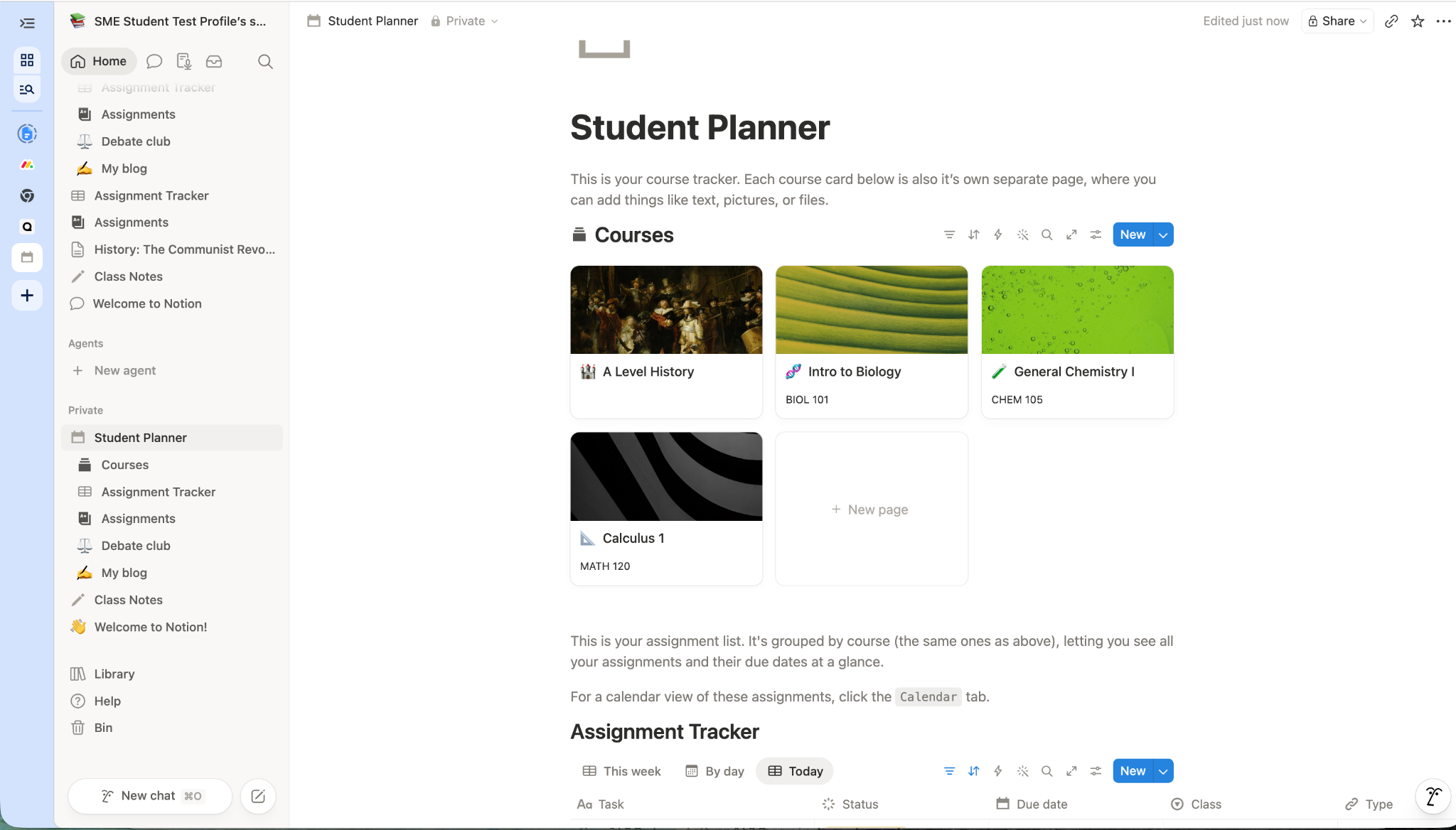
Caption: Notion Student Planner Overview Screen
Tracking assignments
I used the planner to create assignments, add deadlines, and organise work by subject. The system is highly customisable, allowing you to add new columns, statuses, categories, and due dates to suit your own workflow.
One feature I particularly liked was the ability to keep everything related to a task in one place. For example, I linked revision resources directly to assignments, so that notes and tasks could be accessed from the same screen.
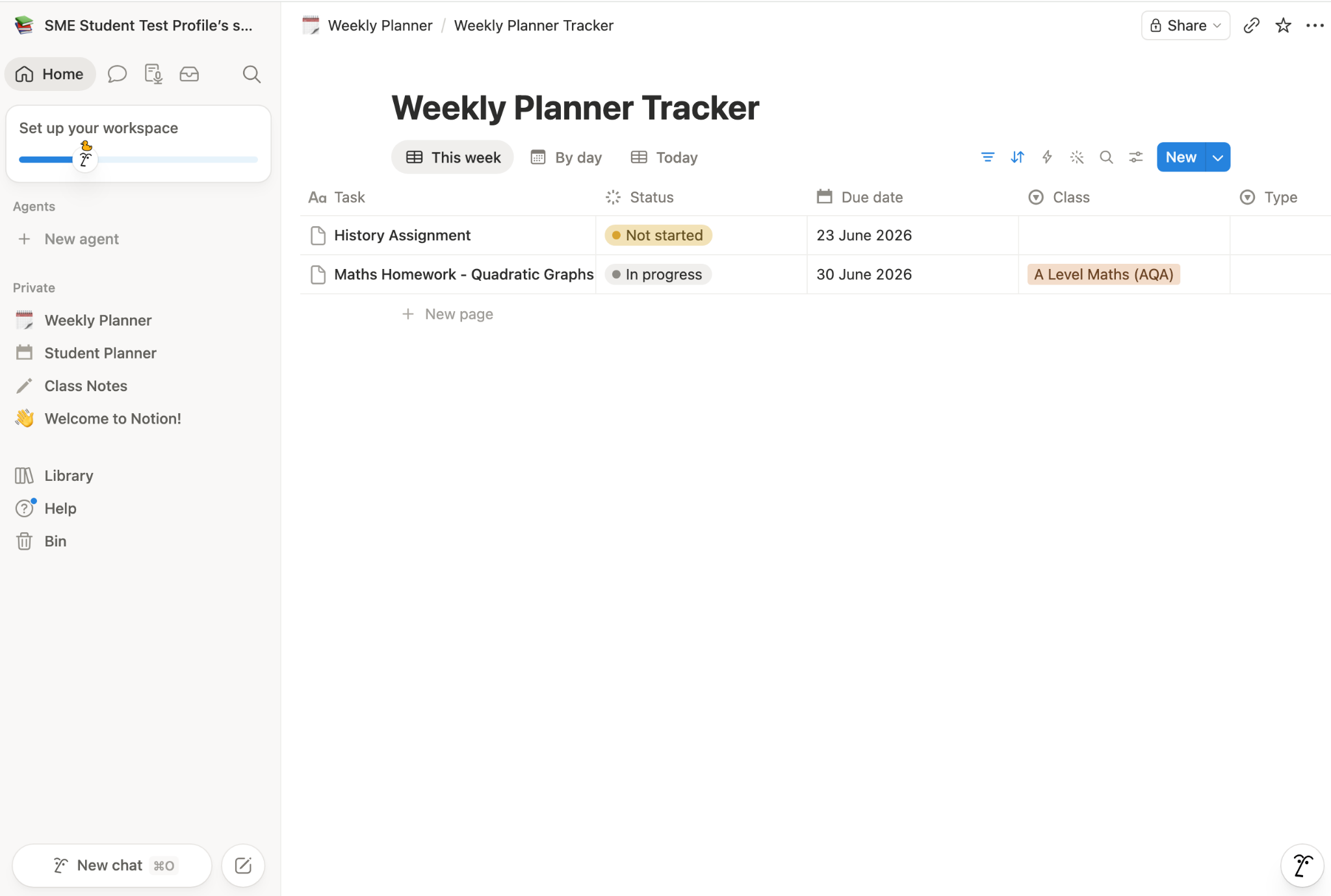
Caption: Notion Weekly Planner showing set assignments
Creating a revision timetable
Revision planning was another area where Notion performed well. Rather than relying on a simple checklist, I built a timetable that combined subjects, revision activities, deadlines, and exam dates into a calendar view.
The result was a revision schedule that was easy to update and gave a clear overview of what needed to be studied each day.
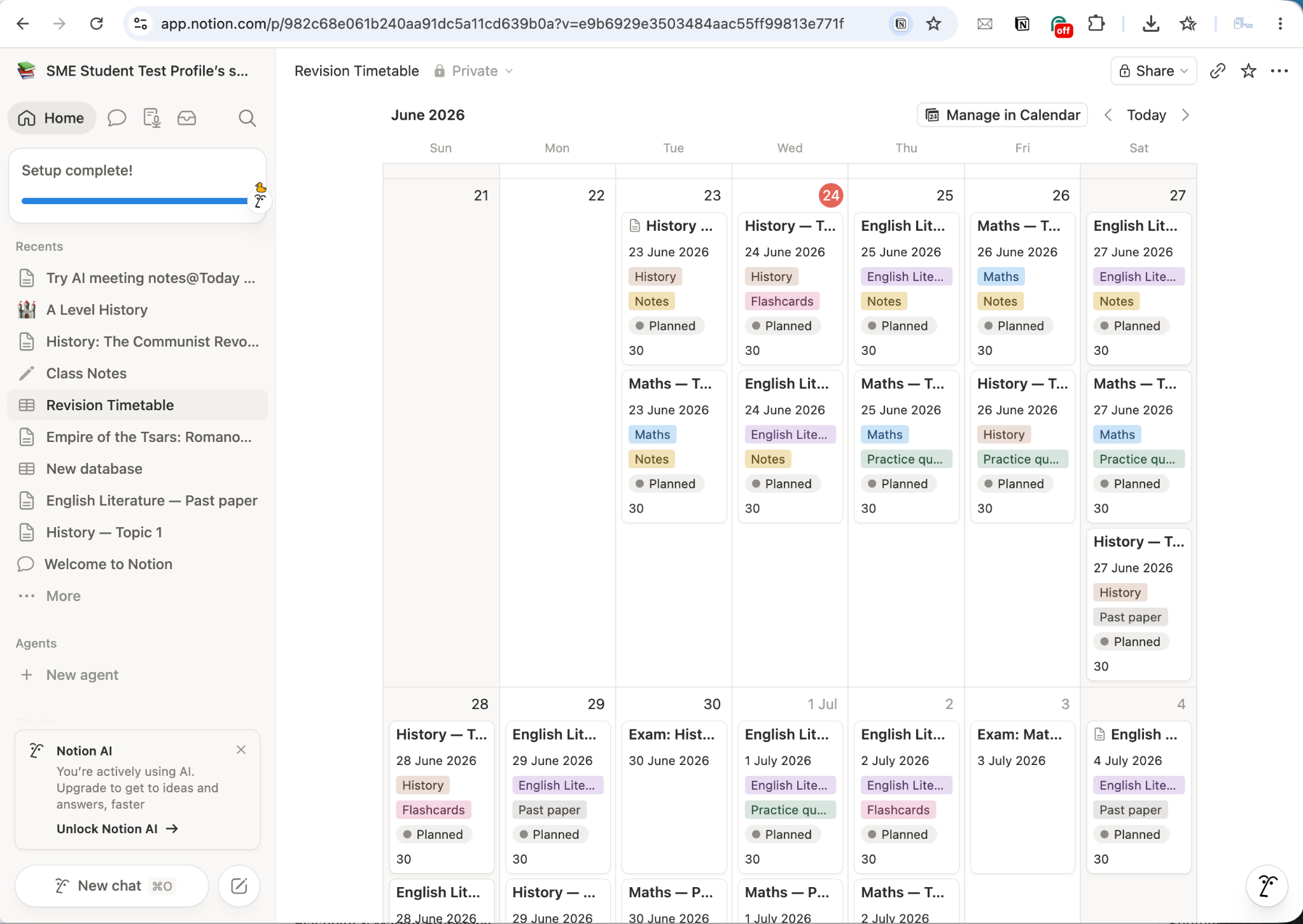
Caption: Notion Calendar view showing populated revision timetable
Notes and Knowledge Management
Although many students first discover Notion as a note-taking app, it’s better to think of it as a complete knowledge management system. Yes, it will store your notes. But it also helps you organise information, connect related resources, and find what you need quickly.
Creating and organising notes
I tested Notion's Class Notes feature by creating notes for an A Level History topic. Adding a new page was straightforward, and the editor supports headings, bullet points, numbered lists, images, links, tables, and embedded content.
What I liked most was how easy it was to organise notes. Pages can be grouped by subject, date, topic, or any custom category you choose. This makes it much easier to keep large volumes of information organised throughout a school year.
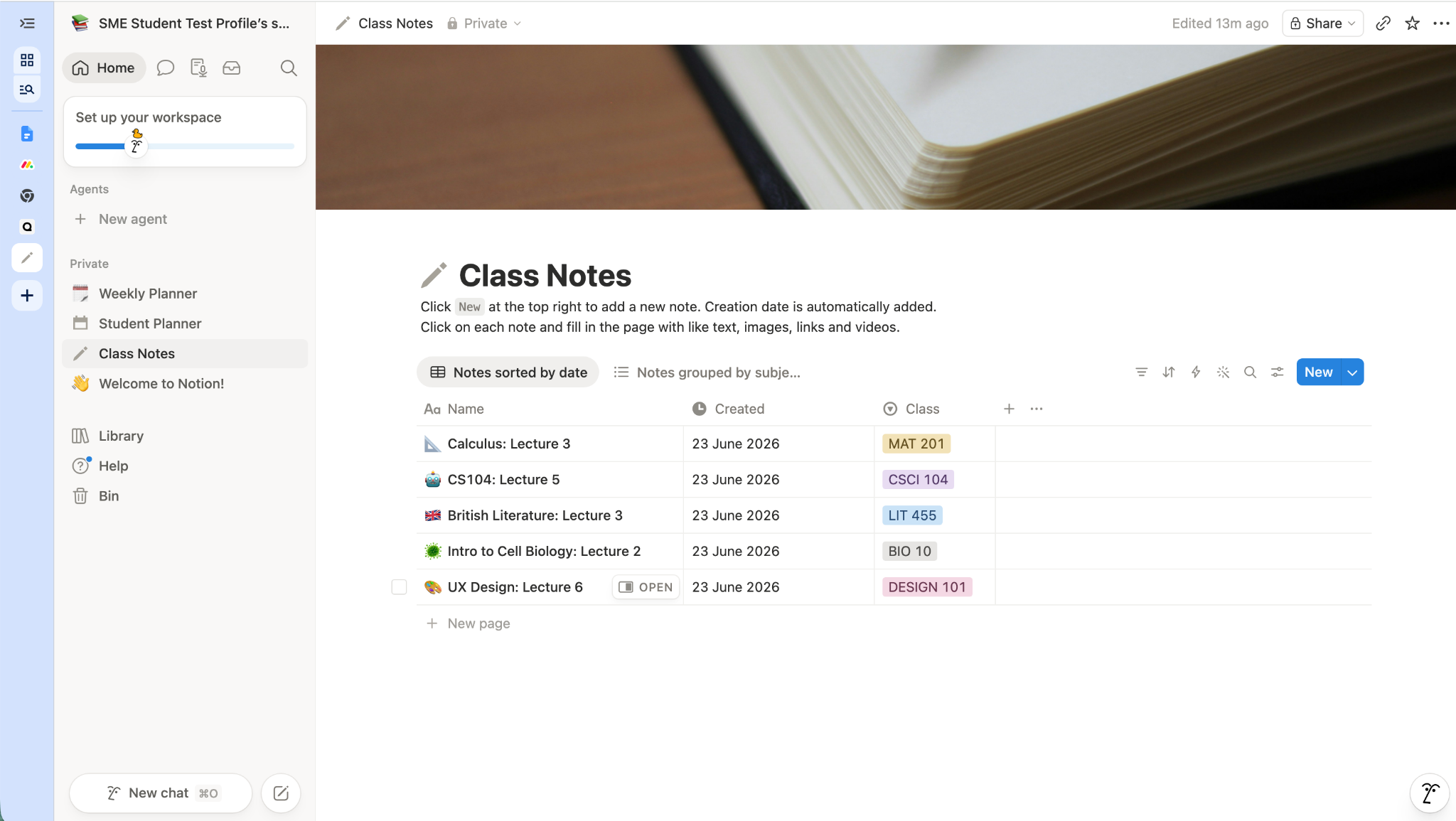
Caption: Notion Class Notes menu showing organisational features
Linking resources together
One of Notion's biggest advantages over traditional note-taking apps is the ability to connect different types of information within the same workspace.
During testing, I linked revision resources directly into my notes. This allowed me to access supporting materials such as the relevant Save My Exams History revision page, my assignments, and other study resources, such as a BBC documentary, right alongside my written notes.
The result was a far more connected study system than simply storing notes in separate folders.
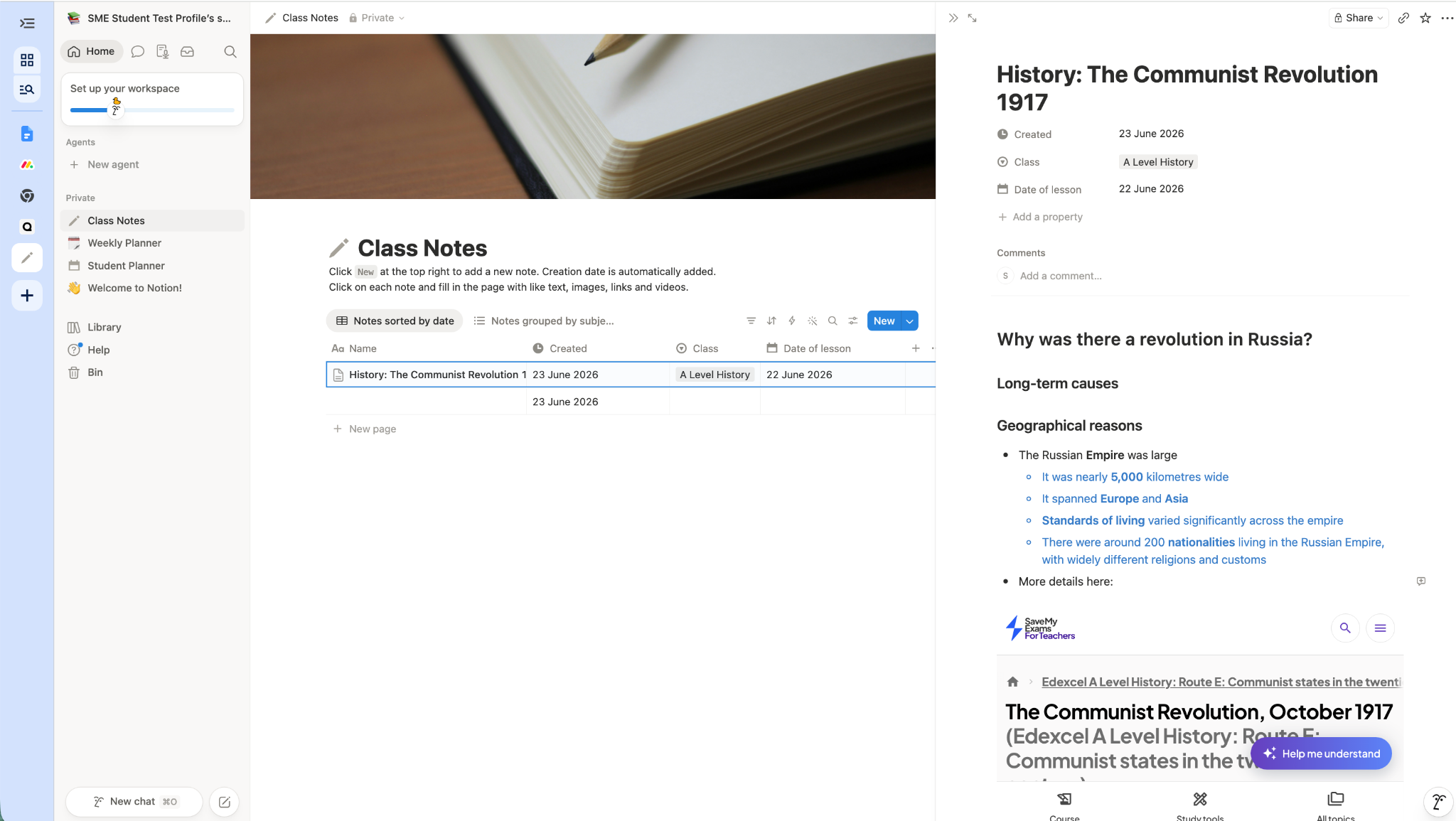
Caption: Notion Class Notes for an A Level History topic showing links to relevant Save My Exams resource
Finding information quickly
As your workspace grows, ease of navigation becomes increasingly important. Notion's search tool proved particularly useful during testing.
Typing a keyword instantly located relevant notes, pages, and resources across the workspace. For example, searching for "Russia" immediately returned the history notes I had created earlier. If you're managing multiple subjects and dozens of pages, this feature can save a significant amount of time.
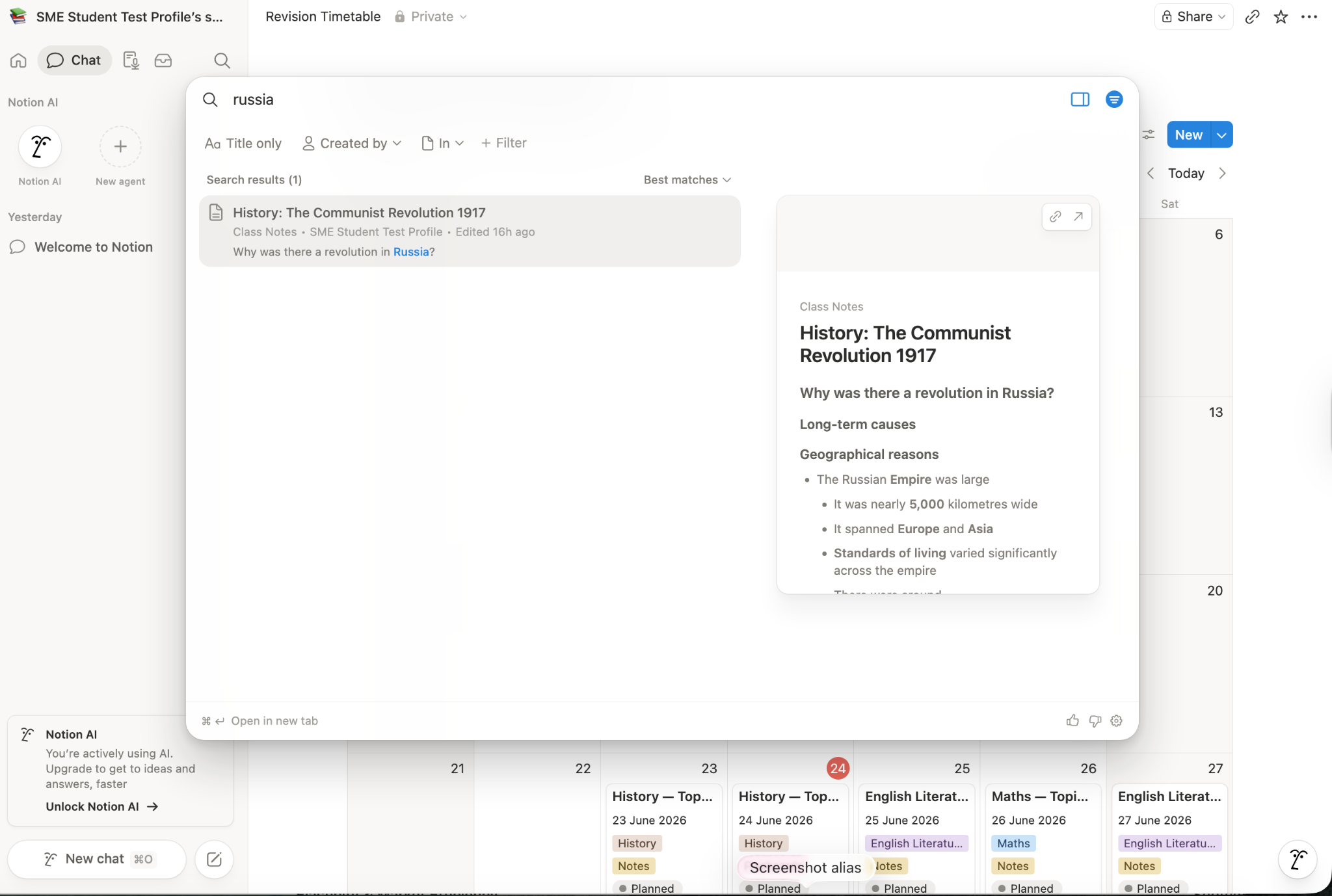
Caption: Notion search tool in use
Templates and Customisation
One of Notion's biggest strengths is that you don't have to start with a blank page. The platform includes a large template gallery containing ready-made systems for planning, note-taking, revision, project management, and productivity.
Getting started with templates
During testing, I explored Notion's template marketplace and found a wide range of student-focused options. These included revision planners, exam countdown dashboards, flashcard systems, Pomodoro study timers, assignment trackers, and complete student workspaces.
Many templates are free, while others are created by third-party users and available for a small fee.
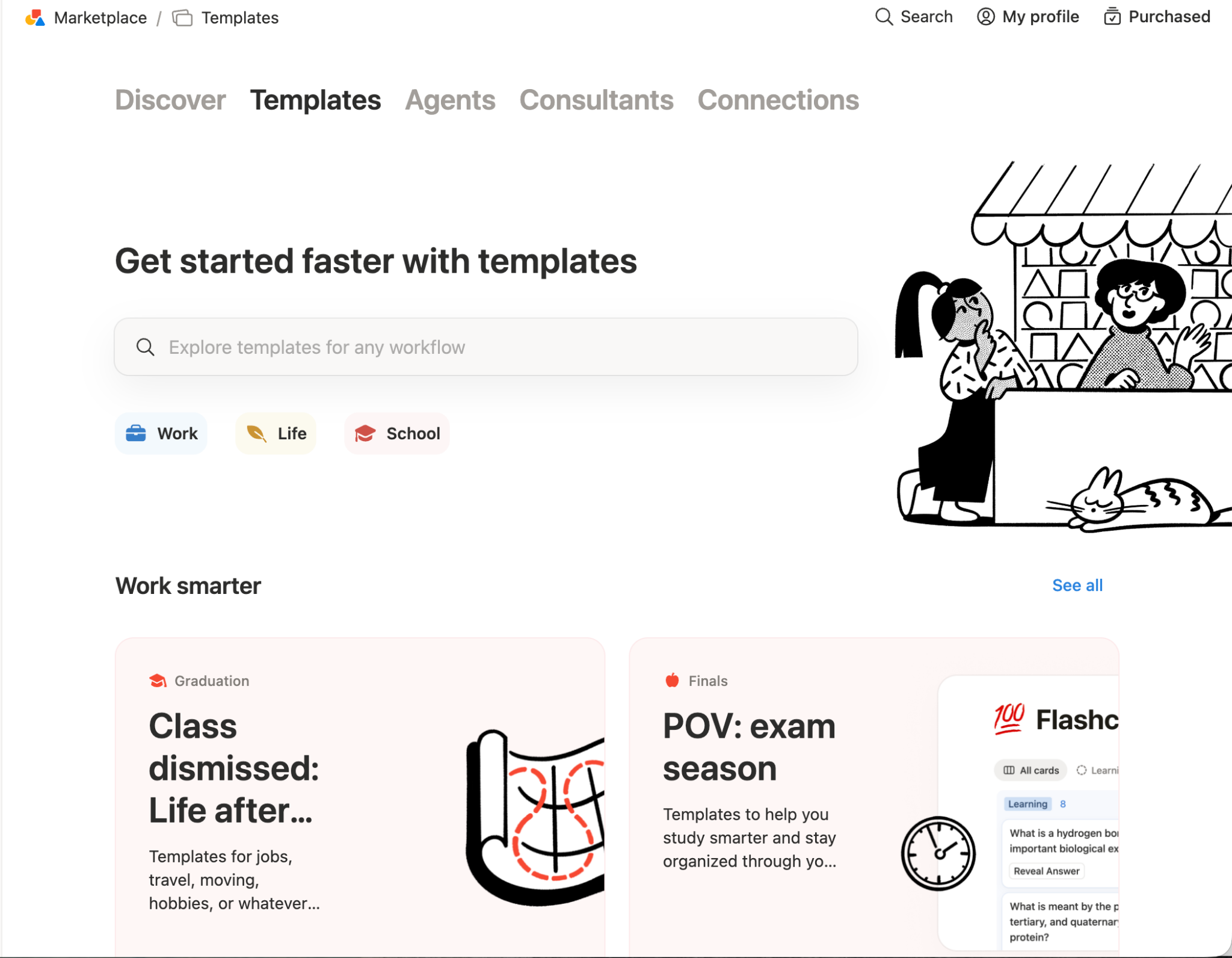
Caption: Notion Templates Marketplace
Building a revision system
I tested several exam-focused templates, including an Exam Planner designed to track revision sessions, deadlines, and upcoming assessments.
What impressed me was how quickly a useful study system could be created. Rather than building databases and calendars from scratch, I could install a template and begin adapting it to my own subjects and deadlines within minutes.
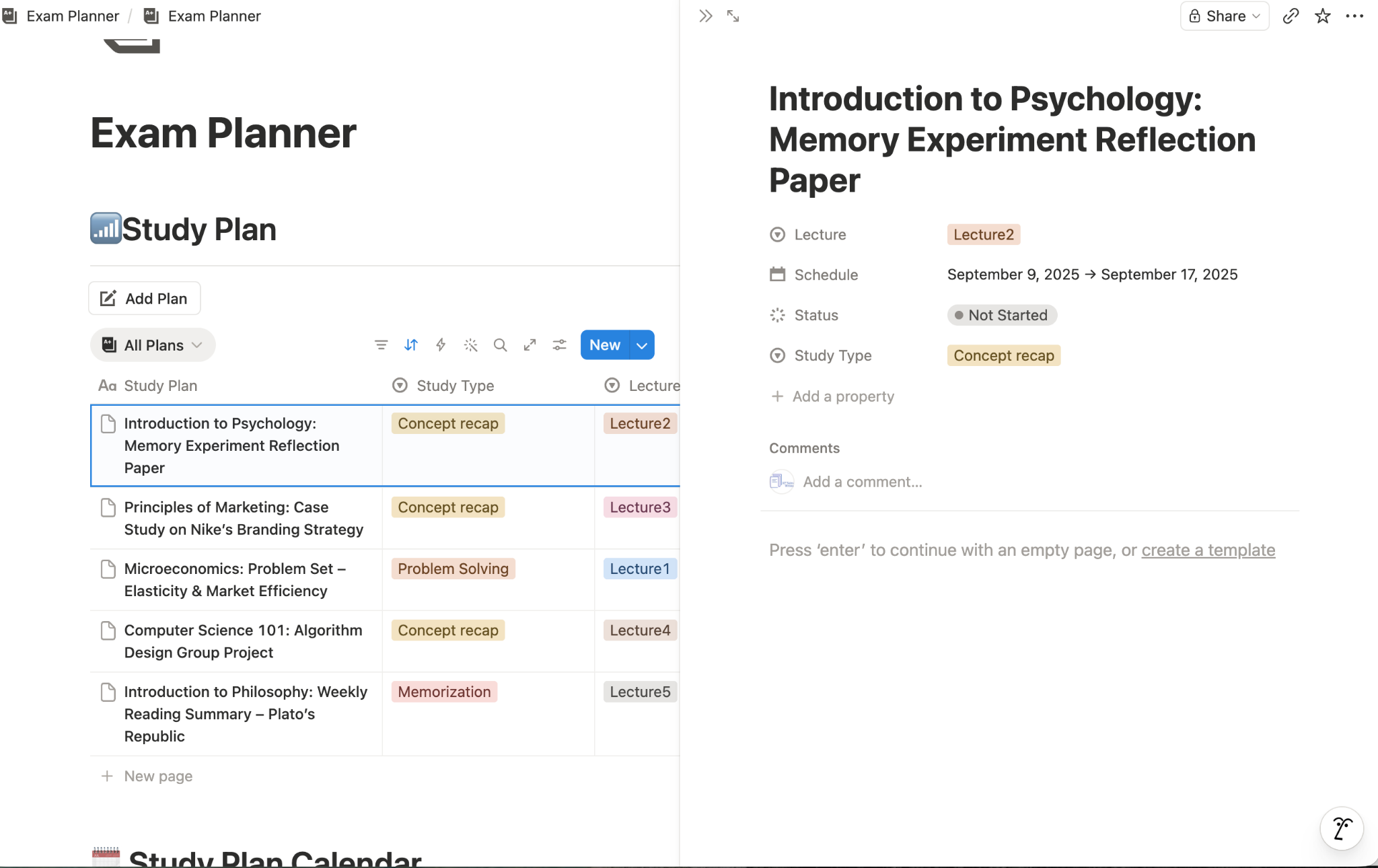
Caption: Notion sample Exam Planner Template downloaded from the Marketplace
Customising your workspace
The template is just a starting point, however. Notion gives you complete control over how your information is organised. Pages, databases, calendars, boards, and trackers can all be modified to suit your preferred way of working.
This flexibility means that two students could use Notion in completely different ways while using the same underlying tools. Some may prefer a simple planner and note-taking system, while others might create a detailed academic dashboard covering every aspect of their studies.
Notion AI
Artificial intelligence is now built into many productivity tools, but the quality of these features varies considerably. I wanted to see whether Notion AI could genuinely help students organise their studies. So during testing, I put it through its paces to see if it could create a useful revision timetable.
Creating a revision timetable
I asked Notion AI to create a revision timetable for three A Levels: History, Maths, and English Literature, specifying how much time I had available on weekdays and weekends.
The results appeared within around 50–60 seconds and were more useful than I expected. Rather than simply creating a list of study sessions, Notion AI generated a structured timetable that included different active revision activities, such as reviewing notes, creating flashcards, completing practice questions, and attempting past papers.
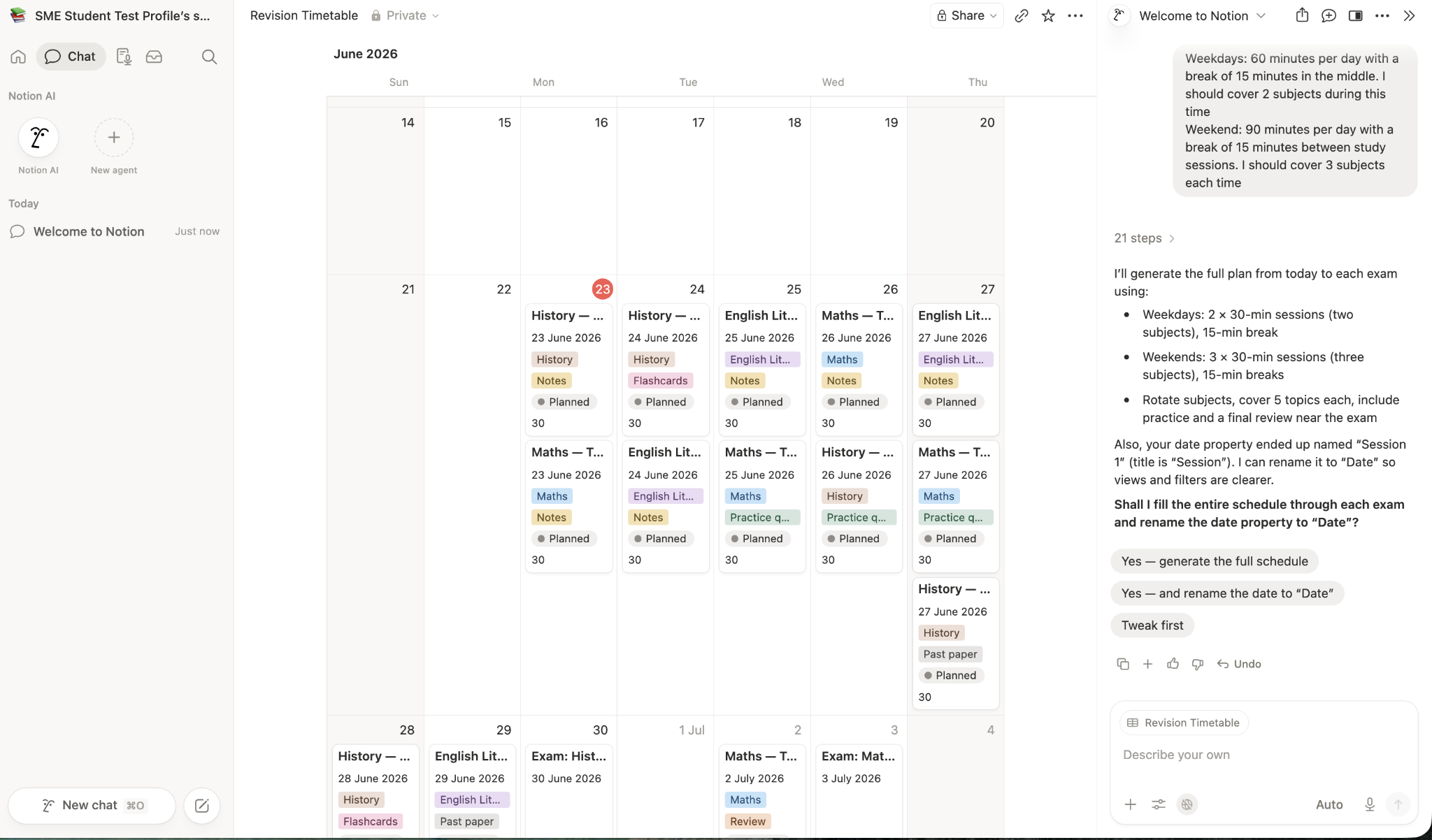
Caption: Screenshot of the process of using Notion AI to help generate a revision timetable
A useful starting point rather than a finished product
While the timetable wasn't perfect, it provided a solid foundation that could be further customised to suit specific topics, exam dates, strengths, and weaknesses.
This felt like the best use of AI within Notion. Instead of replacing planning altogether, it helped remove the blank-page problem and provided a structure that could be refined and personalised.
Integrating AI into your workspace
One advantage of Notion AI is that it works within the same workspace as your notes, assignments, calendars, and planners. This means AI-generated content can be incorporated directly into an existing study system, rather than exported from a separate tool such as ChatGPT.
Students could potentially use Notion AI to help generate revision schedules, organise information, summarise notes, brainstorm project ideas, or create first drafts of study plans.
Collaboration and Sharing
Notion isn't just designed for individual use. It also includes a range of collaboration features that can be useful for students working on group projects, sharing notes, or studying with classmates.
Sharing notes and resources
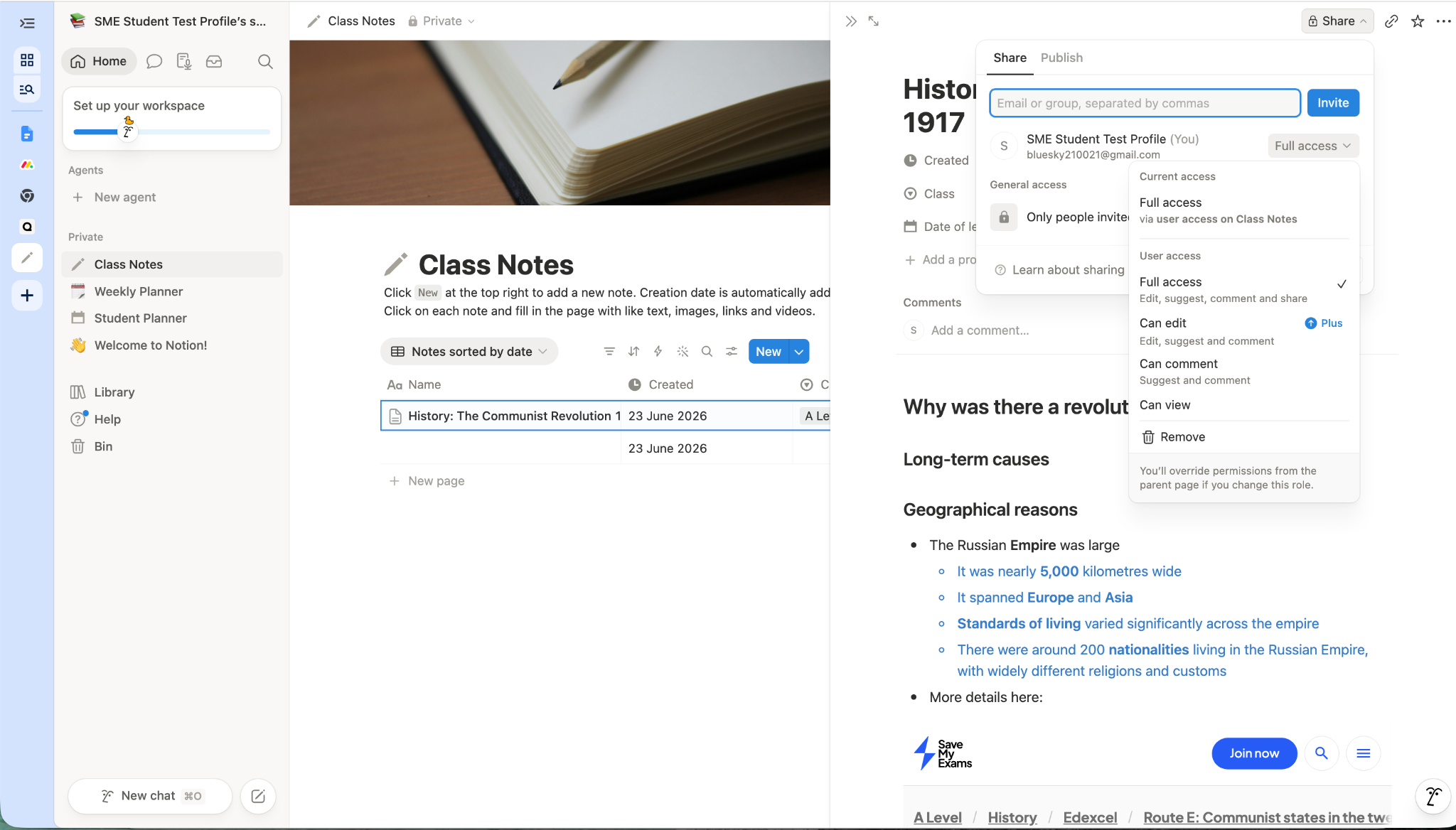
During testing, I found it easy to share pages with other people. By default, everything remains private within your workspace, but individual pages can be shared via email invitation or by generating a link.
This could be particularly useful for students working on coursework, collaborative research tasks, or shared revision resources.
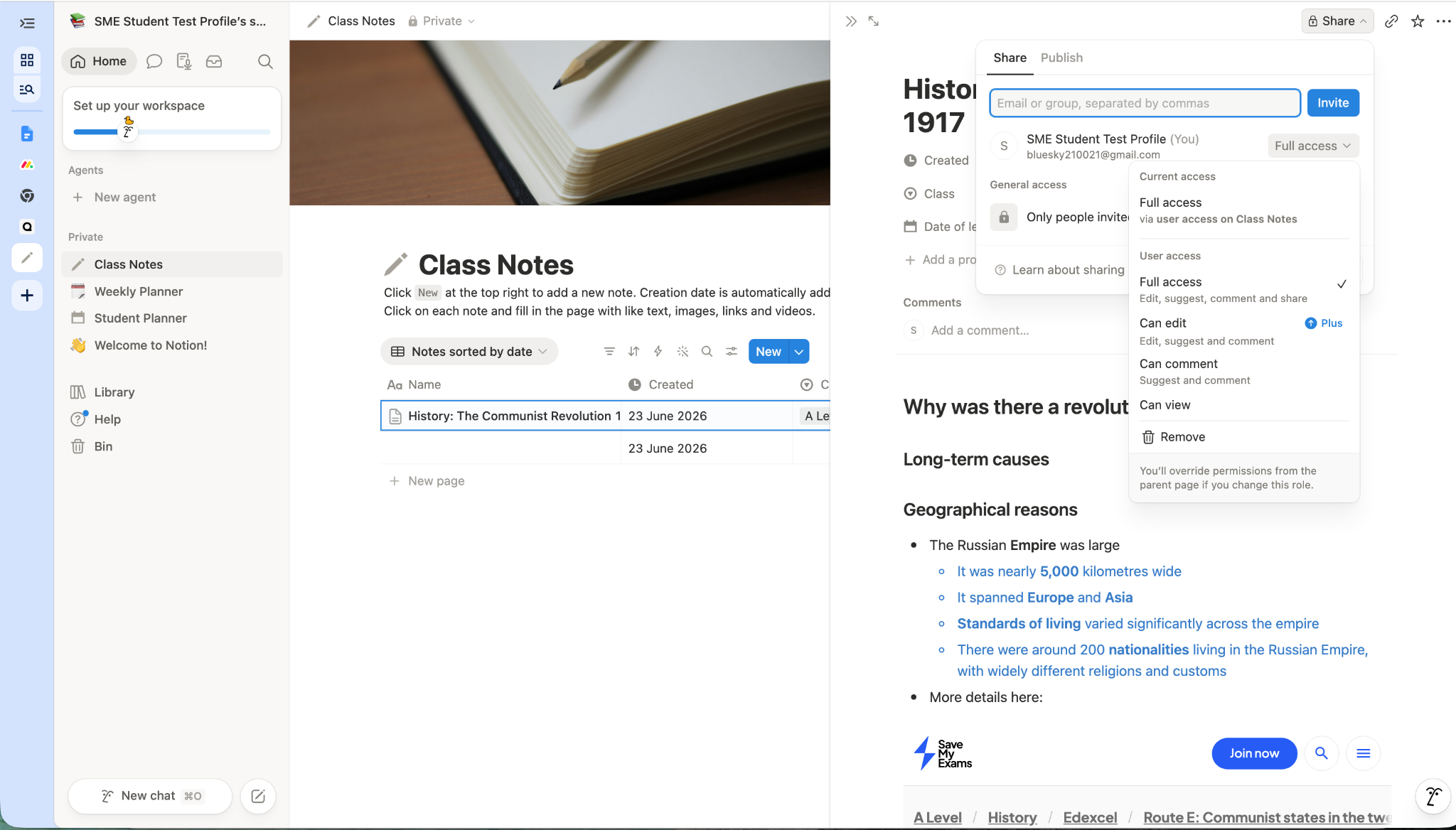
Caption: Sharing Class Notes on Notion
Publishing content
Notion also allows pages to be published to the web. Once published, anyone with the link can view the content without needing access to your workspace.
I tested this feature using class notes and found the process straightforward. It worked smoothly and could be a useful way to share revision materials, project notes, or study guides with classmates.
User Experience
Getting Started
One of the biggest concerns many students have about Notion is its reputation for being complicated. While there is certainly a learning curve, I found the onboarding process much more beginner-friendly than I expected.
Creating an account took only a few minutes. After verifying my email address, Notion asked a series of questions about how I planned to use the platform, including education-specific options. Based on these answers, it generated a starter workspace and suggested relevant templates.
Caption: Notion use case sign-up screen
Rather than dropping new users into a completely blank workspace, Notion provides enough structure to help you get started while still allowing plenty of room for customisation.
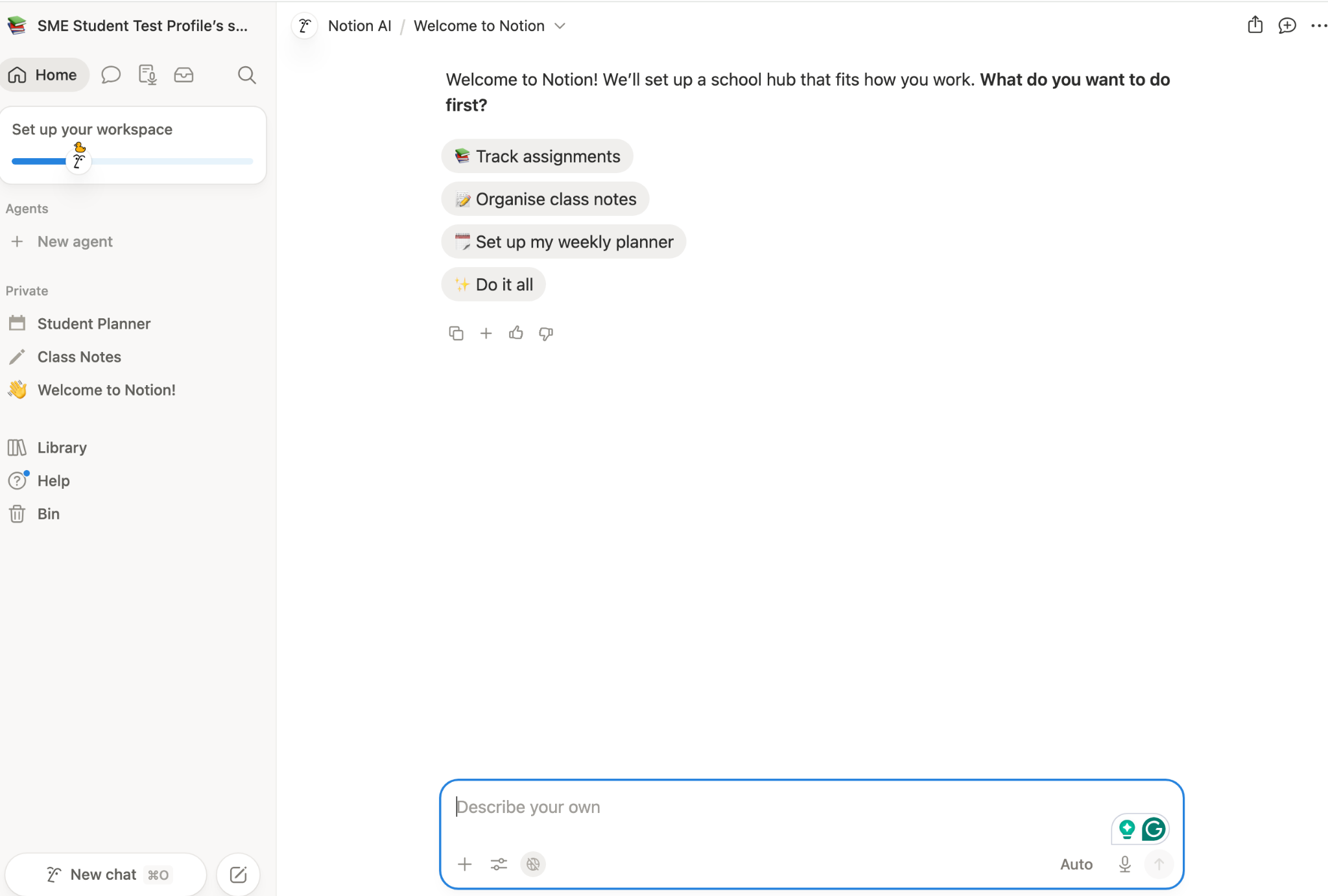
Caption: Welcome to Notion screen
What stood out during testing was how much guidance was available. Templates, prompts, and setup suggestions helped reduce the feeling of being overwhelmed. And this was particularly helpful when creating study planners and note systems for the first time.
Interface and Ease of Use
Notion has a clean, modern interface that is easy to navigate once you've spent a little time exploring.
The main workspace is organised around pages, which can contain notes, databases, calendars, task lists, and other content. While this approach offers enormous flexibility, it can take a little time to understand how everything fits together.
One feature I quickly came to depend on was the power of the right-click button. If you think a feature is missing, it’s probably nestling within the contextual menus you’ll find throughout the workspace.
The search tool is another highlight. From personal experience, I’ve learned how easy it is to find information, no matter how unwieldy your workspace grows. During testing, searching for a keyword immediately located relevant notes and resources, even when I had forgotten exactly where they were stored.
Mobile and Desktop Experience
I tested Notion on both desktop and mobile devices.
The desktop experience is where most students will probably do the majority of their setup and organisation. Creating databases, building planners, customising templates, and managing larger projects all feel more comfortable on a larger screen.
The mobile app performed well during testing and was particularly useful for checking deadlines, reviewing notes, updating tasks, and making quick edits while away from a computer.
One feature I appreciated was how seamlessly information synced between devices. Changes made on desktop appeared quickly on mobile, making it easy to switch between the two throughout the day.
The desktop version remains the better choice for building and managing complex systems, but the mobile app works well for everyday use and makes it easy to keep track of your studies on the go.
Pricing and Plans
One of Notion's biggest advantages for students is that the free plan is generous enough for most people to use without ever needing to upgrade.
Free Plan
During testing, I used Notion's free plan. I was able to access all the features I needed to create notes, organise assignments, build revision planners, use templates, manage calendars, and test the platform's core functionality.
The free plan includes:
Unlimited pages and blocks for individual users
Basic forms and websites
Notion Calendar
Notion Mail integration
Databases and task management tools
A trial of Notion AI
For many students looking for a way to organise their studies, the free plan will be more than sufficient.
Education Plus Plan
Notion offers generous student discounts. Students and educators at eligible colleges and universities can access the Plus Plan for free using a qualifying educational email address.
The Education Plus Plan includes:
Unlimited file uploads
Up to 100 guests
30-day page history
Additional customisation features
Advanced sharing options
Paid Plans
For users who don't qualify for the Education Plus Plan, Notion also offers paid subscriptions.
Plan | Price |
|---|---|
Free | £0 |
Plus | £8.50 per member/month |
Business | £16.50 per member/month (annual billing) or £19.50 monthly |
The Plus Plan is aimed primarily at teams and collaborative workspaces, while the Business Plan adds advanced AI tools, security controls, and administrative features that most students are unlikely to need.
Is Notion Good Value for Students?
Based on my testing, the free plan offers excellent value.
I was able to create planners, track assignments, organise notes, build revision timetables, test templates, use the mobile app, and explore most of the platform's core features without paying anything.
For university students who qualify for the free Education Plus Plan, the value is even better. The only students likely to need a paid subscription are those who require specific collaboration features, larger file uploads, or advanced AI functionality. For everyone else, the free version provides more than enough functionality to build an effective study system.
Benefits of Using Notion
Keep Your Academic Life Organised
Notion brings notes, assignments, revision plans, deadlines, and resources together in one place, making it easier to manage multiple subjects.
Adapt It to Your Study Style
Some students prefer a simple planner, while others enjoy building detailed dashboards and study systems. Notion supports both approaches, so you can create a workspace that fits the way you work.
Get Started Quickly with Templates
The template gallery removes much of the effort involved in setting up a study system from scratch. Student planners, revision dashboards, and assignment trackers can be installed and adapted within minutes.
Find Information Fast
As your notes and resources grow, Notion's search function makes it easy to locate information quickly.
Work Effectively with Others
Sharing notes, revision resources, and project materials is straightforward. This makes Notion particularly useful for group projects, collaborative coursework, and shared study resources.
Build Better Study Habits
Although Notion can’t actually do your work for you, it can make your studies easier to manage. Used correctly, it may help you:
Stay organised
Maintain consistent study habits
Stick to regular revision routines
Cons of Notion
There Is a Learning Curve
Although Notion is easier to get started with than its reputation suggests, it still takes time to learn.
New users may need a few days to become comfortable with concepts such as pages, databases, templates, and different workspace views.
It's Easy to Over-Organise
One of Notion's greatest strengths is flexibility, but that can also become a distraction. During testing, I occasionally found myself spending more time improving my study system than actually studying.
Students who enjoy productivity tools may love this, while others may find it frustrating.
Some Features May Feel Overwhelming
Notion offers a huge range of tools and customisation options. For students who simply want a straightforward place to take notes and track homework, the number of choices can feel unnecessary.
Not a Dedicated Revision Platform
Notion is excellent for organisation and planning, but it doesn't provide subject-specific revision content, exam questions, flashcards, or past papers.
Most students will still need to use revision resources alongside Notion rather than relying on it as a complete exam preparation solution.
Advanced Features May Be More Than Most Students Need
Features such as complex databases, formulas, automations, and advanced AI tools are powerful, but many students are unlikely to use them regularly.
Part of Notion's appeal is its depth, but not everyone will need everything it offers.
Who Is Notion Best For?
Notion is best suited to students who want a central place to organise notes, assignments, revision plans, and deadlines.
It's particularly useful for students who enjoy planning and customising their study systems, as well as those managing multiple subjects or long-term projects.
However, Notion may not be the best fit for students who want a simple, ready-to-use study tool with minimal setup. It is also not a dedicated revision platform, so you'll still need separate resources for revision notes, exam questions, and past papers.
During testing, I found Notion worked best as an academic organisation hub rather than a revision tool in its own right.
What Other Users Say
My experience with Notion was largely consistent with broader user feedback. Most users praise its flexibility, organisation tools, and ability to bring notes, planning, and project management together in one place.
At the time of writing, Notion has a rating of 4.6 out of 5 on the Google Play Store (opens in a new tab), based on more than 360,000 reviews. Many users describe it as an excellent tool for organising notes, assignments, and long-term projects. Several reviews also note a learning curve, but say the effort is worthwhile once the platform becomes familiar.
Users on Reddit (opens in a new tab) frequently give similar advice. Many recommend starting with a simple setup rather than building complex dashboards immediately. One student summed this up neatly (opens in a new tab):
"Honestly, the best template is the boring one you'll actually keep updated."
This reflects one of my own conclusions from testing. Notion is most effective when it supports your studies rather than becoming a project in itself.
Not all feedback is positive. At the time of writing, Notion has a Trustpilot rating of 2.3 out of 5 (opens in a new tab), based on more than 400 reviews. Many of the negative reviews focus on billing issues, paid subscriptions, and customer support rather than the platform's core study and organisation features.
Overall, the wider feedback mirrors my own experience. Students and professionals who invest time in learning the platform often find it extremely useful, while those looking for a simple, ready-to-use solution may find its flexibility overwhelming.
Tips for Getting the Most Out of Notion
Start Simple
One of the most common mistakes new users make is trying to build the perfect workspace immediately. During testing, I found it much easier to start with a simple planner and notes system before adding additional features.
Notion can do an enormous amount, but you don't need everything on day one. A straightforward setup that you use consistently is far more valuable than a complex dashboard that becomes difficult to maintain.
Use Templates as a Starting Point
The template gallery is one of the easiest ways to overcome Notion's learning curve.
Rather than building databases, planners, and calendars from scratch, start with a student template and adapt it to suit your own subjects and study habits. During testing, I found this much quicker than creating a workspace from a blank page.
Let Notion Support Your Studying, Not Replace It
Notion is an excellent organisation tool, but it is easy to spend too much time refining your system. Keep in mind that the goal is to support your studies, not create the world's most impressive timetable.
A simple system that helps you keep track of notes, assignments, and revision is usually all you need.
Is Notion Worth It? Our Verdict
Yes, I think Notion is worth using for many students.
During testing, I found it to be a powerful and flexible way to organise notes, assignments, revision plans, deadlines, and study resources in one place. The free plan offers plenty for most students, while eligible higher education students can access the Plus Plan for free using an educational email address.
The biggest strengths are the way it brings planning, notes, and organisation together in one place. The biggest drawback is that it's easy to spend time perfecting your system rather than using it.
Notion isn't a revision platform, so you'll still need revision notes, exam questions, and subject-specific resources alongside it. However, as an academic organisation tool, it's one of the best options I've tested.
Overall Rating: 4.5/5
Frequently Asked Questions
Is Notion free?
Yes. Notion offers a free plan that includes notes, databases, calendars, templates, task management tools, and a trial of Notion AI.
During testing, I found the free plan provided more than enough functionality for most students.
Is Notion easy to use?
Notion is relatively easy to get started with, thanks in part to its templates and guided onboarding process.
However, there is a learning curve when using more advanced features such as databases, formulas, and highly customised workspaces.
Can I use Notion on mobile?
Yes. Notion is available on iOS and Android, as well as desktop and web browsers.
During testing, the mobile app worked well for reviewing notes, checking deadlines, updating tasks, and making quick edits on the go.
Is Notion worth paying for?
For many students, the free plan will be sufficient. University students and educators may also be eligible for Notion's free Education Plus Plan.
Paid plans are most useful for users who need advanced collaboration features, larger file uploads, or additional AI functionality.
What are some alternatives to Notion?
Popular alternatives include Microsoft OneNote, Evernote, Google Keep, and Trello. These tools are generally easier to learn, but they offer less flexibility and customisation than Notion.
Final Thoughts
Notion won't magically make revision easier, but it can make staying organised much easier. If you're looking for a place to keep track of notes, assignments, deadlines, and revision plans without juggling multiple apps, it's well worth trying.
There is a learning curve, and you'll get the most from it if you enjoy building your own systems, but the generous free plan means there's very little risk in giving it a go and seeing whether it fits the way you like to study.
References:
Notion (opens in a new tab)
Notion for education – Notion Help Centre (opens in a new tab)
Notion Pricing Plans: Free, Plus, Business and Enterprise. (opens in a new tab)
Notion: Notes, Tasks, AI - Apps on Google Play (opens in a new tab)
Reddit: r/Notion (opens in a new tab)
Reddit: For students, what kind of notion template actually works for you? (opens in a new tab)
Trustpilot: Notion Reviews (opens in a new tab)
Was this article helpful?
Sign up for articles sent directly to your inbox
Receive news, articles and guides directly from our team of experts.

Share this article



 written revision resources that improve your