Compound Projects & Activity Networks (AQA Level 3 Mathematical Studies (Core Maths): Paper 2B: Critical Path & Risk Analysis): Revision Note
Exam code: 1350

Activity Networks
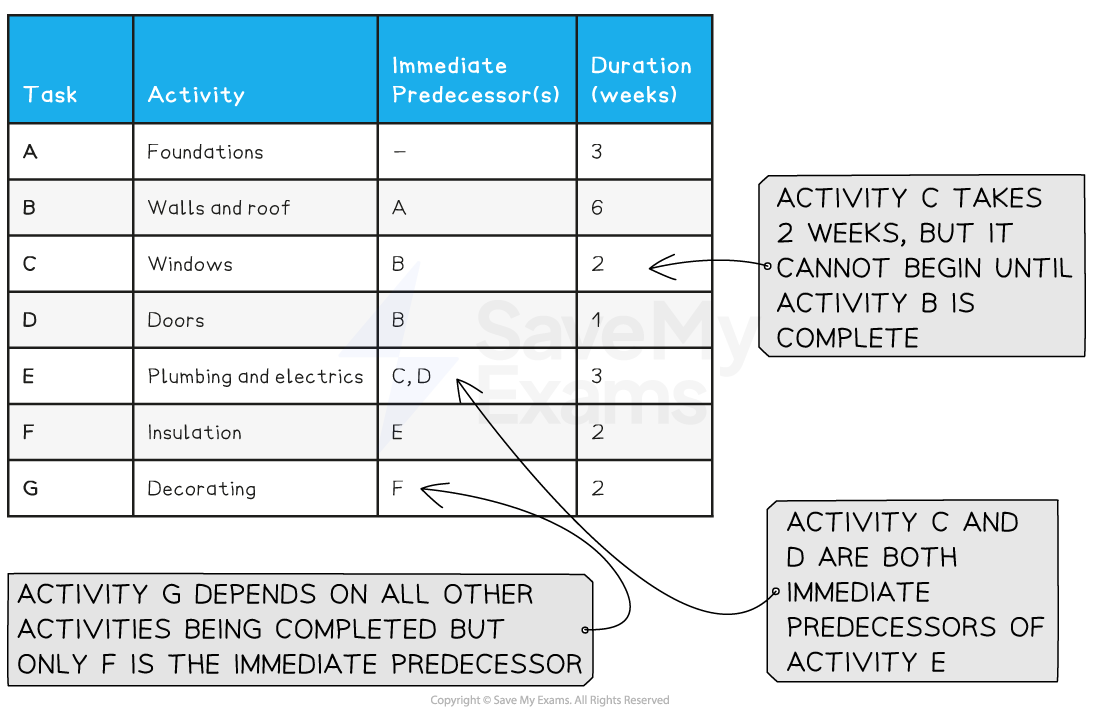
What is a precedence table?
A precedence table shows a list of the activities for a project
E.g. the project could be 'building a house' with activities such as 'foundations'
Some activities will depend on others being completed first
E.g. 'foundation' must be completed before 'plumbing and electrics'
Some activities can occur at the same time
E.g. 'windows' and 'doors' can be completed at the same time
For each activity in the precedence table, a list of the activities that must already have been completed is included
Only the immediately preceding activities are listed, not all of them
Activities that do not have any precedents are indicated by '-'
These activities can begin at the start of the project
As well as displaying a list of activities, a precedence table will also show the duration of each activity
What is an activity network?
An activity network is a diagram that shows the activities needed - and in what order - to complete a project
The nodes of the network represent the activities
This may be referred to as an activity-on-node network
Nodes are in the form of boxes that are labelled with their activities, duration, early time and late time
Activities are denoted by capital letters - A, B, C, D, etc.

In an activity network, arrows are drawn on the edges to show the order in which the project progresses
This is generally from left to right across the activity network

How do I draw an activity network?
An activity network can be drawn from a precedence table by completing the following steps
Draw a vertical column of boxes to represent initial activities on the left hand side
There should be the same number of boxes as there are activities with no immediate predecessors
To the right of the initial activities boxes, draw another vertical column of boxes
There should be the same number of boxes in this column as there are activities with immediate predecessors already drawn in the first column
Draw directed edges between each activity and its immediate predecessor(s)
Continue adding a column at a time and connecting activities with their immediate predecessors with directed edges until all activities have been added
If there is more than one box in the final column, add an additional 'end' activity box with a duration of 0
How do I find the earliest start times?
The earliest start time (placed in the bottom left hand section of an activity box) is the earliest time that an activity can be started
The earliest start time for an activity with no immediately preceding activities is 0
The earliest start time for an activity X can be found by completing the following steps
For all immediate predecessors of X, calculate
'earliest start time of activity + duration of activity'
Select the greatest value
Fill in the earliest start times for each activity, starting from the left hand side of the network
The minimum completion time is the 'earliest start time + duration' for the final box on the right hand side of the diagram
How do I find the latest finish times?
The latest finish time (placed in the bottom right hand section of an activity box) is the latest time that an activity can be finished
The latest finish time for an activity with no immediate successors can be found by calculating 'earliest start time + duration'
The latest finish time for an activity X can be found by completing the following steps
For all immediate successors of X, calculate
'latest finish time of activity - duration of activity'
Select the smallest value
Fill in the latest finish times for each activity, starting from the right hand side of the network
Examiner Tips and Tricks
It often helps to start with a rough version of an activity network
This will give you a mental picture of what the network looks like
You can easily make changes, scribble bits out, etc.
When you are happy with it, you can redraw it neatly with straight edges
Worked Example
Draw an activity network for the precedence table given below.
Activity | Preceding activities | Duration |
A | - | 4 |
B | - | 5 |
C | A | 3 |
D | A | 6 |
E | B | 4 |
F | C, D, E | 6 |
G | F | 3 |
Answer:
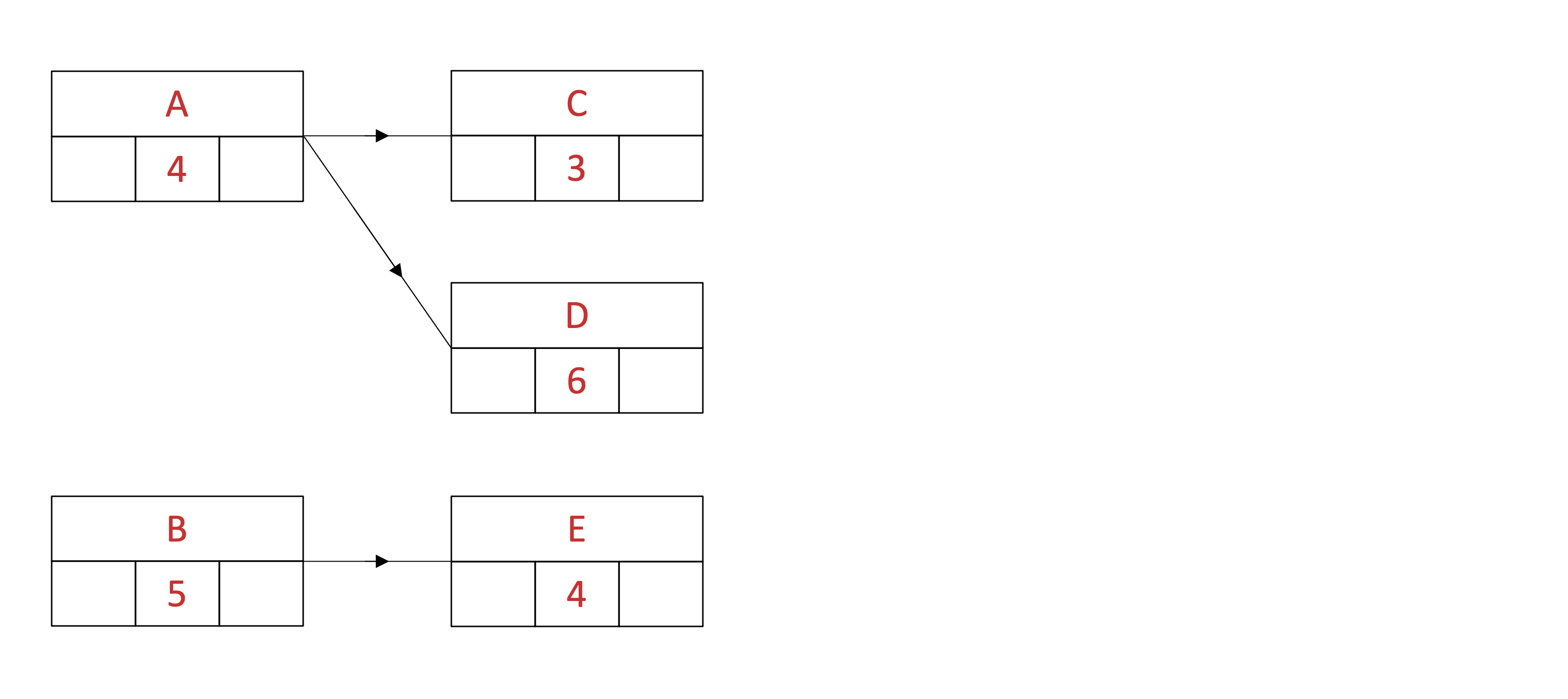
Draw two boxes for the two activities, A and B, that have no preceding activities

Draw the second column of boxes for all activities (C, D and E) that have A or B as preceding activities
Add in directed edges between each activity and its immediate predecessor(s)
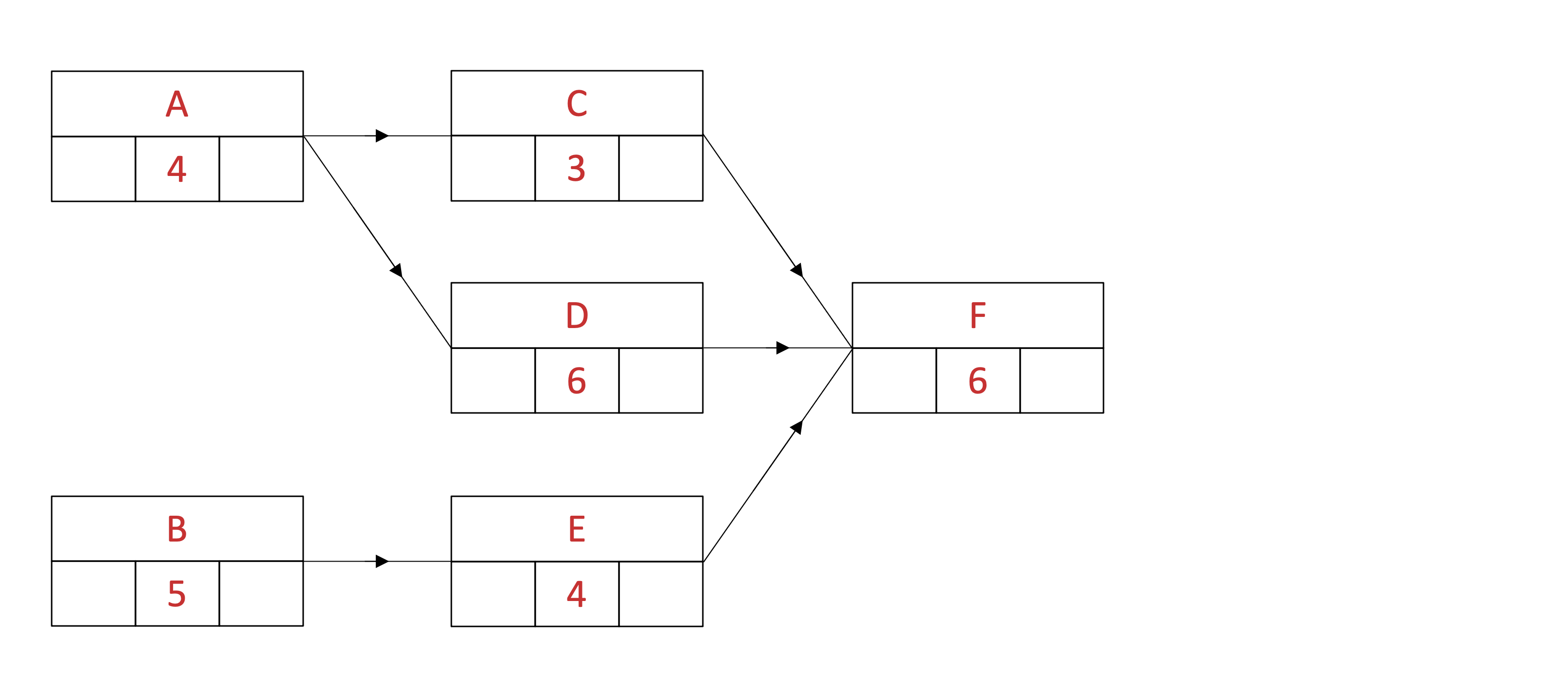
Draw the third column of boxes for all activities (F) that have C, D or E as preceding activities
Add in directed edges between each activity and its immediate predecessor(s)
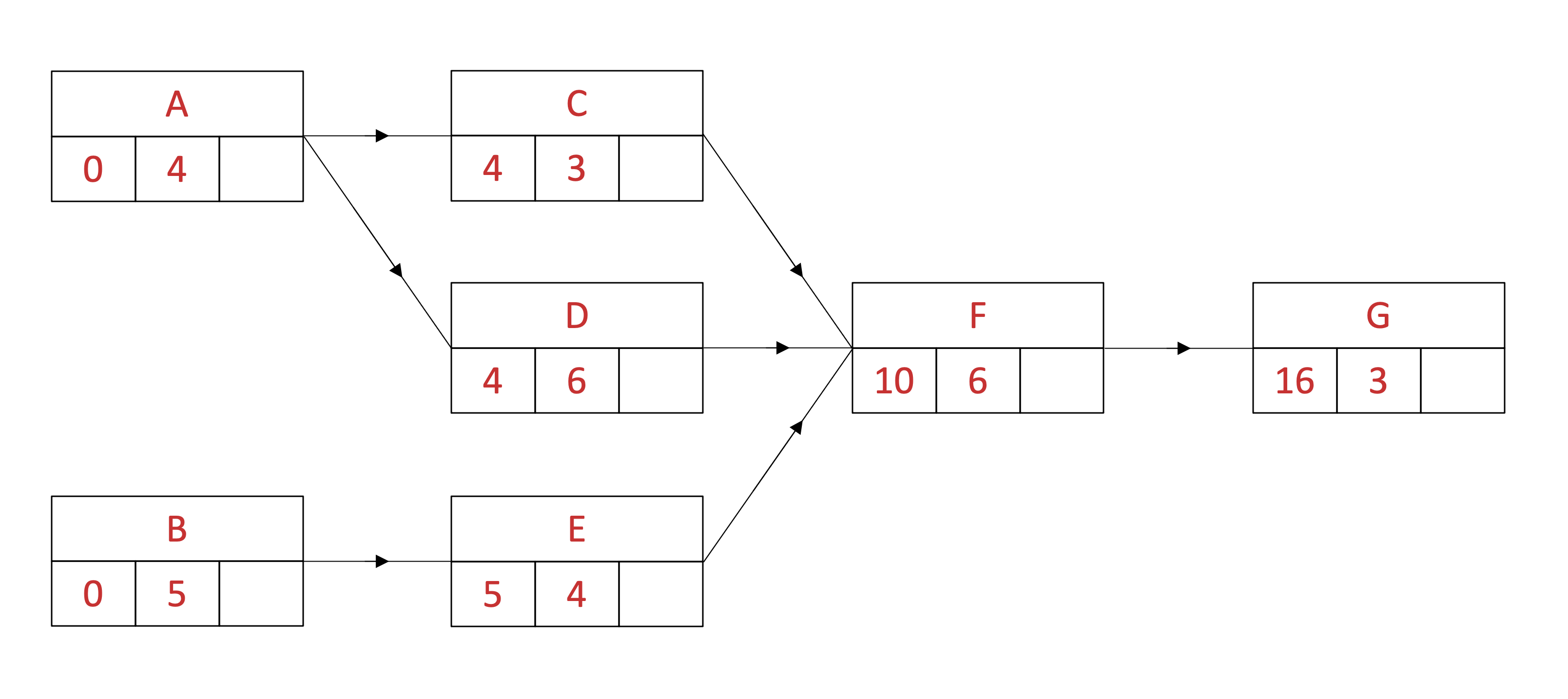
Add the last activity, G, as a final column and add in the directed edge between F and G

Add the earliest start times for each activity to the diagram starting from the left hand side
The earliest start times for A and B will be 0 as they have no preceding activities
Calculate the earliest start times for C, D and E, using 'earliest start time + duration of activity' for all immediately preceding activities
A: 0 + 4 = 4
The earliest start time for C and D is 4
B: 0 + 5 = 5
The earliest start time for E is 5

Calculate the earliest start time for F, using 'earliest start time + duration of activity' for all immediately preceding activities and selecting the greatest value
C: 4 + 3 = 7
D: 4 + 6 = 10
E: 5 + 4 = 9
The earliest start time for F is 10

Complete the earliest start time for G
F: 10 + 6 = 16
Add the latest finish times for each activity to the diagram starting from the right hand side
The latest finish time for G will be 'earliest start time + duration of activity'
G: 16 + 3 = 19
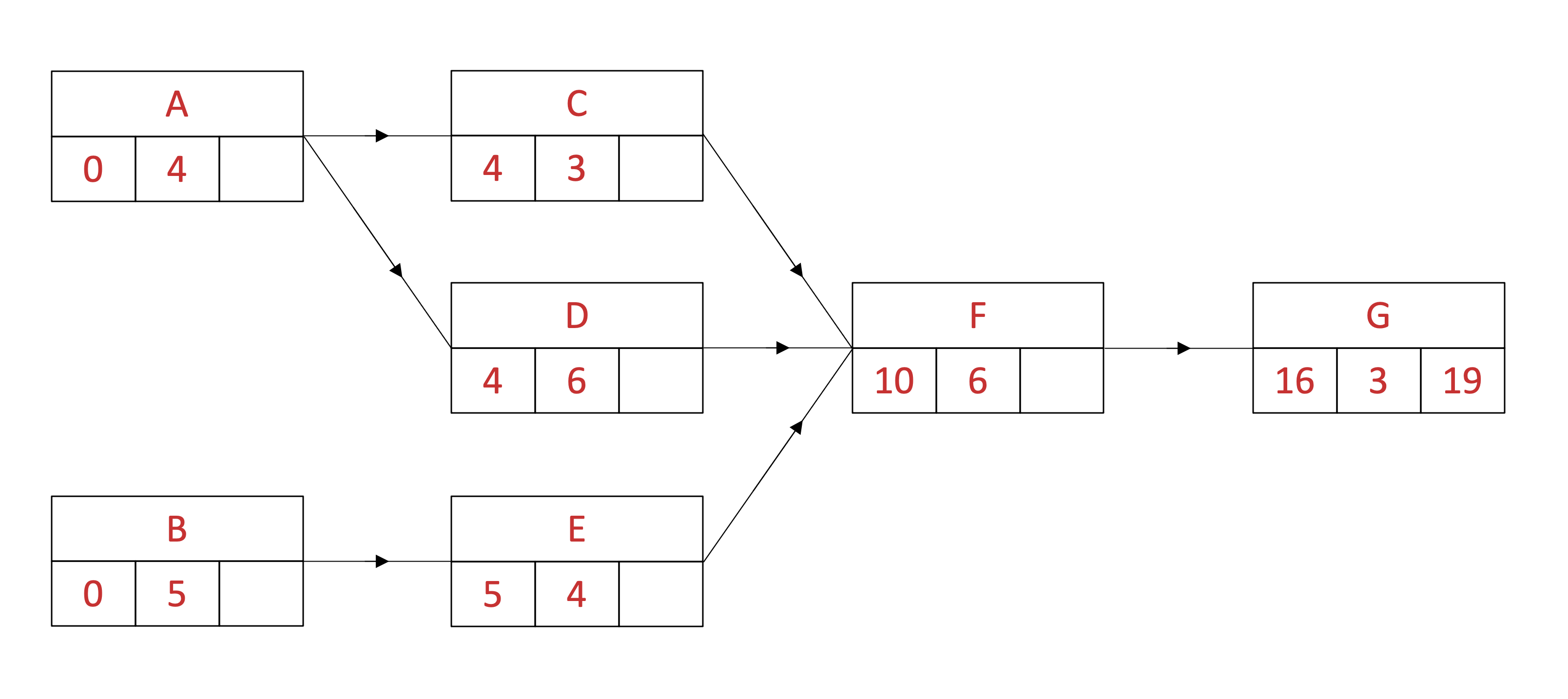
Find the latest finish time for F, using 'latest finish time - duration of activity' on all succeeding activities
G: 19 - 3 = 6
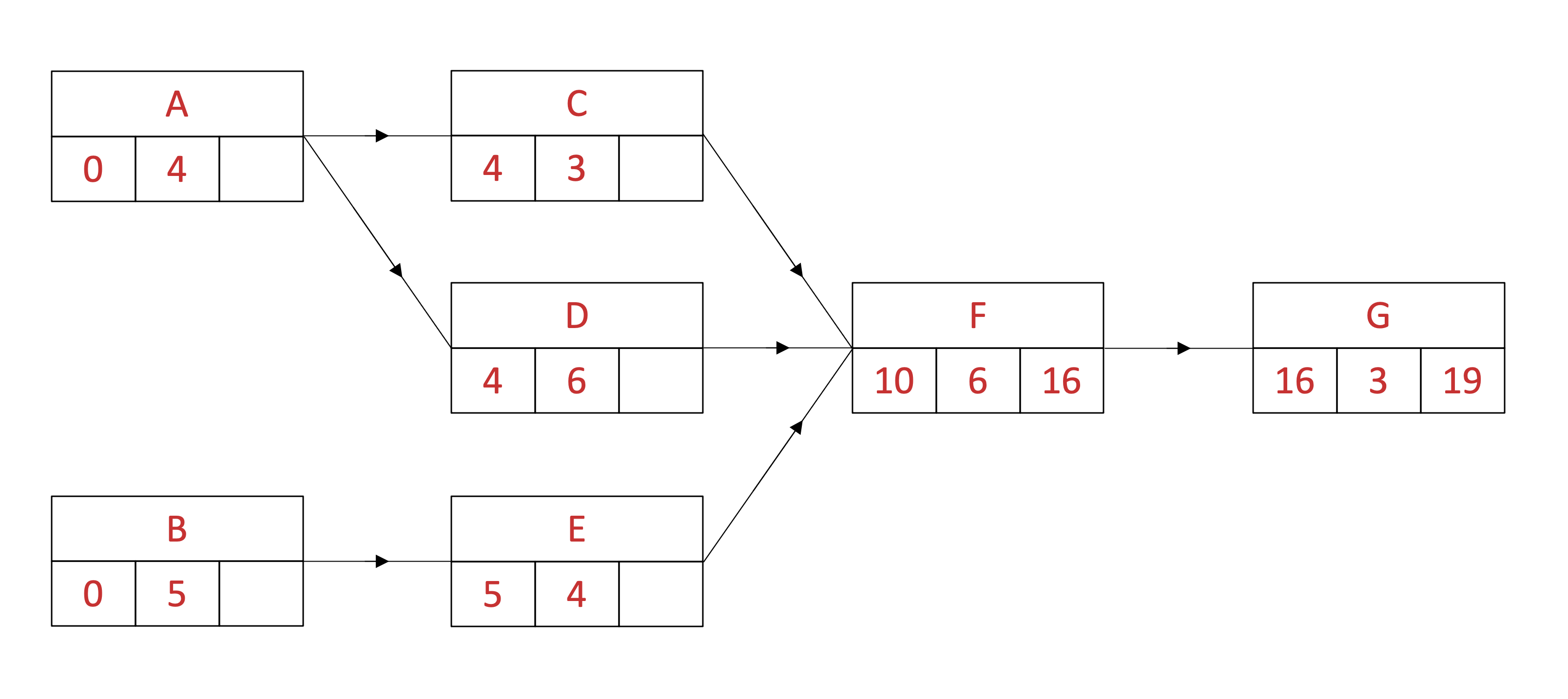
Find the latest finish times for C, D and E
F: 16 - 6 = 10

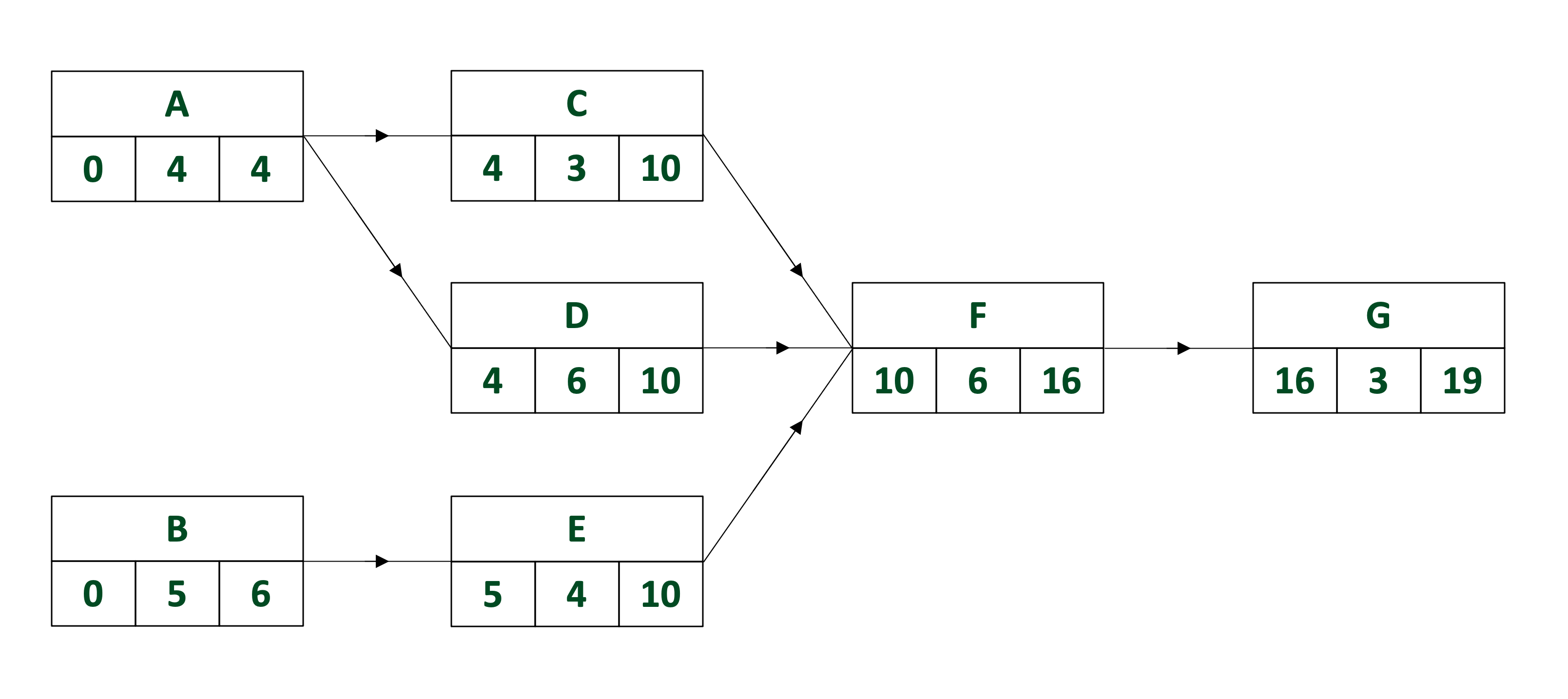
Find the latest finish time for A, using 'latest finish time - duration of activity' for all immediately succeeding activities and selecting the smallest value
C: 10 - 3 = 7
D: 10 - 6 = 4
The latest finish time for A is 4
Find the latest finish time for B
E: 10 - 4 = 6

Unlock more, it's free!
Join the 100,000+ Students that ❤️ Save My Exams
the (exam) results speak for themselves:

Was this revision note helpful?