Best Productivity Apps for Students: 6 Options Tested and Compared

Written by: Angela Yates
Reviewed by: Holly Barrow
Published
Contents
- 1. Key Takeaways
- 2. Productivity Apps at a Glance
- 3. How We Tested
- 4. Top 3 Productivity Apps for Students
- 5. Other Productivity Apps Worth Considering
- 6. How to Choose the Right Productivity App for You
- 7. What Other Users Say
- 8. Our Verdict: The Best Productivity App for Students
- 9. Frequently Asked Questions
- 10. Final Thoughts
The right productivity app can make it easier to keep track of your studies, manage deadlines and stay focused. But with so many apps promising to help you get organised, which ones are actually useful for students?
For this guide, I tested six popular productivity apps using realistic student tasks, looking at how easy they were to get started with, how useful their core features were and what they offered for the price. MyStudyLife was our best overall productivity app for students, although the best choice will depend on your own study needs.
Here are the apps that stood out, along with the alternatives I'd recommend for different study needs.
Key Takeaways
Best overall: MyStudyLife. It was easy to use and stood out for being designed specifically around student life, with assignments, exams, revision sessions and grades all in one place.
Best for simple organisation: Todoist. Its Ramble voice tool made setting up my test workload particularly quick, turning spoken tasks into an organised schedule within minutes.
Best all-in-one workspace: Notion. It's the most flexible option I tested for bringing notes, deadlines, revision plans and study resources together, although that flexibility comes with a learning curve.
You don't necessarily need an all-in-one app. Forest and Goodnotes solve more specific productivity problems, while TickTick offers plenty of tools for students who want more control over how they organise their time.
Productivity Apps at a Glance
App | Best for | Standout feature | Free option/starting price | My rating |
|---|---|---|---|---|
Planning & Deadlines | ||||
MyStudyLife | Managing your whole student workload | Student-specific timetable, assignments and exam planning | Free; MyStudyLife+ £4.99/month or £29.99/year. Family plans are available. | 5/5 |
Todoist | Simple task and deadline management | Ramble voice capture makes adding a workload exceptionally quick | Free; Todoist Pro £6.99/month or £59.99/year | 4.5/5 |
TickTick | Combining tasks with productivity tools | Tasks, calendar, Pomodoro timer, habits and Eisenhower Matrix in one app | Free; Premium £49.99/year. Student discount available. | 4/5 |
Notes & Organisation | ||||
Notion | Flexible study organisation | Highly customisable workspace for notes, tasks and study planning | Free; eligible university students can access Plus free | 4.5/5 |
Goodnotes | Handwritten notes and PDF annotation | Excellent tools for annotating revision notes and PDFs | Free limited plan; Essential £11.99/year or Pro £35.99/year | 4/5 |
Focus & Revision | ||||
Forest | Staying off your phone while studying | Gamified focus timer | Free. Optional Forest Plus subscription £5.99/month or £35/year | 4/5 |
How We Tested
I tested six productivity apps, chosen to cover different ways students might want help managing their studies. These included apps for planning and deadlines, organising study materials and staying focused.
To make the comparison as fair as possible, I used the same fictional student workload wherever the app allowed it. My test week included homework and revision tasks with different deadlines, a recurring study session and an upcoming exam. I looked at how easy it was to set everything up, organise the workload and see what needed to be done next.
Some of the apps are designed for a more specific purpose, so I adapted the task where a direct comparison wouldn't make sense. For example, I tested a focused revision session in Forest and used Goodnotes to complete and annotate study work, rather than expecting either app to function like a traditional task manager.
I also recorded how long it took to get started, the features that stood out, anything I found frustrating or limiting and the type of student I thought each app would suit best.
I mainly tested free accounts and free trials, as these are likely to be the starting point for most students. Where relevant, I also explored paid features and what upgrading offers. All of the prices in this guide were correct at the time of writing.
Top 3 Productivity Apps for Students
MyStudyLife: Best Overall
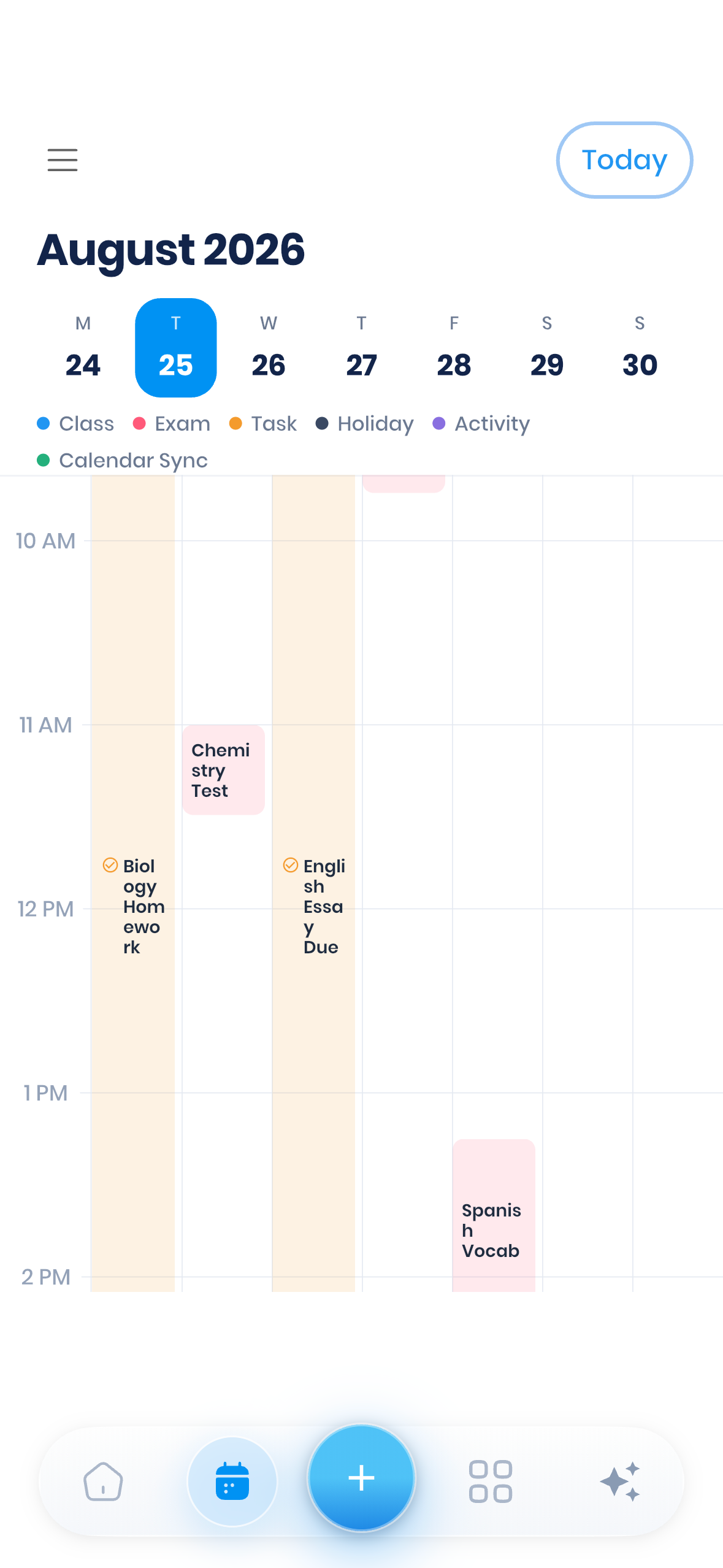
MyStudyLife was my favourite all-round productivity app because it's designed specifically around the way students organise their time.
I found it quick and intuitive to add classes, assignments, revision sessions and exams. You can even upload a photo of your class timetable rather than entering everything manually.
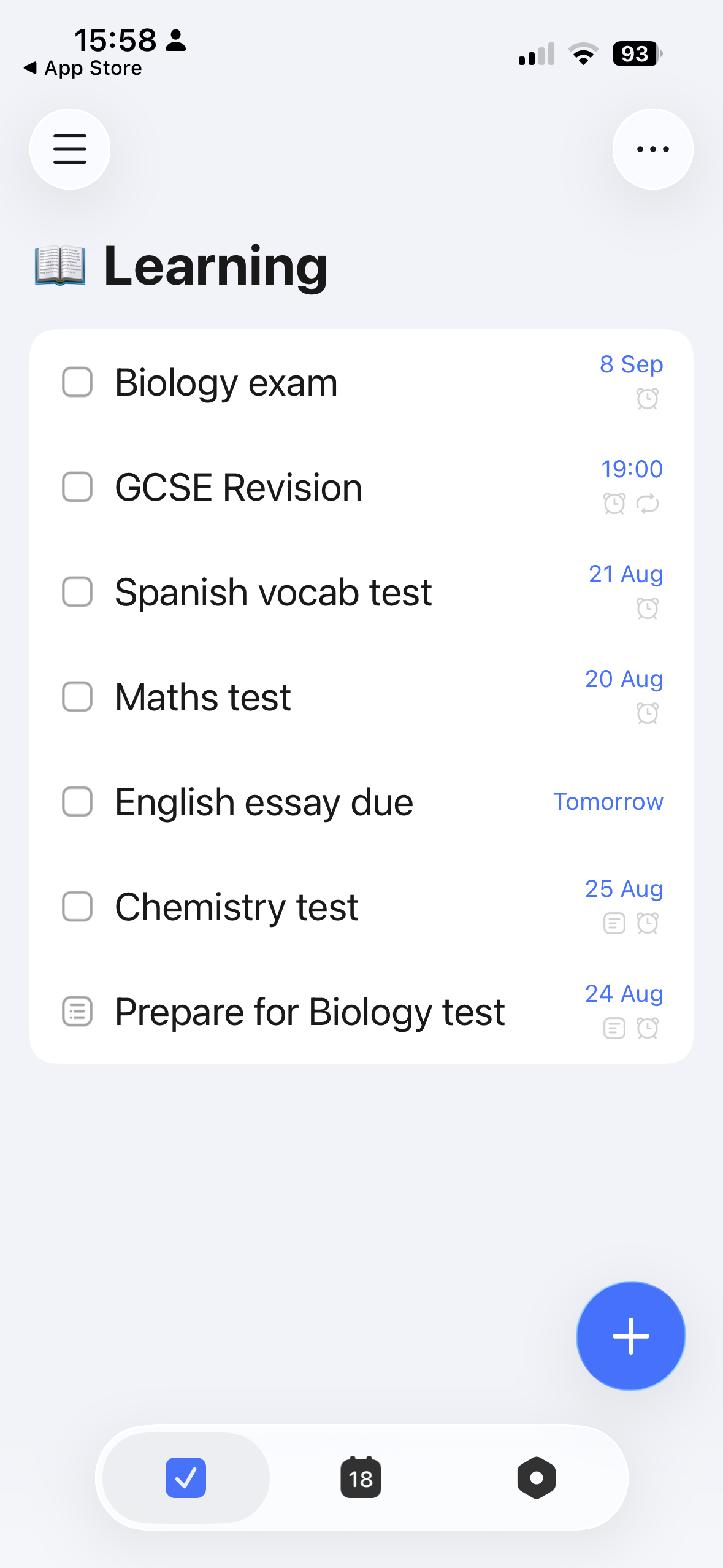
The student-specific features go beyond basic planning. When I added an exam, for example, I could later record my score, and revision sessions gave me access to a Pomodoro timer and progress-tracking tools. The app can also keep track of extracurricular activities, such as sporting fixtures, alongside your academic workload.
I also tested the AI planning feature by asking it to help me prepare for a GCSE Biology exam in three weeks. It suggested five revision sessions and added the first one to my calendar, giving me a useful starting point for planning my preparation.
The main drawback is the free plan. Its restrictions quickly became obvious when setting up a realistic workload, with features such as recurring tasks and subtasks requiring an upgrade. I'd recommend using the seven-day trial before deciding whether the MyStudyLife+ plan offers enough value for you.
Price: Free plan available. MyStudyLife+ from £4.99 per month or £29.99 per year at the time of testing.
Pros:
Designed specifically around school and college workloads
Quick and intuitive to set up
Combines assignments, exams, revision and other activities
Limitations:
The free version becomes restrictive if you want to use MyStudyLife for your full workload.
Best for: Students who want one place to organise multiple subjects, assignments, exams and revision.
Todoist: Best for Simple Task Management
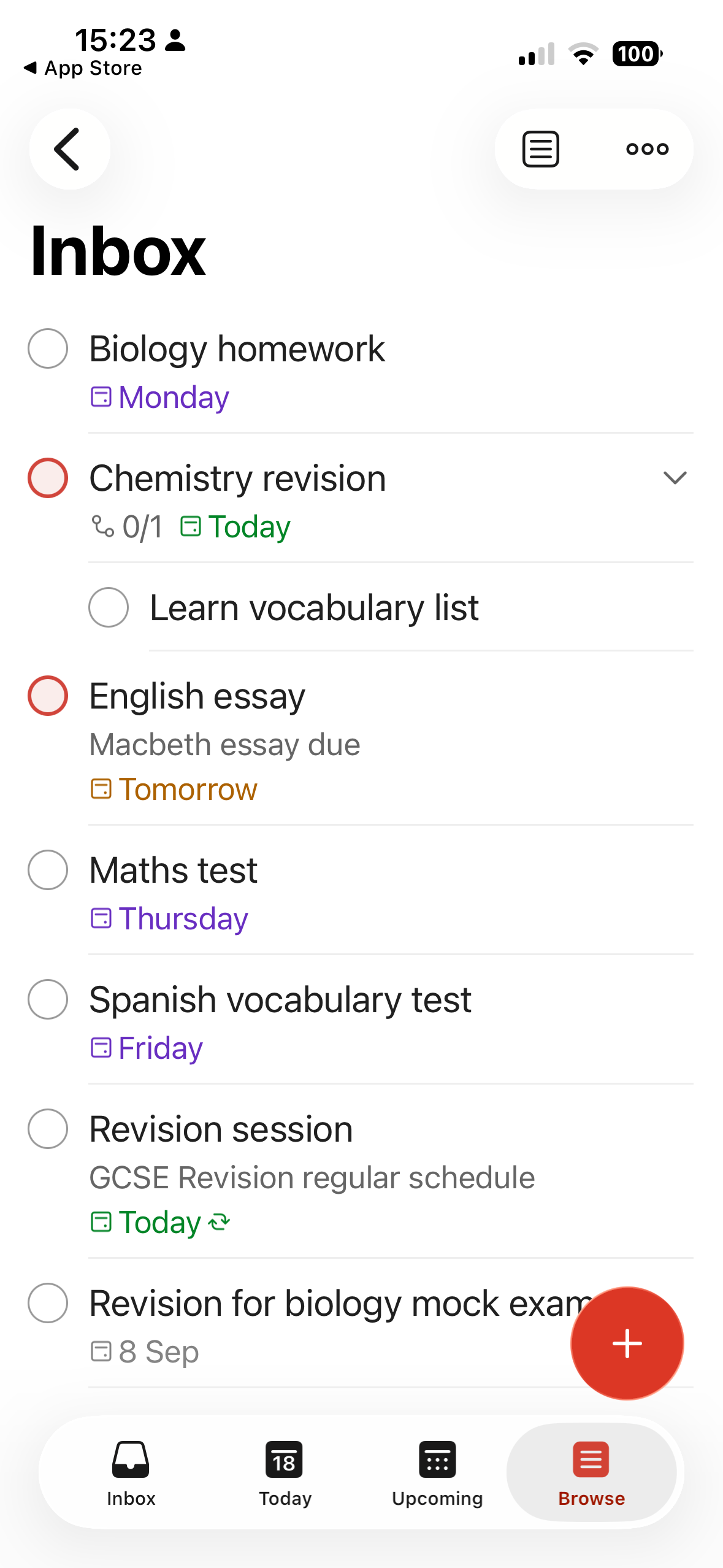
Todoist stood out as the quickest and easiest app I tested for turning a long list of to-dos into a manageable plan.
Setup took only a few minutes. Using Ramble, Todoist's impressive voice-capture tool, I read out my fictional student's mix of homework, revision and deadlines. The app separated the workload into individual tasks and added them to the schedule for me.
From there, I could change dates, set priorities and add descriptions or subtasks. The Today and Upcoming views also made it easy to see what needed attention without having to build a complicated productivity system first.
Students who want more structure can explore templates, including a student planner and options based on techniques such as time blocking and the Pomodoro technique. However, some useful features, including personalised reminders, sit behind the Pro subscription.
Todoist doesn't offer the same student-specific features as MyStudyLife, but that may be part of its appeal. If you mainly want something straightforward to manage your workload and track deadlines, that simplicity may be exactly what you need.
Price: Free plan available. Pro was £6.99 per month or £59.99 per year at the time of testing.
Pros:
Very quick and intuitive to set up
Ramble handled my test workload particularly well
Clean views make upcoming work easy to see
Limitations:
Some useful planning and reminder features require Pro
It isn't designed specifically for academic life.
Best for: Students who want a simple way to get tasks, deadlines and revision plans out of their heads and into an organised system.
Notion: Best for Flexible Study Organisation
Notion offers much more than a to-do list, making it my pick for students who want to organise most of their academic life in one place.
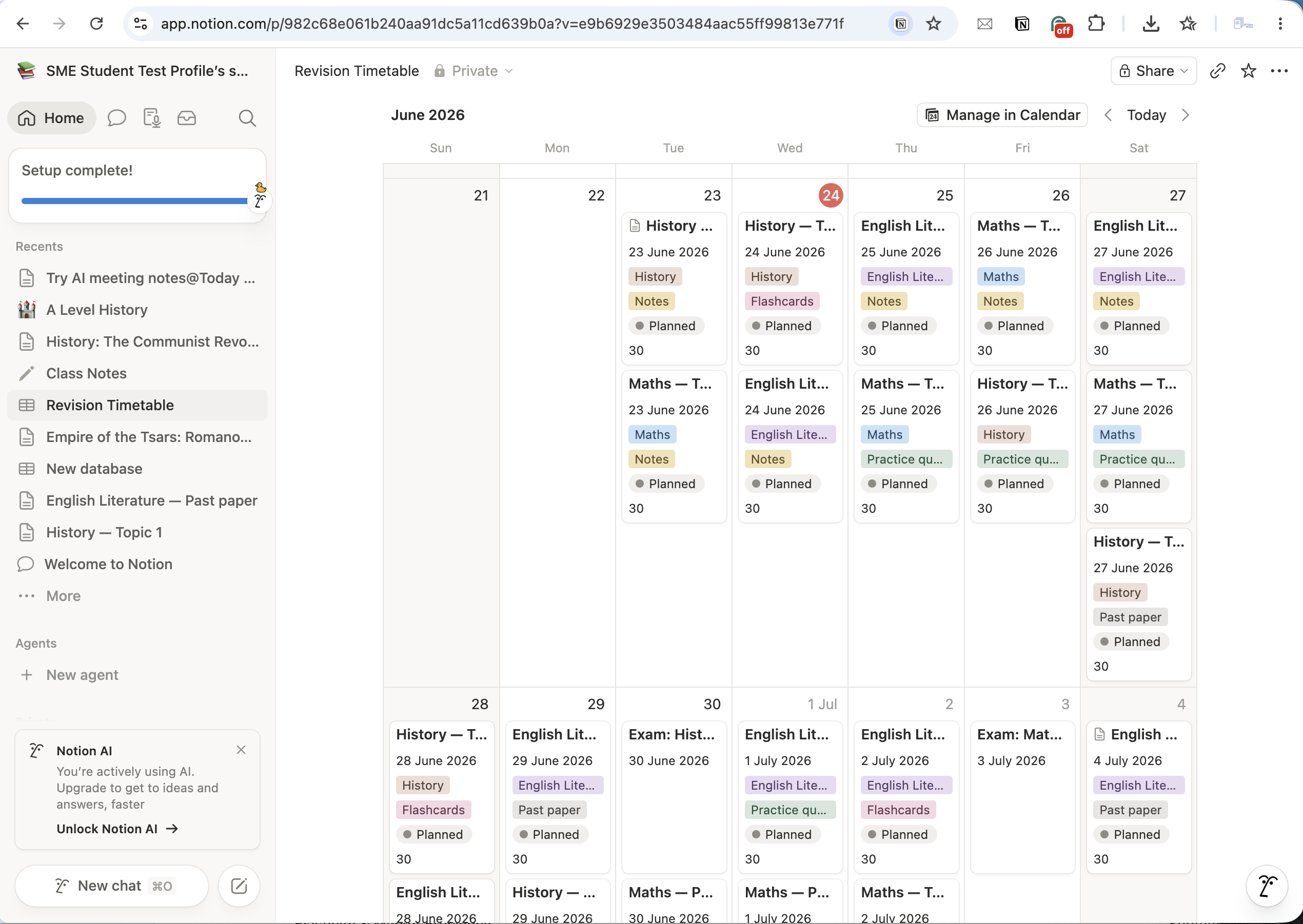
I've previously tested Notion in depth for students, creating revision timetables, organising notes, using an Exam Planner, exploring student templates and testing its AI tools.
Its biggest strength is flexibility. You can bring together class notes, assignments, deadlines, revision plans and useful resources within the same workspace. Templates also mean you don't necessarily have to build that system from scratch.
I found Notion AI useful for getting a revision plan started. When I asked it to create a timetable for three A Levels around different weekday and weekend availability, it produced a structured plan that I could then adapt to suit the student.
That flexibility is also Notion's biggest drawback. During my testing, I found it tempting to spend more time improving my study system than studying. There is a learning curve once you move beyond the basics. Students who simply want to keep track of homework may find Todoist or MyStudyLife easier to use.
The free offering is generous, while eligible university students and educators can currently access a one-person Plus workspace for free with an eligible education email.
Price: Free plan available, with a free education Plus plan for eligible university students and educators.
Pros:
Brings notes, tasks, deadlines and revision planning together
Extremely flexible and customisable
Excellent value for eligible university students
Limitations:
There's a learning curve
It's easy to spend too much time building or refining your system.
Best for: Students who want to build a personalised academic workspace rather than simply manage a to-do list.
Other Productivity Apps Worth Considering
These productivity apps are also worth considering, particularly if you want help with a specific part of your study routine rather than an all-in-one planning system.
TickTick: Best for Built-In Productivity Tools
TickTick combines task planning with tools such as a Pomodoro timer, habit tracker and Eisenhower Matrix, giving you plenty of ways to organise your time and stay focused.
I found the initial setup a little busier and less intuitive than Todoist. I also had mixed results with voice input. When I read out the same student workload I'd used in Todoist, TickTick entered it as a single task rather than separating and scheduling the individual items.
Once I'd added my tasks manually, however, I found the finished calendar clean and easy to use. I particularly liked the range of additional productivity features available. You can organise tasks by importance and urgency using time management tools such as the Eisenhower Matrix and Pomodoro timers. You can also track your study habits alongside your workload.
Price: Free plan available. Premium was £49.99 per year at the time of testing. Eligible students and educators can also apply for 25% off an annual Premium plan.
Pros:
Plenty of productivity tools in one app
Clean task and calendar views once set up
Student discount available for eligible users
Limitations:
Less intuitive than Todoist at first
Voice input didn't handle my test workload as effectively.
Best for: Students who want to experiment with different ways to organise their time, prioritise tasks and stay focused.
Forest: Best for Avoiding Phone Distractions
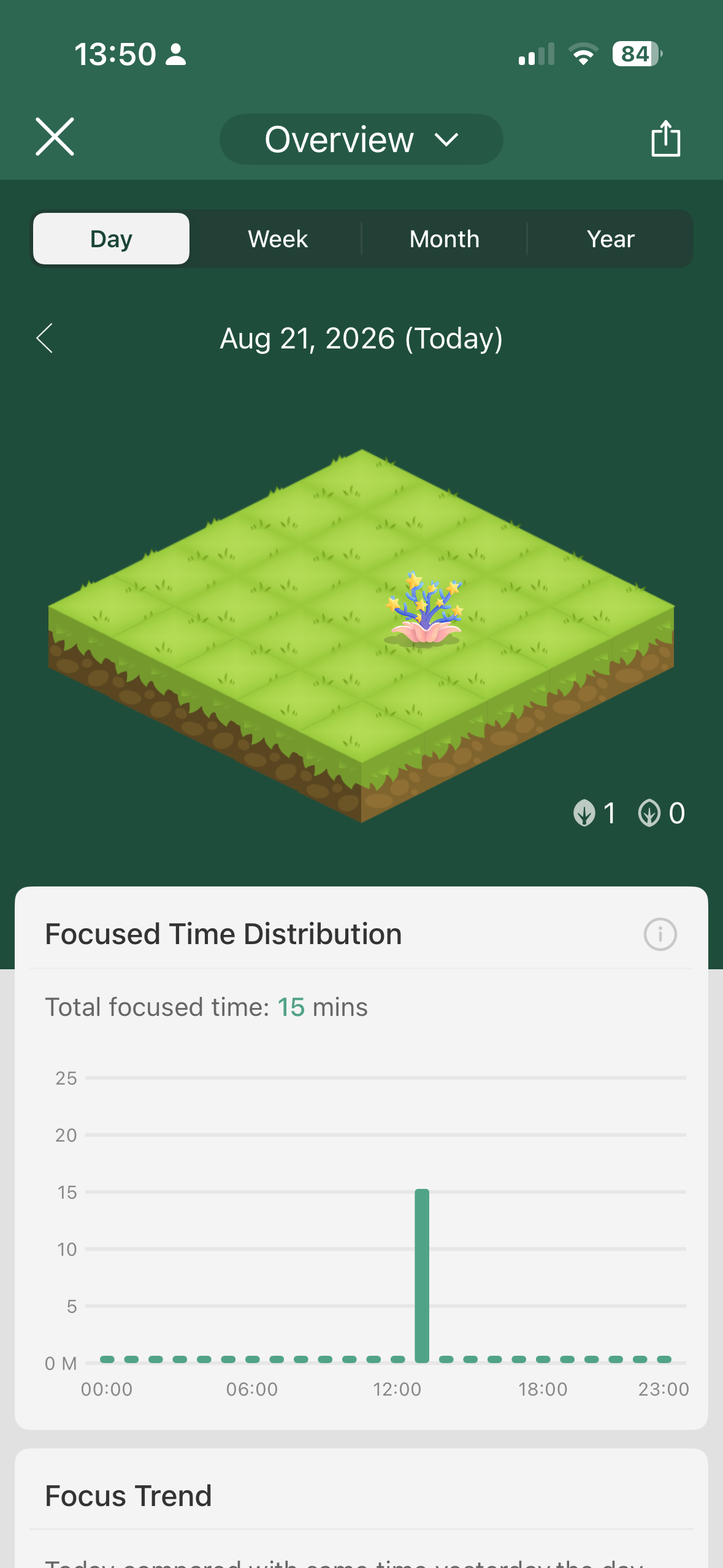
Forest has one very specific job: helping you put down your phone and concentrate on studying.
I've had Forest on my phone since I first wrote about it in 2022, and I tested it again while working on this roundup. Choose how long you want to focus for, plant a virtual tree and leave your phone alone while it grows. Complete your session and the tree becomes part of your virtual forest.
It's simple, but that's part of the appeal. What it does brilliantly is stop that urge to pick up your phone to distract yourself whenever studying gets difficult or boring.
Forest won't organise your homework or remind you when your exams are. If you already have good focus habits, you may not need it either. But if your phone is the thing getting between you and your revision, it's well worth trying. Just by reading that sentence, you’ll know instantly whether Forest is a tool you may need in your life!
Price: Free. An optional Forest Plus subscription adds benefits including faster coin rewards, exclusive tree species and the ability to use your focus coins to help plant real trees.
Pros:
Extremely easy to use
Makes staying away from your phone feel more rewarding
Useful free version
Limitations:
It's a focus tool rather than a full student planner
The gamified approach won't appeal to everyone.
Best for: Students who struggle with phone distractions or procrastination when they're supposed to be studying.
Goodnotes: Best for Handwritten Notes and PDF Annotation
Goodnotes is a strong choice if your idea of productivity is keeping your digital notes and study materials organised and working with them.
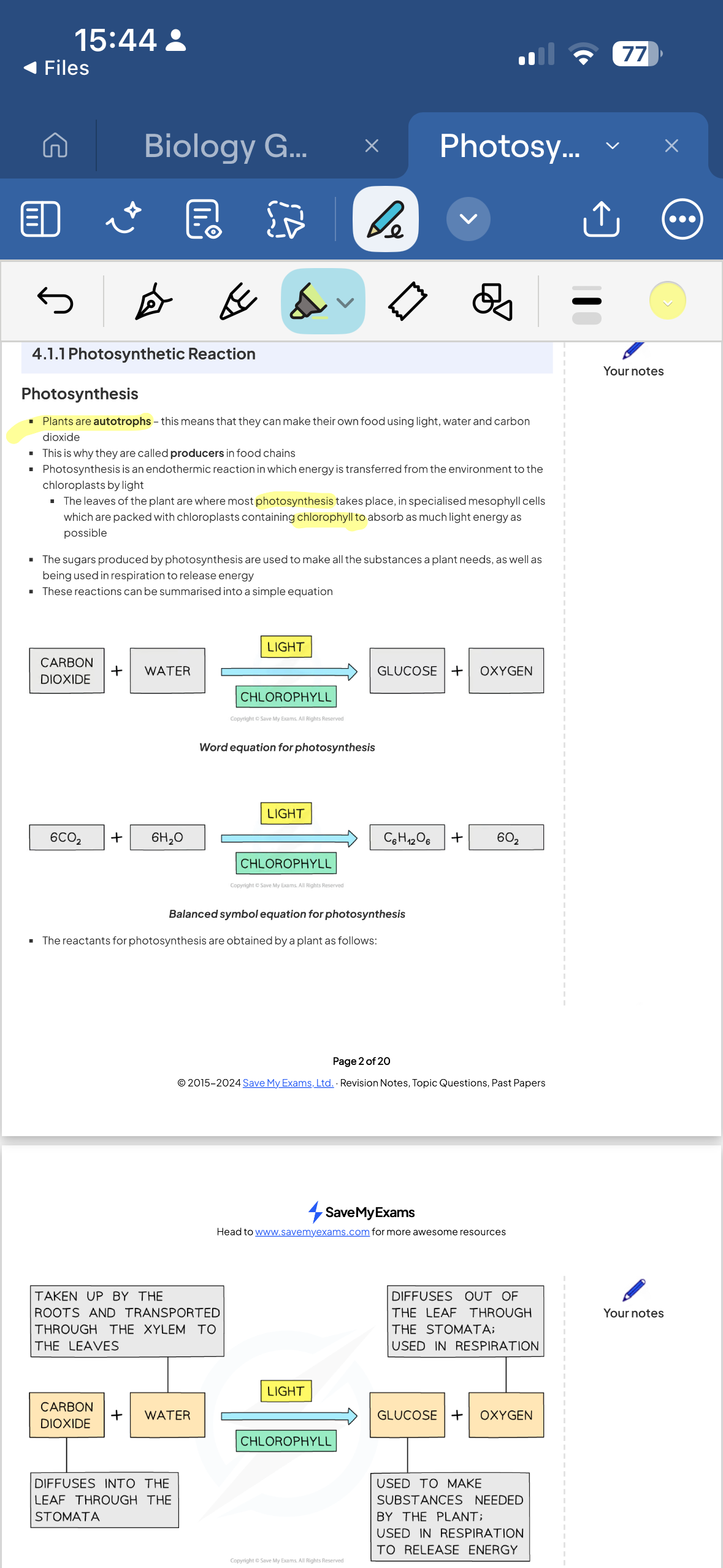
For my test, I imported a PDF of Save My Exams GCSE Biology revision notes and annotated them using tools such as pens, highlighters and shapes. I particularly liked being able to use digital tape to cover parts of the page, which makes it useful for active recall when revising.
Goodnotes also offers notebooks, whiteboards and text documents, while templates can help you create study planners and other organisational tools. The free version lets you create up to three notebooks; paid plans remove this restriction and add more features.
I didn't find every part of working with imported PDFs immediately intuitive, so expect a small learning curve.
Price: Free version available. Essential costs £11.99 per year and Pro £35.99 per year at the time of writing.
Pros:
Excellent tools for annotating and working with digital study materials
Useful for active revision as well as note-taking
Plenty of options for organising and customising your study workspace
Limitations:
There's a learning curve
It's better for managing your study materials than managing your overall workload.
Best for: Students who do a lot of their studying digitally and want one place to annotate, organise and work with their notes and PDFs.
How to Choose the Right Productivity App for You
The best productivity app for you depends on what you most need help with. Before signing up, think about where organisation tends to go wrong and which features would make the biggest difference.
1. Decide what you need help with
Start with the problem you want the app to solve:
Juggling assignments, revision and exam dates: Try MyStudyLife, designed specifically for student workloads.
Keeping tasks and deadlines organised: Todoist offers a quick, straightforward system with minimal setup.
Bringing notes, resources and planning together: Notion gives you much more freedom to build your own academic workspace.
Managing your time and study habits: TickTick includes tools such as Pomodoro sessions, habit tracking and the Eisenhower Matrix.
Staying off your phone: Forest could be more useful than yet another planner if distraction is your main problem.
Working with digital notes and PDFs: Goodnotes is the more natural fit if much of your studying involves digital materials.
2. Check what you get for free
You may not need a paid plan at all. Start with the free version or a trial whenever possible, and see whether you actually use the app before upgrading.
Check which features are restricted on the free plan and whether you qualify for a student or education discount.
3. Think about where you'll use it
Check that your choice works on the devices you use for studying. If you regularly switch between your phone, tablet and computer, syncing across devices may be important.
Browser access can also be useful if you want to use the app on a school, college or university computer where you can't install your own software.
What Other Users Say
My experience was broadly reflected in feedback from other users. I checked recent reviews alongside overall ratings to see which strengths and limitations were repeatedly noted.
MyStudyLife: The app currently has a 4.4/5 rating from over 870 ratings on Apple’s UK App Store (opens in a new tab). One reviewer described it as “absolutely amazing for me as a UK GCSE student”, particularly for organising classes, homework and tests.
The same reviewer preferred the previous calendar layout. What impressed me was the way MyStudyLife responded to her feedback. The developers appear to acknowledge comments and suggestions, explaining when improvements are underway.
Todoist: With a score of 4.8/5 from around 20,000 UK App Store ratings (opens in a new tab), Todoist has one of the strongest overall user scores of the apps I tested. It has a reported 50 million users across all platforms. Reviews regularly praise Todoist’s simplicity, and from my own experience of organising a fairly complicated student workload within minutes, I’d have to agree.
Notion: Notion currently has 4.7/5 from around 15,000 UK App Store ratings (opens in a new tab). Its flexibility attracts plenty of praise, with one recent reviewer calling it ‘literally the best app I have found through 36 years of ADHD-fuelled desperate searching for the ultimate brain organisation tool’. Some users highlight the complexity I noticed during testing, while others have found some database features frustrating on mobile.
TickTick: TickTick scores 4.8/5 from around 6,500 UK App Store ratings (opens in a new tab). Users praise its combination of task management and extra productivity features, including habit tracking and the Pomodoro timer. Some also mention needing time to get used to everything on offer, which reflects my own slightly less intuitive first experience with the app.
Forest: Forest also scores 4.8/5 based on around 20,000 UK App Store ratings (opens in a new tab). Student reviews repeatedly mention using it to stay focused while studying. One recent student said it had helped them increase their study time, while other users enjoy seeing their virtual forest grow as a visual record of how long they've focused. Some reviews do ask for more features within the free version.
Goodnotes: Goodnotes has 4.6/5 from around 49,000 UK App Store ratings (opens in a new tab), the largest number of ratings of the six apps tested. Student feedback highlights the app’s note-taking, templates and annotation tools. One recent student praised the flashcard feature, but felt its Smart Learn tool needed improvement.
Overall, the broader feedback supported what I found during testing: there's no single productivity app that will suit every student. Your choice should reflect your own organisational needs and the way you prefer to study.
So look beyond the overall ratings and read feedback from students using an app in a similar way to you. Take particular care before investing in a paid upgrade. Pay attention to which premium features other students find useful and think about whether you'll use them enough to justify the cost. Better still, use a free trial and decide for yourself.
Our Verdict: The Best Productivity App for Students
After testing all six apps, MyStudyLife is my top productivity app for students. It stood out because it's designed specifically around academic life, rather than adapting a general productivity system to fit it.
I found it quick and intuitive to organise assignments, tests, exams and revision sessions. Features such as grade tracking, Pomodoro sessions and the AI planning tool added genuinely useful ways to manage a student workload.
The free version does have limitations, so I'd recommend trying it before paying for MyStudyLife+. If you want something simpler for managing tasks and deadlines, Todoist is my strongest alternative. Notion is a better choice if you want a flexible workspace that brings your planning, notes and study resources together.
Ultimately, the best choice depends on what you need help with, but MyStudyLife offered the best combination of student-specific features, ease of use and practical organisation in my testing.
Frequently Asked Questions
What Is the Best Productivity App for Students?
MyStudyLife was the best productivity app for students in my testing, thanks to its combination of student-specific planning tools and ease of use.
However, the best choice for you will depend on which part of your study routine you need help managing.
Are There Any Free Productivity Apps for Studying?
Yes. All six apps I tested have a free option, although the features included vary.
Before paying for a subscription, try the free version to see how well the app fits your study routine. You may find it gives you everything you need, or you can use your experience to decide whether the additional paid features would be worth the cost.
Which Productivity App Is Easiest to Use?
Todoist was the easiest app to get started with in my testing. I was particularly impressed by how quickly Ramble turned a spoken list of assignments, revision and deadlines into organised tasks.
MyStudyLife was also intuitive to use, particularly because its setup and features are already designed around the kinds of tasks students need to organise.
Is It Worth Paying for a Productivity App?
It can be, but only if the paid features solve a problem you have.
For example, you might decide it's worth paying for recurring tasks, additional planning tools or other features you use regularly. Start with the free version or trial where possible and pay attention to which restrictions you encounter before upgrading.
What Should I Look for When Choosing a Productivity App?
Start with the problem you want the app to solve, then compare cost, free-plan restrictions and device compatibility. The best choice is the one you'll use consistently, rather than the app with the endless list of features.
Final Thoughts
The six apps I tested take very different approaches to productivity, from organising your entire academic workload to simply keeping your phone out of reach while you revise. MyStudyLife was my strongest all-rounder, but all of the apps on this list offer valuable tools and benefits. Ultimately, the best app for you is the one that makes your study easier to manage, not the one that seems to add more and more to your workload.
Whichever you choose, test it with your own workload before paying. Try using it to plan a week of study with your Save My Exams revision resources, and you'll soon see whether it's a good fit for you.
References:
MyStudyLife (opens in a new tab)
Todoist (opens in a new tab)
Notion (opens in a new tab)
TickTick (opens in a new tab)
TickTick education discount (opens in a new tab)
Forest (opens in a new tab)
Goodnotes (opens in a new tab)
My Study Life - School Planner App | App Store UK (opens in a new tab)
Todoist: To Do List & Calendar App | App Store UK (opens in a new tab)
Notion: notes, tasks, AI | App Store UK (opens in a new tab)
TickTick: To-Do List & Calendar App | App Store UK (opens in a new tab)
Forest: Focus for Productivity App | App Store UK (opens in a new tab)
Goodnotes: AI Notes, Docs, PDF App | App Store UK (opens in a new tab)
Was this article helpful?
Sign up for articles sent directly to your inbox
Receive news, articles and guides directly from our team of experts.

Share this article


 written revision resources that improve your