Best Note-Taking Apps for Students: 8 Options Tested and Compared

Written by: Angela Yates
Reviewed by: Holly Barrow
Last updated
Contents
- 1. Key Takeaways
- 2. The Best Note-Taking Apps for Students at a Glance
- 3. How We Tested the Best Note-Taking Apps
- 4. Top 3 Note-Taking Apps for Students
- 5. Other Note-Taking Apps Worth Considering
- 6. How to Choose the Right Note-Taking App for You
- 7. Our Verdict: The Best Note-Taking App for Students
- 8. How to Use Note-Taking Apps Effectively for Revision
- 9. FAQs
- 10. Final Thoughts
The best note-taking apps for students help you do more than keep your notes organised. The right tools can help you turn lessons, videos and revision resources into notes you can actually learn from.
We tested eight popular note-taking apps using Save My Exams GCSE Biology material to find out which are genuinely useful for revision. Microsoft OneNote is our best all-rounder, with Apple Notes, Notability, Goodnotes and RemNote standing out for more specific study needs.
Key Takeaways
Microsoft OneNote is the best all-rounder, with flexible tools for typed, handwritten and visual notes.
Apple Notes produced the most accurate transcription in our test, while Notability was strongest at turning recordings into structured revision notes.
Goodnotes is particularly useful for handwriting and annotation, while RemNote turns notes into flashcards and spaced-repetition practice.
AI tools can help capture and organise information, but always check generated content against your course materials.
The Best Note-Taking Apps for Students at a Glance
App | Best for | Cost |
|---|---|---|
Microsoft OneNote | Best all-round note-taking app | Free |
Apple Notes | Best for Apple users | Free |
Notability | Best for turning lessons into revision-ready notes | From £12.99/year |
Notion | Best for building a revision hub | Free plan available |
Google Keep | Best for quick, simple notes | Free |
Evernote | Best for notes and study planning | Limited free option available |
Goodnotes | Best for handwritten and visual revision | Free option available; Essential £11.99/year |
RemNote | Best for notes and spaced repetition | Free plan available |
How We Tested the Best Note-Taking Apps
To make the comparison as fair as possible, I used the same Save My Exams GCSE Biology material, AQA revision notes on Animal and Plant Cells, for most of the hands-on tests.
I created real revision notes and tested features a student might actually use, including transcription, diagrams, formatting, annotation, AI tools and active-revision features. I compared how easy each app was to use and how effectively it turned lesson content into useful revision material.
RemNote had already been tested using GCSE Biology material for our guide to the best AI flashcard generators, so I used those results rather than repeating the exercise.
Top 3 Note-Taking Apps for Students
Microsoft OneNote: Best All-Round Note-Taking App
Cost: Free; additional Microsoft 365 features available with a subscription
Microsoft OneNote is an excellent place to start if you want a flexible digital notebook without paying for another subscription.
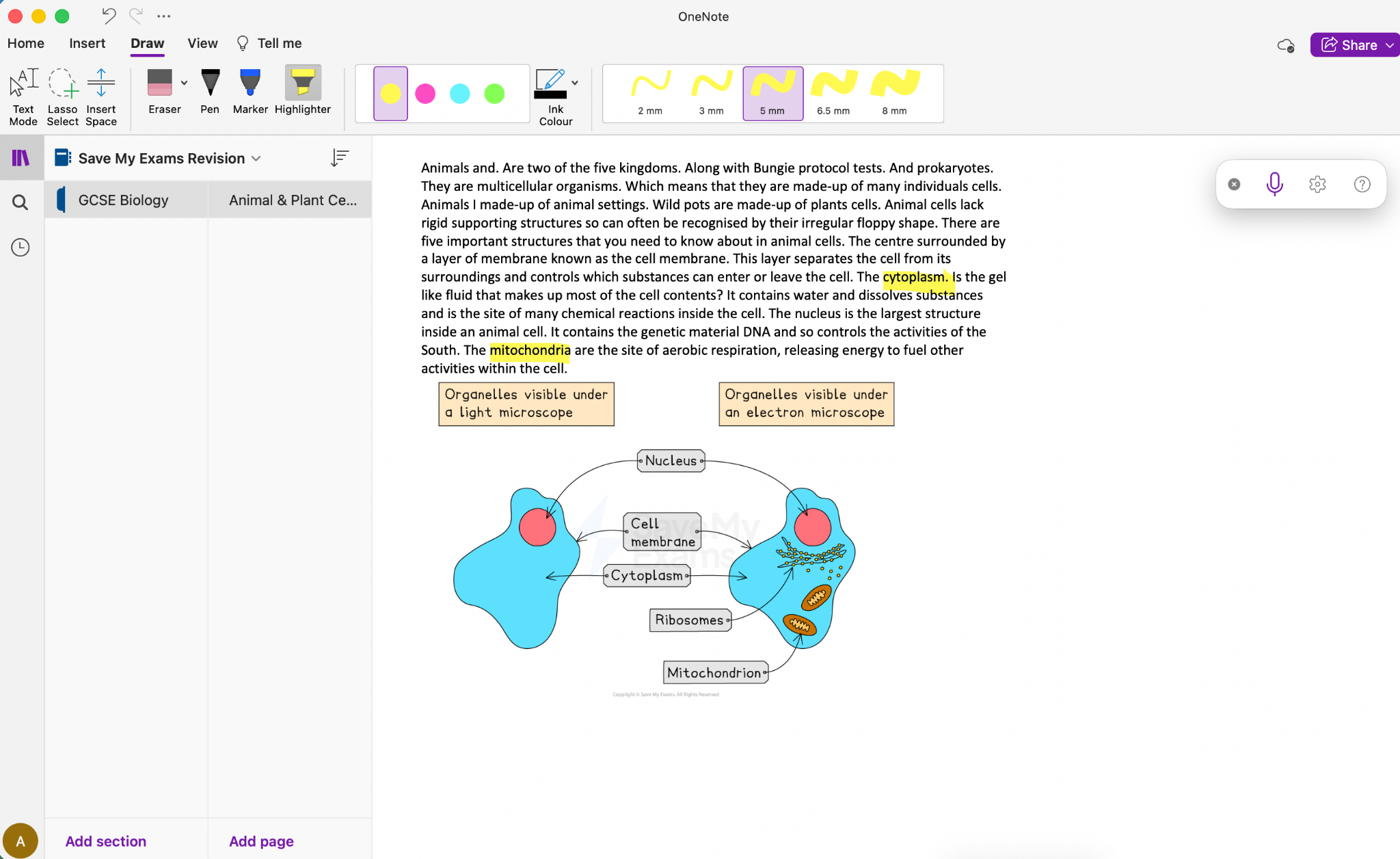
I created a Save My Exams Revision notebook, added a GCSE Biology section and created notes using an Animal & Plant Cells revision resource. Setting everything up took only a few minutes.
The notebook, section and page structure works particularly well for revision. You could create a notebook for school, sections for individual subjects and separate pages for each topic.
OneNote also gives you plenty of freedom on the page. You can combine typed notes with diagrams and images, highlight important terminology and add handwritten annotations. This could be particularly useful on a tablet when revising subjects involving diagrams or other visual information.
Your notes sync through OneDrive, making it easy to continue working across different devices. You can also share notebooks with other people, email individual pages or save them as PDFs.
Pros:
Quick and easy to organise notes by subject and topic
Combines typed notes, images, diagrams and handwritten annotations
Syncs across devices through OneDrive
Limitations:
Dictation produced several significant errors in my test, although the results improved as I continued
Less suitable if your main priority is accurately capturing spoken lessons
Best for: Students who want to organise detailed revision notes by subject and topic, particularly those already using Microsoft 365.
What other users say: OneNote has a 4.6/5 rating (opens in a new tab) from around 206,000 ratings on the UK App Store (opens in a new tab). One reviewer praised its organisation, search function and ease of use.
Apple Notes: Best for Apple Users
Cost: Free
Don't overlook an app that may already be sitting on your iPhone, iPad or Mac.
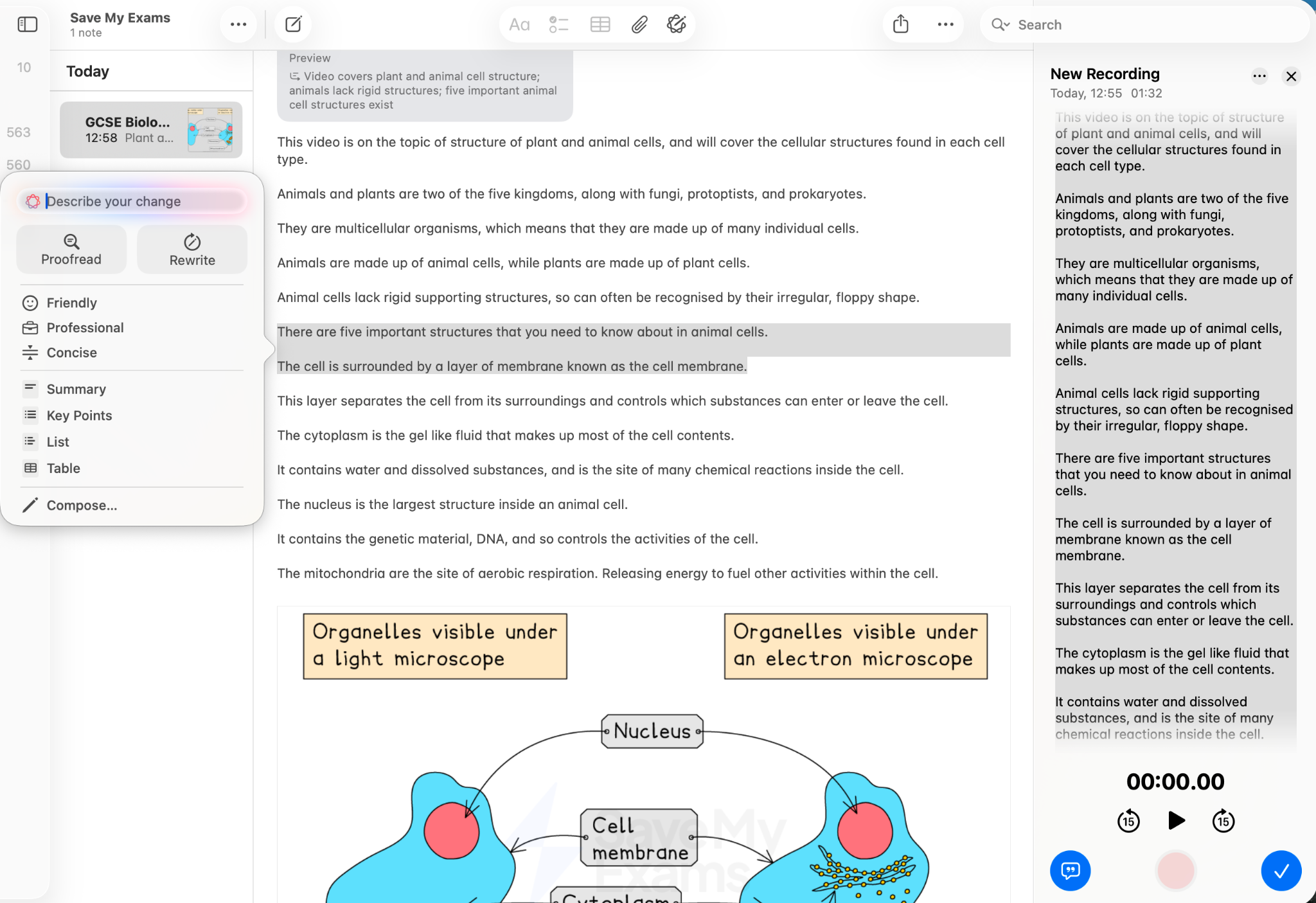
Apple Notes was one of the biggest surprises of this test. I recorded the same GCSE Biology material I had used with OneNote, and its transcription was hugely impressive.
I could actually watch words being corrected as the recording continued. The finished transcript was considerably more accurate than the one produced during my OneNote test, while the original audio remained stored alongside it.
Notes also syncs through iCloud. You could therefore create notes on a Mac, open them on an iPad to annotate them and access them later from your iPhone.
Pros:
Produced the most accurate transcription in my test
Writing Tools successfully turned dictated material into bullet points and a correctly organised table
Syncs across Apple devices through iCloud
Limitations:
Annotation and drawing tools aren't as extensive as OneNote's
Some tools are tucked away behind additional menus
Best for: Apple users who want to turn spoken material into organised revision notes quickly.
What other users say: Apple Notes has a 4.8/5 rating (opens in a new tab) from 66,000 ratings on the UK App Store (opens in a new tab). One reviewer summed up its appeal simply: “Love how easy it is to access and use.”
Notability: Best for Turning Lessons into Revision-Ready Notes
Cost: Lite £12.99/year; Plus £17.99/year; Pro £99.99/year
I've used Notability extensively in schools before, where I found students generally took to it well. It performed strongly in this test too.
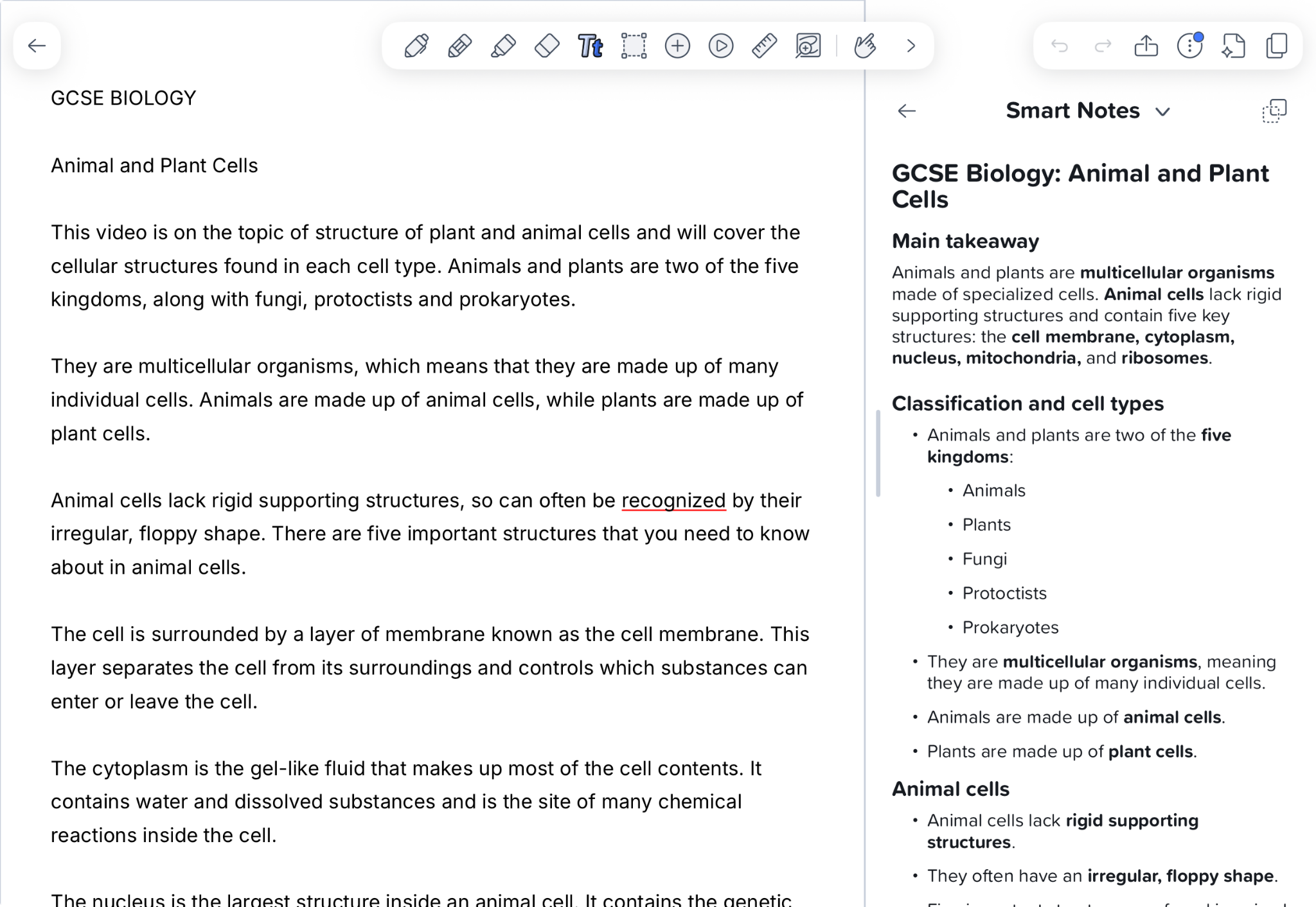
The interface was easy to navigate, and I was recording the Biology material within seconds. The transcription initially seemed to be picking up something completely unrelated, but it corrected itself and generated a set of Smart Notes.
Alongside the full transcript, Smart Notes reorganised the material into headings, subheadings, bullet points, and bolded terminology. The result looked much more like a set of revision notes than a raw transcript.
Notability is also particularly strong for handwritten and visual note-taking. There is a wide choice of pens, pencils and highlighters, along with tools for drawing and annotating your notes. On an iPad with an Apple Pencil, you can therefore move easily between recorded material, typed notes, handwriting and annotation on the same page.
Pros:
Smart Notes turned the transcript into clearly structured revision notes
Easy to combine recordings, typed notes, handwriting and annotation
Wide range of pens, highlighters and drawing tools
Limitations:
The transcription initially picked up unrelated material before correcting itself
I've previously had concerns about saving and backing up files, while some recent App Store reviewers have also reported syncing or lost-note problems
Best for: Students who want to record lesson material and turn it into structured revision notes.
What other users say: Notability has a 4.7/5 rating from around 41,000 ratings on the UK App Store (opens in a new tab). One recent reviewer praised how easy it is to use despite its wide range of features, while a sixth-form student particularly valued its organisation, annotation and audio-recording tools.
Other Note-Taking Apps Worth Considering
Notion: Best for Building a Revision Hub
Cost: Free plan available
Notion offers much more than just a place to type a page of notes.
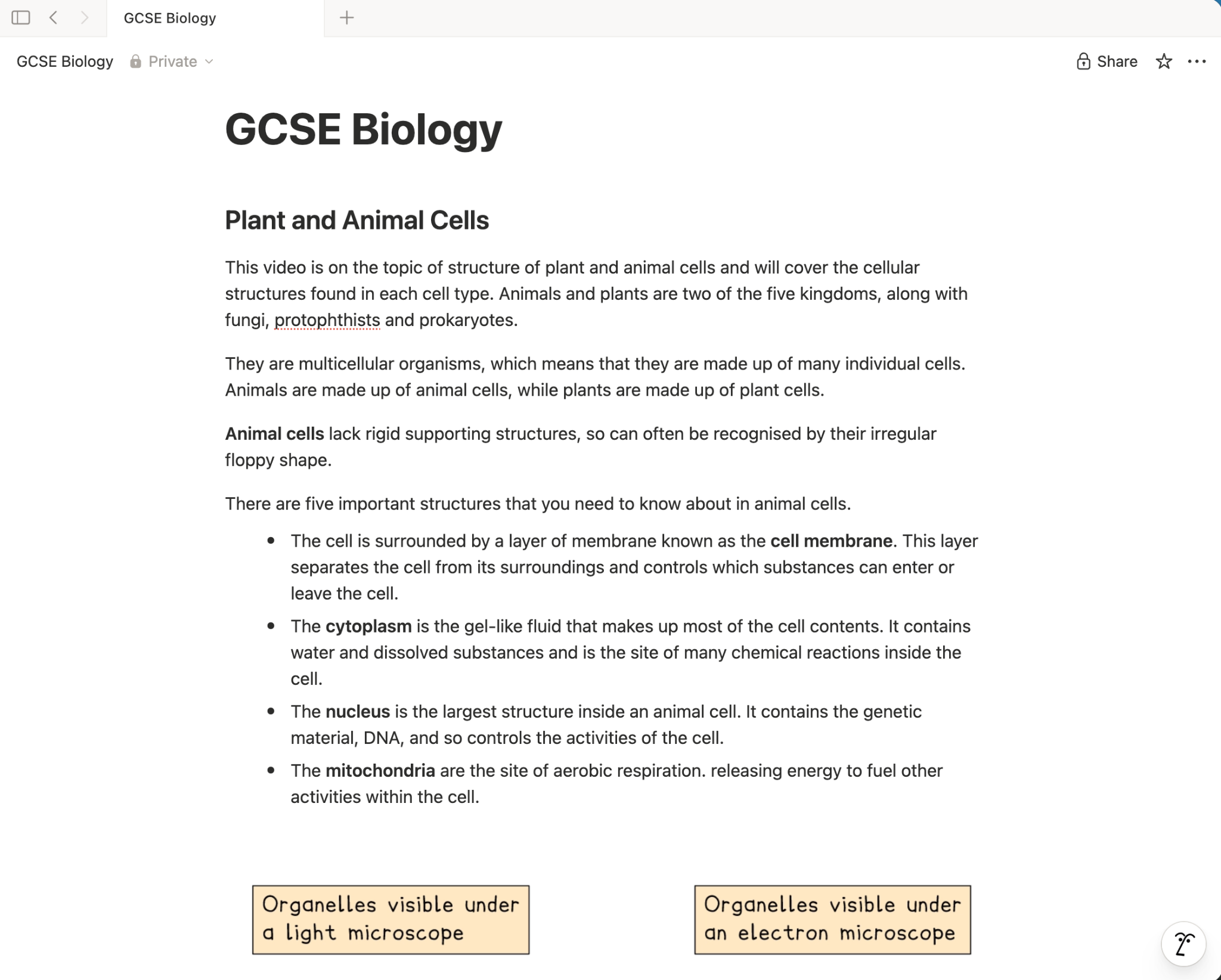
I created a GCSE Biology page, added the same Save My Exams diagram and experimented with headings, bullet points, annotations, callouts and links. It didn't take long to turn a block of text into a much clearer set of revision notes.
The AI Meeting Notes feature was the only built-in transcription option I could find. It produced a very good transcript in my test, although it wasn't completely error-free.
Once the information was on the page, Notion's flexibility became its main strength. You can link to other pages, your Save My Exams resources or material provided by your school. The Explain tool can also offer alternative explanations.
As we found in our Notion review for students, used with some restraint, Notion could become a central revision hub. It could contain your notes and resources across several subjects.
Pros:
Plenty of ways to organise and format notes and bring resources together
AI Meeting Notes produced a very good transcript in my test
Useful tools for linking information and explaining concepts
Limitations:
Reformat wasn't entirely successful at reorganising my notes
Extensive customisation can become a distraction from revision
Students using AI Meeting Notes regularly should check the current free-plan usage limits
Best for: Students who want to build an organised revision hub across multiple subjects and can resist spending more time organising it than revising.
What other users say: Notion has a rating of 4.6 out of 5 (opens in a new tab) on the Google Play Store (opens in a new tab), based on more than 360,000 reviews. Many users describe it as an excellent tool for organising notes, assignments, and long-term projects. Several reviews also note a learning curve, but say the effort is worthwhile once the platform becomes familiar.
Google Keep: Best for Quick and Simple Notes
Cost: Free
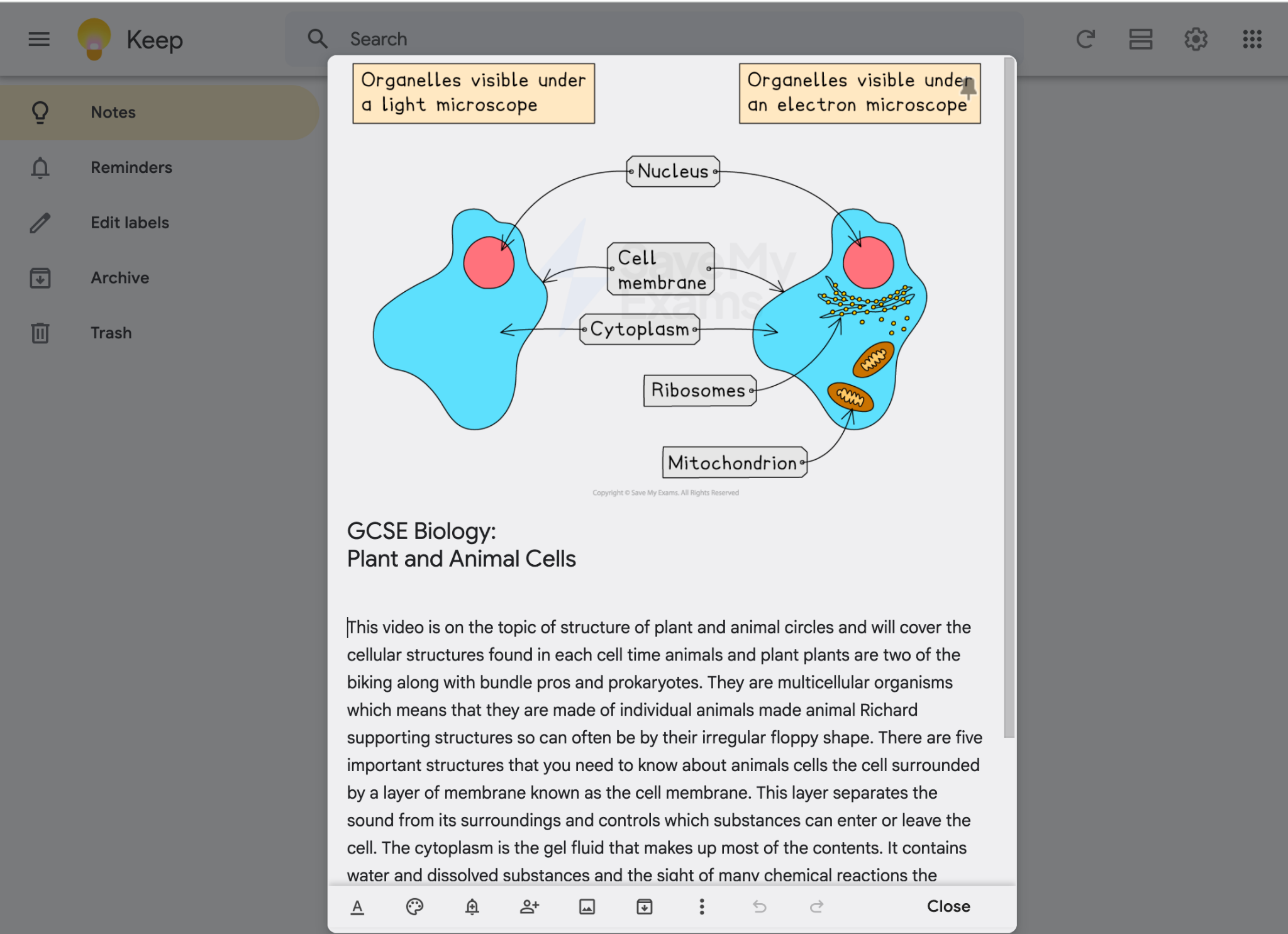
Google Keep is a good option if you want to capture straightforward notes without spending time setting up a complicated system.
I accessed Keep through Chrome and created a new Biology note within seconds. It was easy to add an image and make basic changes to the text, while colours and labels provide simple ways to organise your notes.
Recording the lesson was less successful. I couldn't record directly into Keep on my Mac, so I had to use the mobile app and my phone's dictation. The resulting Biology notes contained numerous errors and needed substantial correction before I would have trusted them for revision.
There is an important qualification here. I carried out the test using an iPhone and Mac. Google Keep offers native voice recording on Android, so the experience may differ for Android users.
Keep worked much better when I stuck to its core purpose: capturing short notes quickly. My notes synced instantly between my phone and desktop through my Google account, and you can copy a note directly into Google Docs with a single click when you need more advanced editing tools.
Pros:
Free, quick and simple to use
Syncs easily across devices through your Google account
Notes can be copied directly into Google Docs
Limitations:
No direct recording option on my Mac
Dictation produced numerous errors in my iPhone-based test
Best for: Students who want a free, simple place to capture short notes, particularly if they already use Google tools.
What other users say: Google Keep has a 4.7/5 rating on Google Play, (opens in a new tab)based on around 2.5 million reviews (opens in a new tab). However, some of the more recent reviews we checked criticised changes to the interface and features such as autocorrect.
Evernote: Best for Notes and Study Planning
Cost: Limited free option available
Starter: £8.99/month or £64.90/year (equivalent to £5.40/month)
Advanced: £14.99/month or £154.90/year (equivalent to £12.90/month)
Evernote could appeal to students who want to manage their wider study routine as well as their notes.
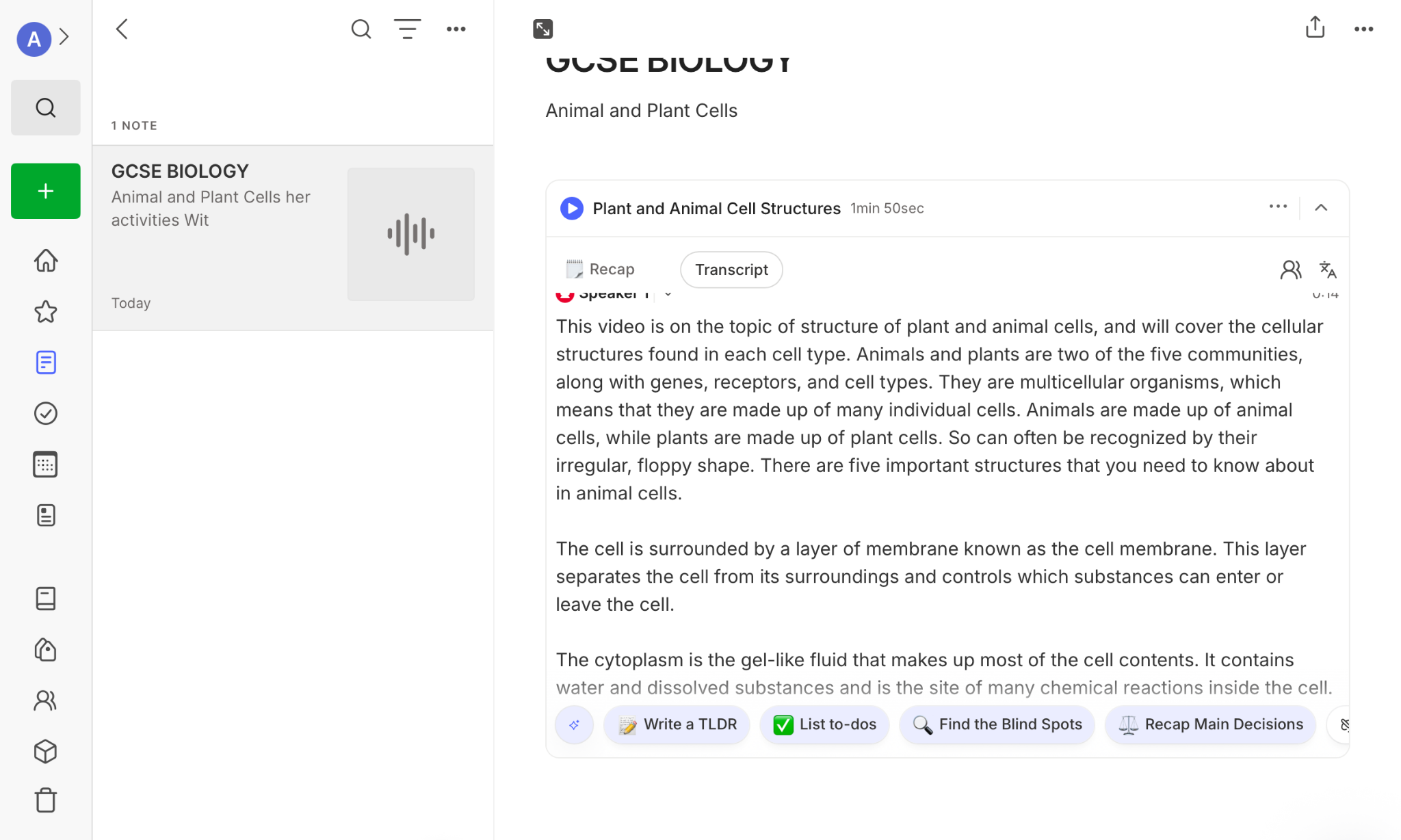
The interface was intuitive, and I quickly created a notebook and page. There are plenty of useful formatting options, including bullet points and quote boxes, while tags and hyperlinks make it easy to organise and connect information. There's also a scratch pad for capturing ideas quickly.
My first attempt to capture the Biology material via dictation was hit-and-miss. I then found Evernote's dedicated Dictate feature and repeated the test, with much better results. It kept the audio recording alongside a transcript and also offered the option to generate a recap.
The AI tools I tested were less convincing as revision aids. Many of the options seemed designed for workplace meetings, with prompts to identify decisions and to-dos. Even the TL;DR option didn't produce anything particularly useful from my Biology material.
Evernote becomes more interesting when you look beyond note-taking. You can connect a Google or Outlook calendar and use tasks to manage revision deadlines and workload alongside your subject notes. That could make it a useful all-in-one study companion to help your productivity.
Pros:
Intuitive interface with plenty of ways to organise and connect notes
Dedicated Dictate feature produced much better results than my first attempt
Combines notes with calendars and tasks for managing revision
Limitations:
The AI tools I tested seemed better suited to workplace meetings than revision
Much of the functionality sits behind paid plans
Best for: Students who want to combine revision notes with study planning and organisation.
What other users say: Evernote has a 4.2/5 rating from 8,600 ratings on the UK App Store (opens in a new tab). One long-term user praised recent improvements and described it as “very useful”, although they also noted that it has become more expensive.
Goodnotes: Best for Handwritten and Visual Revision
Cost: Free option available; Essential £11.99/year; Pro £35.99/year
Goodnotes has a different strength. It's particularly good when you want to interact with your revision material rather than simply store it.
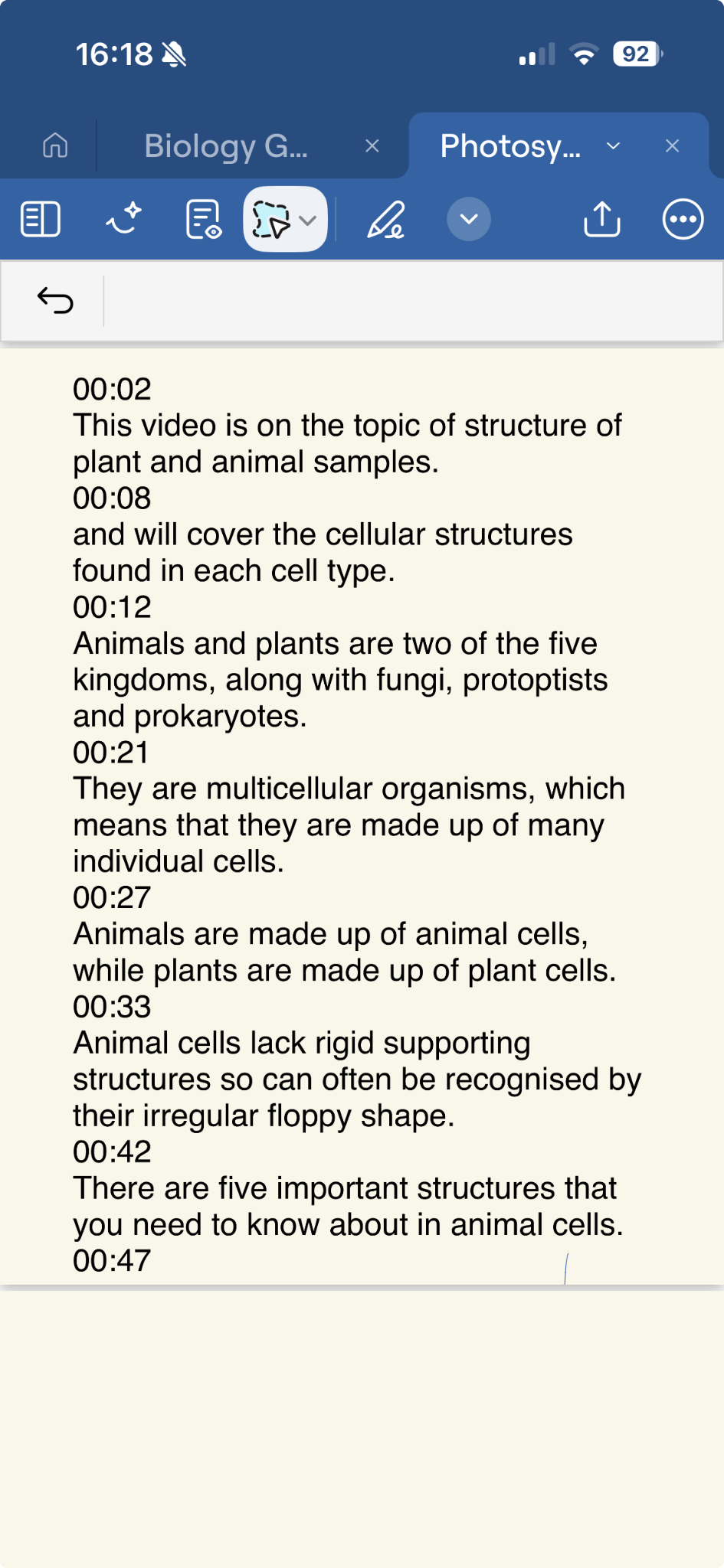
The transcription was generally accurate. It successfully handled some fairly challenging Biology terminology, although there were still errors. For example, "plant and animal cells" became "plant and animal samples". Timestamps alongside the transcript made it easy to follow the text while listening to the recording.
Goodnotes really came into its own once I started working with existing revision material. There are pens, pencils, highlighters and other annotation tools, while the Tape tool lets you cover information and reveal it again. That's a simple but effective way to turn an existing page of notes into an active recall activity.
Goodnotes also works particularly well on an iPad with an Apple Pencil, making it a useful option if visual revision methods, including annotation, form a big part of the way you study.
Pros:
Strong range of handwriting, highlighting and annotation tools
Tape tool turns existing notes into a simple active recall activity
Transcription was generally accurate, including some challenging Biology terminology
Limitations:
I didn't find the app particularly intuitive at first, and features such as audio recording and transcription took some time to find
Some tools for transforming transcribed notes require paid features
Best for: Students who prefer handwriting, annotation and visual revision, particularly on a tablet.
What other users say: Goodnotes has a 4.6/5 rating from around 49,000 ratings on the UK App Store (opens in a new tab). One student reviewer praised its templates, pens and highlighters, as well as the flashcard feature.
RemNote: Best for Notes and Spaced Repetition
Cost: Free plan available; paid plans available from £14.99/month through the UK App Store
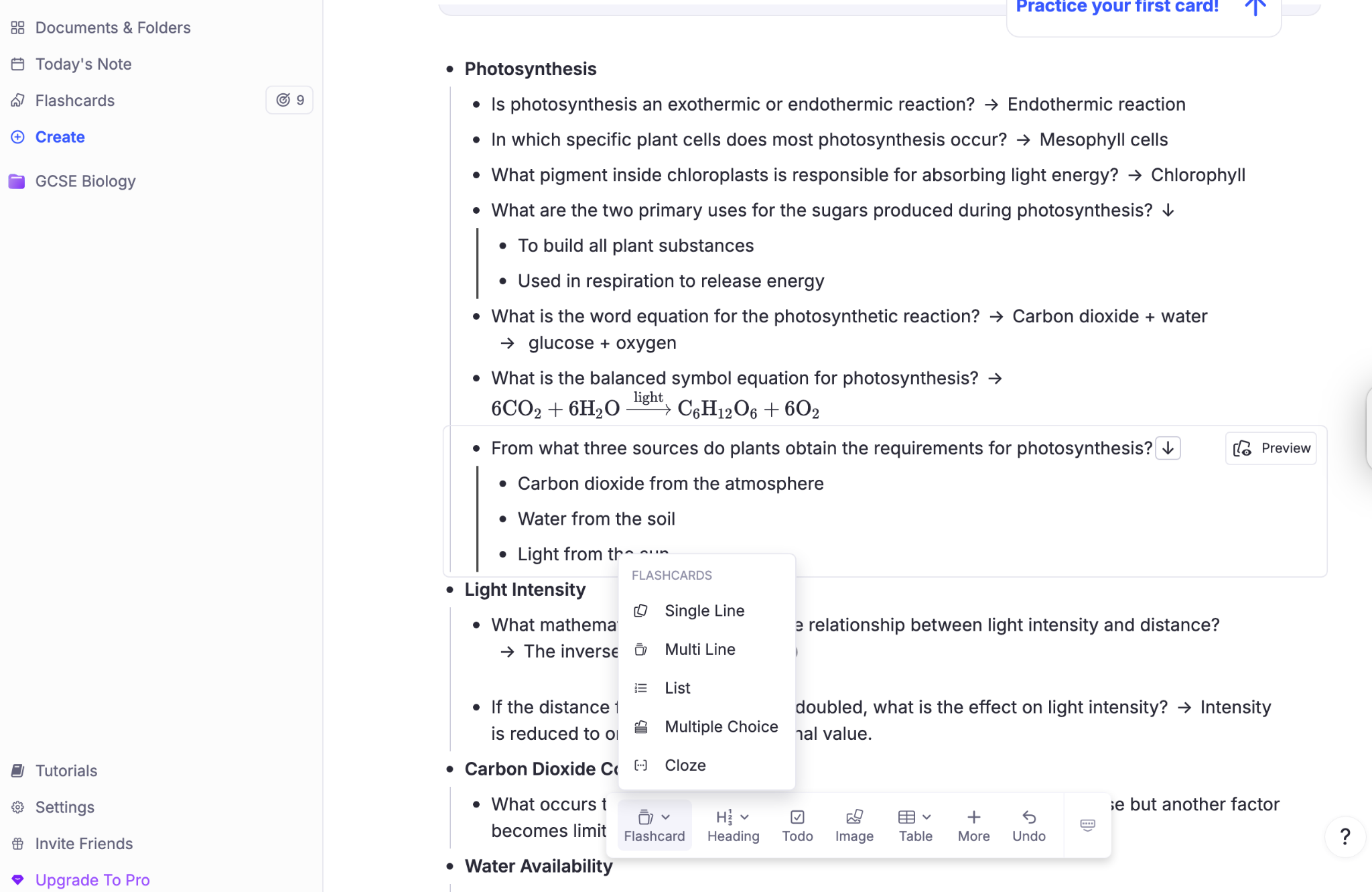
RemNote combines note-taking, flashcards and spaced repetition, making it more of a complete study system than a straightforward notes app.
I had already tested RemNote using GCSE Biology material for our guide to the best AI flashcard generators, so I used those results here rather than repeating the same test.
During that test, RemNote generated accurate flashcards from my Biology notes. I could create several types of cards, including multiple-choice, cloze, lists and short-answer questions.
What particularly impressed me was how closely the notes and flashcards worked together. You can build your own notes and then turn the material directly into active recall resources, rather than switching between separate apps.
There are also additional study aids for key terms, including definitions, mnemonics and visual associations. The AI Tutor can provide further explanations when you're stuck, although I found some of these quite dense and text-heavy.
As with any AI-generated revision material, check generated flashcards and explanations against your course resources before relying on them.
Pros:
Turns notes directly into flashcards for active recall and spaced repetition
Generated accurate flashcards from my Biology notes
Offers several card formats, plus additional study aids such as mnemonics and visual associations
Limitations:
Takes longer to learn than a simple note-taking app and may feel overwhelming at first
Some AI Tutor explanations were quite dense and text-heavy
Best for: Students who want to turn their notes into flashcards and use active recall and spaced repetition within the same study platform.
What other users say: RemNote has a 4.8/5 rating from more than 500 ratings on the UK App Store (opens in a new tab). One recent reviewer praised the way it turns notes into flashcards for spaced repetition and said the free version still lets you do a lot.
How to Choose the Right Note-Taking App for You
The best note-taking app for you depends on how you plan to use your notes.
If you regularly record lessons or spoken material, Notability performed strongly. Its Smart Notes turned the transcript into structured notes with headings, subheadings and key information clearly organised.
Students who prefer handwriting and visual revision should consider Goodnotes, while RemNote is better suited to students who want to turn their notes into flashcards and use spaced repetition. Notion offers more flexibility for building a central revision hub containing notes, links and resources, although its many customisation options can easily become a distraction.
Think about what you want to do with your notes once you've made them. Organisation matters, but revision only begins when you return to the information and use it.
Our Verdict: The Best Note-Taking App for Students
For a flexible all-round digital notebook, Microsoft OneNote is our strongest overall choice. It's free, familiar to many and offers plenty of ways to combine written notes, images, handwriting and annotations.
For Apple users, Apple Notes is an excellent alternative. It produced the most accurate transcription in our test, while Writing Tools helped turn the transcript into more useful revision material.
How to Use Note-Taking Apps Effectively for Revision
A note-taking app should make revision easier, not create another job.
Keep your system simple enough that you can find what you need. Colours, layouts and dashboards can help with organisation, but spending too long perfecting them takes time away from learning the material.
Once you've made your notes, use them actively. Turn key ideas into questions, cover definitions and try to recall them, create flashcards or explain a concept without looking at the page. Find more advice in our guide to the best revision techniques.
Be particularly careful with AI-generated summaries, explanations and study materials. During our testing, even some of the stronger tools made transcription errors or introduced information when reorganising notes. Always check important facts and terminology against your course materials and trusted revision resources.
FAQs
What is the best note-taking app for students?
Microsoft OneNote is our best overall note-taking app for students. It's free and combines flexible note organisation with handwriting, images, drawing and annotation tools.
However, Apple Notes, Notability and Goodnotes may be better choices depending on your devices and how you prefer to take notes.
Which note-taking app is easiest to use?
Apple Notes was one of the easiest apps to use in our test, particularly if you're already familiar with Apple devices. It requires very little setup, syncs across Apple devices through iCloud and produced the most accurate transcription of the apps we tested.
Is it worth paying for a note-taking app?
Not necessarily. OneNote and Apple Notes both offer strong note-taking tools for free, so try the free options before paying for additional features.
A paid app may be worthwhile if you need particular tools, such as Notability's Smart Notes or Goodnotes' more advanced handwriting and annotation features.
Final Thoughts
The most useful note-taking app is the one that best supports the way you study and revise.
Our testing found clear differences between the apps. Apple Notes produced the most accurate transcription, while Notability did an excellent job of turning spoken material into structured revision notes. Goodnotes offered strong tools for handwriting, annotation and active recall, while RemNote made the clearest connection between note-taking, flashcards and spaced repetition.
However, you may have to try a few out to find the best fit for you. Remember, you don't necessarily need the app with the most features. Look for one that feels genuinely useful to you: a tool that helps you capture information clearly, organise it sensibly and return to it when you're ready to test what you know.
References:
OneNote—Digital Note-Taking App | Microsoft 365 (opens in a new tab)
Microsoft OneNote App | App Store UK (opens in a new tab)
Notes - Apple iCloud (opens in a new tab)
Notes App | App Store UK (opens in a new tab)
Notability (opens in a new tab)
Notability: AI Notes & PDF app | App Store UK (opens in a new tab)
Notion (opens in a new tab)
Notion: Notes, Tasks, AI - Apps on Google Play (opens in a new tab)
Google Keep (opens in a new tab)
Google Keep - Notes and lists – Apps on Google Play (opens in a new tab)
Evernote (opens in a new tab)
Evernote - AI Notes Organiser App | App Store UK (opens in a new tab)
Goodnotes (opens in a new tab)
Goodnotes: AI Notes, Docs, PDF App | App Store UK (opens in a new tab)
RemNote (opens in a new tab)
RemNote - Notes & Flashcards App | App Store UK (opens in a new tab)
Was this article helpful?
Sign up for articles sent directly to your inbox
Receive news, articles and guides directly from our team of experts.

Share this article


 written revision resources that improve your