Bitmap Images (Cambridge (CIE) A Level Computer Science): Revision Note
Exam code: 9618

Bitmap encoding
What is a bitmap?
A bitmap image is made up of squares called pixels
A pixel is the smallest element of a bitmap image
Each pixel is stored as a binary code
Binary codes are unique to the colour in each pixel
A typical example of a bitmap image is a photograph
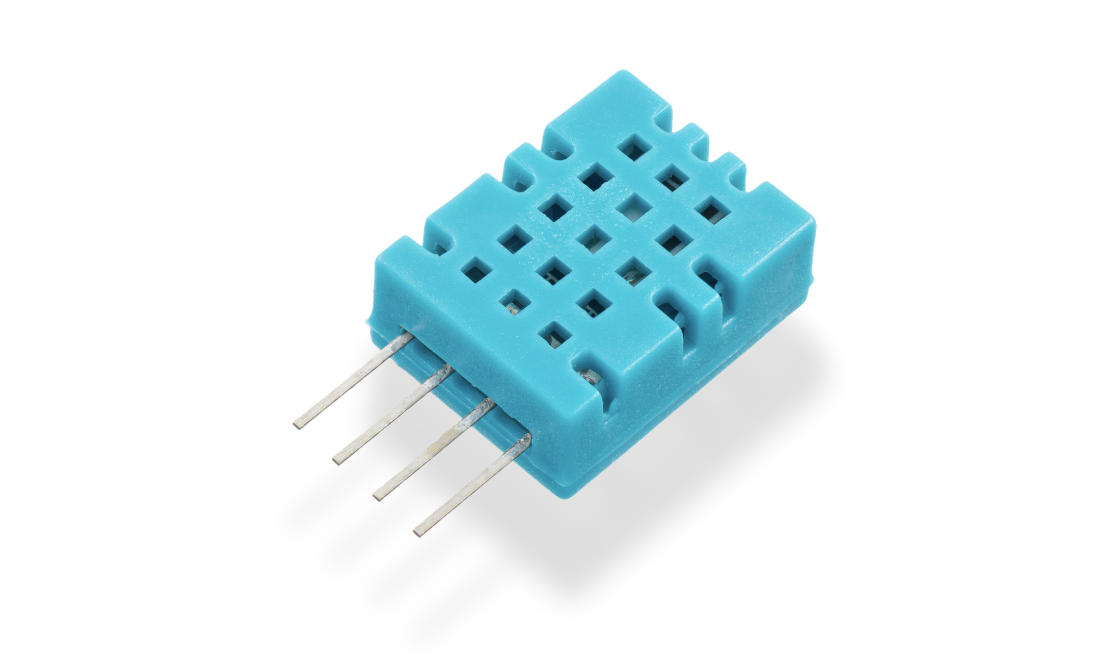
The more colours and more detail in the image, the higher the quality of the image and the more binary that needs to be stored
Image vs screen resolution
Image resolution is the total amount of pixels that make up a bitmap image
The image resolution is calculated by multiplying the height and width of the image (in pixels)
In general, the higher the resolution the more detail in the image (higher quality)
Screen resolution is the number of pixels a screen can display horizontally and vertically, given as width x height, e.g. 1920 x 1080, such as:
Computer monitors - a 1440p monitor is 2560 x 1440 pixels, compared to a 4K monitor at 3840 x 2160 pixels
TVs - HD (high definition) televisions are 1920 x 1080 pixels (1080p, where 1080 is the number of pixel rows), compared to newer 4K televisions at 3840 x 2160 pixels
YouTube - the quality button allows a user to change the video playback resolution from 144p (144 pixel rows) up to 4K
If an image's resolution does not match the screen resolution, the image is scaled up or down to fit the screen, which can reduce its quality
Colour/bit depth
Colour depth is the number of bits stored per pixel in a bitmap image
The colour depth is dependent on the number of colours needed in the image
In general, the higher the colour depth the more detail in the image (higher quality)
In a black & white image the colour depth would be 1, meaning 1 bit is enough to create a unique binary code for each colour in the image (1=white, 0=black)

In an image with a colour depth of 2, you would have 00, 01, 10 & 11 available binary codes, so 4 colours

As colour depth increases, so does the amount of colours available in an image
Colour depth determines the number of colours that can be represented in an image
The number of colours is calculated using the formula:
Number of colours = 2n (where n = colour depth in bits)
Colour/bit depth | Number of colours | Example |
|---|---|---|
1 bit | 21 = 2 | B&W |
2 bit | 22 = 4 | Icons/logos |
4 bit | 24 = 16 | Early computer graphics |
8 bit | 28 = 256 | GIFs, retro games |
24 bit (True colour) | 224 = 16 777 216 | High-quality images |
Calculating the size of a bitmap file
How do you calculate the size of a bitmap image?
Estimating the size of a bitmap image can be carried out with the following formula:
Resolution x colour/bit depth
Example
Image Files | |||||||||||||||
|---|---|---|---|---|---|---|---|---|---|---|---|---|---|---|---|
(Resolution) x (Colour Depth) | |||||||||||||||
|
When bitmap images are saved, a file header is created
This contains:
File type (.bmp or .jpg)
File size
Image resolution
Colour depth
Any type of compression if used
Worked Example
The following section of a bitmap image is 10 pixels wide and 5 pixels high. In this example, each colour is represented by a letter, e.g. O is orange.
The complete image can have up to 256 colours
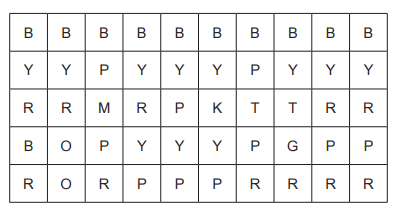
a) Identify the smallest number of bits that can be used to represent each colour in the complete bitmap image. [1]
b) Calculate an estimate for the file size of the section of the bitmap image shown, giving your answer in bytes. Use your answer from part a and show your working. [2]
Answer
8 [1 mark]
10 x 5 = 50(pixels), 50 x 8(bits) = 400 // 400 ÷ 8(bits) = 50 [1 mark]
50 (bytes) [1 mark]
Image quality & file size
What is the relationship between image quality and file size?
As the resolution and/or colour depth increases, the bigger the size of the file becomes on secondary storage
The higher the resolution, the more pixels are in the image, the more bits are stored
The higher the colour depth, the more bits per pixel are stored
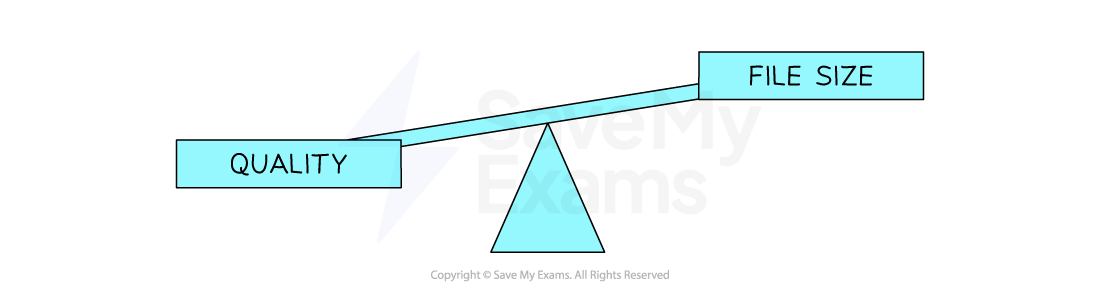
Striking a balance between quality and file size is always a consideration
Compression can be used on high quality images to help reduce the file size

Unlock more, it's free!
Join the 100,000+ Students that ❤️ Save My Exams
the (exam) results speak for themselves:

Was this revision note helpful?
Build on this topic