11 mark
The system uses software and hardware.
Which one of these is the best type of software to use to manage online bookings?
Database
File management
Spreadsheet
Web authoring
Was this exam question helpful?
Exam code: 4IT1
The system uses software and hardware.
Which one of these is the best type of software to use to manage online bookings?
Database
File management
Spreadsheet
Web authoring
Was this exam question helpful?
Visitors usually bring a digital device to events at the venue.
The venue uses a barcode scanner that connects to the booking system.
Explain one benefit to the venue staff of using a barcode scanner.
Was this exam question helpful?
Camille uses digital devices for work.
(a) A distance sensor is used as an input for an embedded system in a car.
(i) Describe how a distance sensor is used by an embedded system in a car.
Was this exam question helpful?
Camille shares family photographs online with friend.
Explain one reason why a website should provide accessibility features.
Was this exam question helpful?
Camille’s child, Sarah, uses websites and video sharing sites for her school work.
Sarah is researching changes in global temperatures.
Here is an image of her use of a search engine.
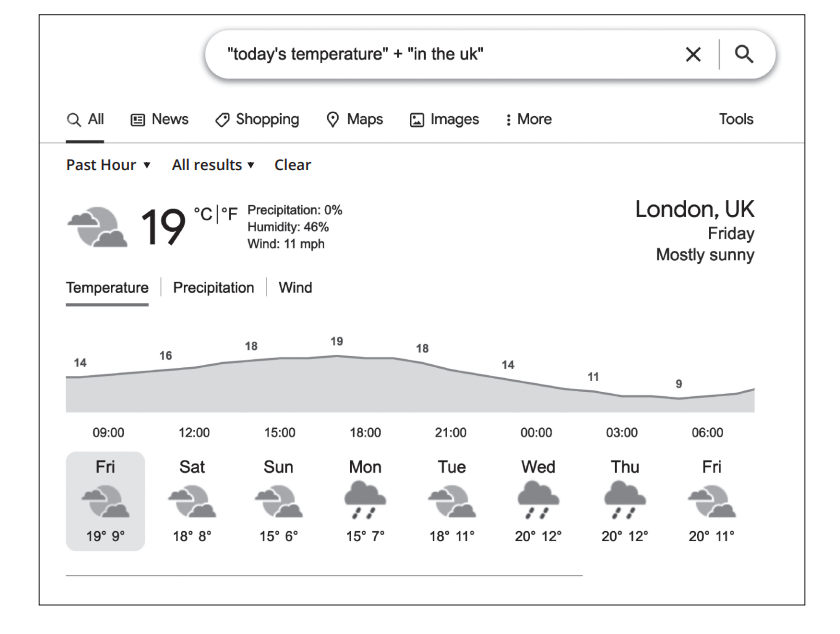
Describe how one peripheral device can support users of the search engine who have accessibility needs.
Was this exam question helpful?
A delivery driver asks each customer to sign for their parcel on a handheld device.
Which one of these input devices is the most suitable for capturing the customer's signature?
Bar code scanner
Microphone
Touch screen
Webcam
Was this exam question helpful?
A factory wants its staff to record the time they arrive at work and the time they leave.
Explain one reason why a biometric scanner is more suitable than a magnetic stripe card reader for this.
Was this exam question helpful?
Kai sells hot food from a stall at outdoor markets in different towns. Kai wants to use a digital device to take customer orders at the stall.
Kai has chosen a tablet computer.
Explain two reasons why a tablet computer is a suitable choice for Kai's stall.
Was this exam question helpful?
A school is preparing for an open day.
State the most suitable type of software for each task.
Task 1: making a slide show to play on a large screen in the school hall
Task 2: creating the pages of the school's website
Was this exam question helpful?
Robin is the treasurer of a small sports club. Robin records all the money the club receives and spends each month.
Explain one reason why a spreadsheet is a suitable type of software for this task.
Was this exam question helpful?
Mika runs a small photography business. Mika needs to:
improve the photographs before sending them to clients
keep a record of every client and the photo sessions they have booked
Explain a suitable type of software Mika should use for each need.
Was this exam question helpful?
Ayo has a visual impairment and finds it difficult to see what is on a computer screen.
Give two ways the settings on Ayo's computer could be changed to help Ayo.
Was this exam question helpful?
Sasha has a hearing impairment. Sasha uses a video calling app (application) on a laptop to talk to friends.
Describe how one setting in the app could be configured to support Sasha.
Was this exam question helpful?
Remi is a university student. Remi has arthritis in both hands, so moving a mouse accurately and typing for a long time are both painful.
Explain two ways the settings on Remi's laptop could be configured to meet Remi's needs.
Was this exam question helpful?
Dev cannot move their arms or hands. Dev wants to control a computer.
Which one of these peripheral devices is designed for Dev's need?
Puff-suck switch
Reading pen
Touch screen
Tracker ball
Was this exam question helpful?
Rin is a student with dyslexia. Rin finds it difficult to read printed textbooks.
Explain how a reading pen can support Rin.
Was this exam question helpful?
A secondary school has several learners with accessibility needs. One learner is blind, one has dyslexia and one cannot use their hands.
The school must decide whether to rely on the accessibility settings already built into its computers, or to buy specialist peripheral devices for these learners.
Discuss the choices the school could make to meet these learners' needs.
In your answer you should consider:
cost
how well each option meets each learner's need
where and how the learners will use the computers
Was this exam question helpful?