Assembly Language & Little Man Computer (OCR A Level Computer Science): Revision Note
Exam code: H446

Assembly Language & Little Man Computer
What is the purpose of assembly language?
Assembly language sits between high-level languages (like Python, Java) and machine code (binary code executed by the computer hardware)
Allows developers to write more efficient, albeit more complex, code when compared to high-level languages
Direct access and manipulation of hardware components, e.g., registers, memory addresses
Each type of computer CPU has its specific assembly language
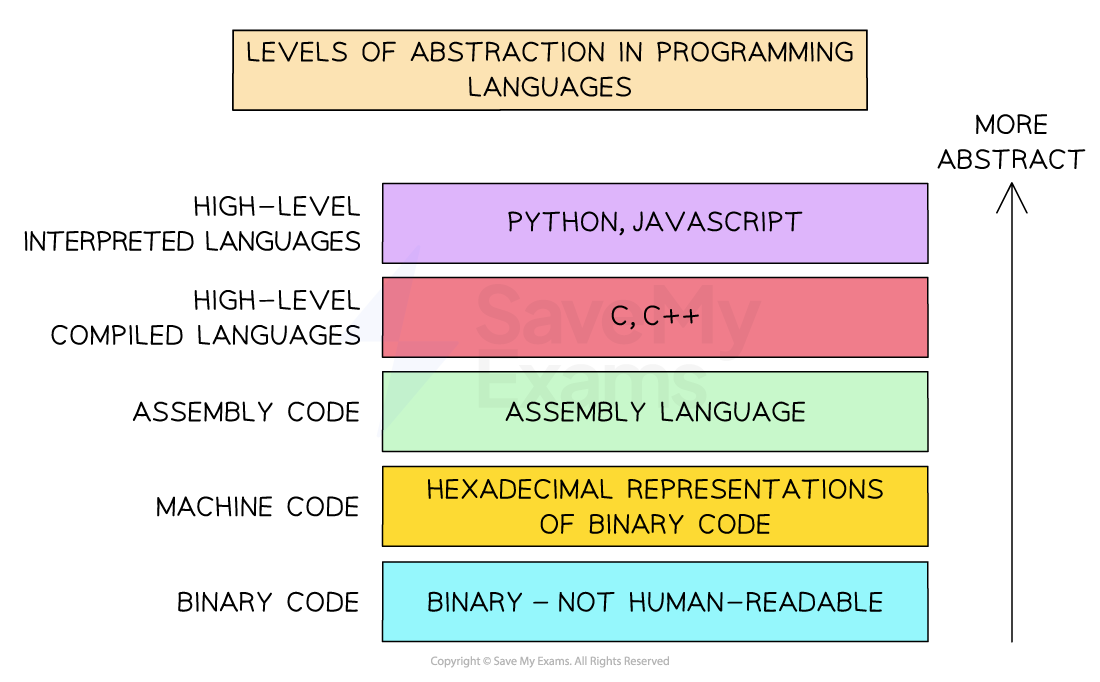
Levels of Abstraction of Programming Languages
Little Man Computer
The Little Man Computer (LMC) is a hypothetical computer model used for understanding the fundamental operations and mechanics of a computer
The LMC is a simplified version of a computer
It has key elements like memory, a calculator, an accumulator, and an instruction set
Little Man Computer instruction set
The following mnemonics represent different actions that can take place in an LMC program
Mnemonic | Instruction | Alternative Mnemonic |
|---|---|---|
ADD | Add |
|
SUB | Subtract |
|
STA | Store | STO |
LDA | Load | LOAD |
BRA | Branch always | BR |
BRZ | Branch if zero | BZ |
BRP | Branch if positive OR zero | BP |
INP | Input | IN, INPUT |
OUT | Output |
|
HLT | End program | COB, END |
DAT | Data location |
|
How does branching work in LMC?
A branch instruction makes the program jump to a different line instead of running the next line in sequence
The line to jump to is marked with a label, e.g.
looporend; the assembler replaces each label with the memory address of that lineBRA always branches, without checking the accumulator
BRZ branches only if the value in the accumulator is zero
BRP branches only if the value in the accumulator is zero or positive
If the condition is not met, the program carries on with the next line
To compare two values, subtract one from the other and then branch on the result:
LDA a,SUB b,BRZ samejumps if a and b are equalLDA a,SUB b,BRP biggerjumps if a is greater than or equal to b
To create a loop, use a branch that jumps back to a label earlier in the program
Tracing a loop
This program counts down from a number that is input:
        INP
        STA count
loop    LDA count
        OUT
        SUB one
        STA count
        BRP loop
        HLT
one     DAT 1
count   DAT 0
If 2 is input, the trace is:
Output | ACC after | Does |
|---|---|---|
2 | 1 | Yes, 1 is positive |
1 | 0 | Yes, BRP also branches on zero |
0 | -1 | No, so the program reaches |
The outputs are 2, 1, 0
A common mistake is to forget that BRP branches on zero as well as on positive values
Example 1: Add two numbers
        INP          // Input the first number
        STA first    // Store it in the memory location labelled first
        INP          // Input the second number
        ADD first    // Add the value stored in first to the accumulator
        OUT          // Output the result
        HLT          // End the program
first   DAT          // Reserves a memory location (address 6) labelled first
Example 2: Find the largest of three numbers
This program inputs three numbers and determines the largest of the three, outputting the result.
          INP              // Input the first number
          STA num1
          INP              // Input the second number
          STA num2
          INP              // Input the third number
          STA num3
          LDA num1
          SUB num2
          BRP compare13    // If num1 >= num2, compare num1 with num3
          LDA num2
          SUB num3
          BRP output2      // If num2 >= num3, output num2
          LDA num3
          OUT
          HLT
compare13 LDA num1
          SUB num3
          BRP output1      // If num1 >= num3, output num1
          LDA num3
          OUT
          HLT
output1   LDA num1
          OUT
          HLT
output2   LDA num2
          OUT
          HLT
num1      DAT
num2      DAT
num3      DAT
How it works:
This worked example demonstrates branching logic and how comparisons are chained to identify the correct result using
SUBandBRPInputs are stored in the memory locations labelled num1, num2 and num3
The program first checks if the first number ≥ second number
If so, it then checks the first vs third
If not, it checks if the second number ≥ third number
The value that is greatest is loaded into the accumulator and output
Worked Example
A digital thermostat has a CPU that uses the Little Man Computer Instruction Set.
The thermostat allows users to set a desired room temperature. The acceptable range for room temperature settings is between 15 and 25 degrees Celsius, inclusive. If the user sets a temperature within the range, the code outputs a 1 indicating a valid setting. If the temperature setting is outside of the acceptable range, the code outputs a 0 indicating an invalid setting.
The code is as follows:
INP
STA tempSetting

LDA tempSetting
SUB minTemp
BRP checkMax      // If tempSetting ≥ 15, check against max

LDA invalidVal
BRA end

checkMax LDA maxTemp
SUB tempSetting
BRP isValid       // If maxTemp - tempSetting ≥ 0, input is valid

LDA invalidVal
BRA end

isValid  LDA validVal

end      OUT
HLT

validVal   DAT 1
invalidVal DAT 0
minTemp    DAT 15
maxTemp    DAT 25
tempSetting DAT
a) What is the purpose of the label checkMax in the code? Describe its role in determining the validity of the temperature setting.
[2]
b) If a user inputs a temperature setting of 14, what will be the output? Justify your answer.
[2]
c) If the acceptable range of temperature settings was expanded to include temperatures up to 30 degrees Celsius, what modification would be needed in the code?
[2]
Answer:
Example answer that gets full marks:
a) The label checkMax marks the section of code that checks whether the temperature setting is less than or equal to the maximum allowed value (25).
It is used to continue validation only after confirming that the input is greater than or equal to the minimum temperature (15).
If the temperature is within range, the program continues from checkMax to determine if it is also below the maximum; otherwise, it skips this section.
b) The output will be 0.
This is because 14 is less than the minimum allowed value of 15.
The program compares the input to the minimum temperature first, and since 14 is below 15, it does not continue to checkMax and instead loads and outputs the invalid value (0).
c) The value stored at the maxTemp label should be changed from 25 to 30.
This allows the program to correctly validate temperatures up to and including 30 degrees when comparing the input against the maximum allowed temperature.
Acceptable answers you could have given instead:
a) Any response mentioning that checkMax it is for checking if the user's input is below or equal to the maximum allowable temperature should be awarded marks.
b) Any answer stating that the output will be 0 because 14 is less than 15, or similar logic, should be awarded marks.
c) Any answer suggesting a change to the maxTemp DAT value to 30 should be awarded marks.

Unlock more, it's free!
Join the 100,000+ Students that ❤️ Save My Exams
the (exam) results speak for themselves:

Was this revision note helpful?
Build on this topic