Simplifying Surds (Edexcel IGCSE Further Pure Maths): Revision Note
Exam code: 4PM1

Surds & Exact Values
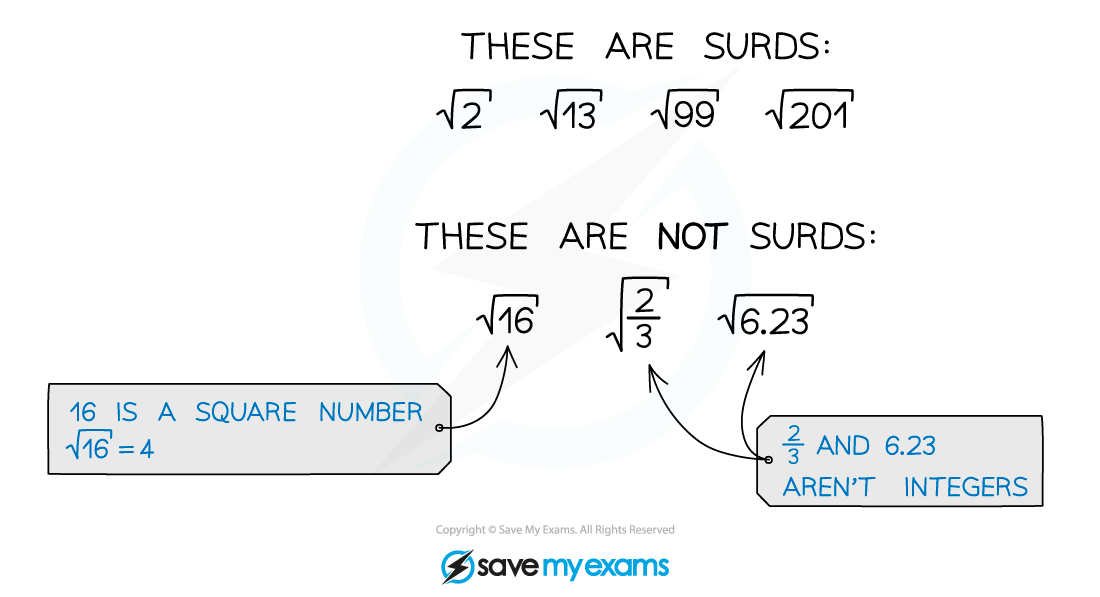
What is a surd?
A surd is the square root of a non-square integer
Using surds lets you leave answers in exact form
e.g. rather than
How do I calculate with surds?
Multiplying surds
You can multiply numbers under square roots together
e.g.
Dividing surds
You can divide numbers under square roots
e.g.
Factorising surds
You can factorise numbers under square roots
This lets you split a single square root into a product of square roots
e.g.
Adding or subtracting surds is very like adding or subtracting letters in algebra
you can only add or subtract multiples of “like” surds
e.g. or
but can't be simplified further
Be very careful here, you cannot add or subtract numbers under square roots
is not equal to
is not equal to
Think about
It is not equal to
Examiner Tips and Tricks
If your calculator gives you an answer as a surd
Leave the value as a surd throughout the rest of your calculations
This will make sure you do not lose accuracy
Round only at the very end (if necessary)
A question might ask for an 'exact value' answer
In that case leave your answer as a surd
Simplifying Surds
How do I simplify surds?
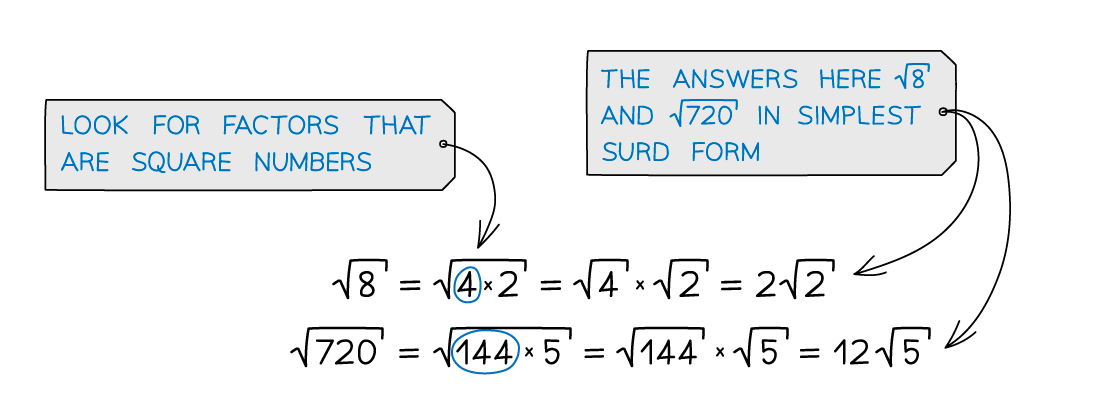
To simplify a surd, separate out any square factors and take their square root
Look for the greatest square number that is a factor of the number you are simplifying
e.g.
If you don't spot the greatest square factor the first time continue the process
e.g.
But 50 still has a square factor so continue
You can collect like terms with surds like you do with letters in algebra
Understanding how to simplify surds can help with simplifying expressions and collecting like terms
e.g. simplify by simplifying each part separately
An important skill is expanding brackets containing surds
This is done in the same way as expanding brackets algebraically
But the property can be used to simplify the expression, once expanded
Examiner Tips and Tricks
In exam questions different surds being simplified will often have the same non-square factor
This can help you find the correct highest square factors
e.g. can be rewritten as
This then simplifies easily to
Worked Example
Write in the form where and are integers and has no square factors.
Simplify both surds separately by finding the highest square number that is a factor of each of them
9 is a factor of 54, so
4 is a factor of 24, so
Simplify the whole expression by collecting the like terms
This is in the required form with and

Unlock more, it's free!
Join the 100,000+ Students that ❤️ Save My Exams
the (exam) results speak for themselves:

Was this revision note helpful?
Build on this topic